15.2 – Wilcoxon Rank Sum Test
Introduction
Wilcoxon rank sum test also called the two sample Wilcoxon test. It is equivalent to another nonparametric tests called the Mann-Whitney test, which was independently derived. We get the Wilcoxon test statistic in Rcmdr through the Statistics submenu.
Rcmdr: Statistics → Nonparametric tests → Two-sample Wilcoxon Test
I’ll show you the test with an example. We’ll use the same data set introduced in chapter 10.3, body mass (g) for four geckos (Hemidactylus frenatus, Fig 1) and four green anolis lizards (Anolis carolinensis, Fig 2).

Figure 1. Female common house gecko, Hemidactylus frenatus, central Oahu, M. Dohm 2018.

Figure 2. Male Anolis carolinensis, ʻAkaka Falls, Hawaiʻi, M. Dohm 2018.
Wilcoxon test, worked example
Geckos: 3.186, 2.427, 4.031, 1.995
Anoles: 5.515, 5.659, 6.739, 3.184
Note 1. This test in Rcmdr requires that data were stacked worksheet and not in unstacked worksheet two columns. If you need help with worksheet format, then see Part07 in Mike’s Workbook for Biostatistics.
We choose from the Rcmdr Nonparametric statistics menu the Two sample Wilcoxon test (Fig 3), then a two-tailed test of the null hypothesis (Fig 4) and elect to use the defaults for the tests and calculations of P-values.
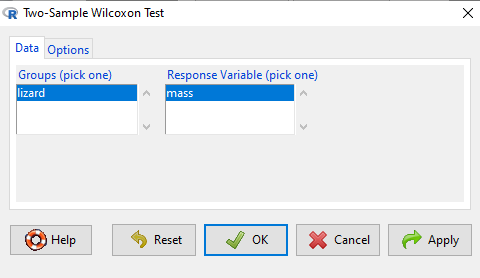
Figure 3. Screenshot Rcmdr menu 2 sample Wilcoxon test. Options are selected by clicking on “Options” tab (see Fig 4).
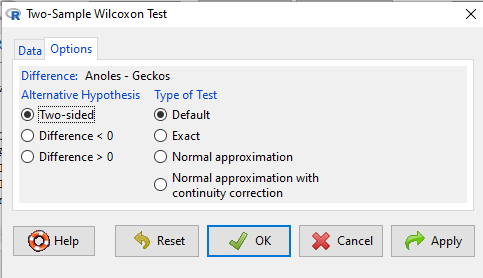
Figure 4. Screenshot of options tab Rcmdr menu 2 sample Wilcoxon test. Keep defaults to run the “Wilcoxon test.”
Don’t forget to stack the data. Rcmdr won’t produce an error message if the data set is in the unstacked, improper conformation. Instead, Rcmdr menu options will not be available. For example, Fig 5 shows a Two-sample Wilcoxon test… dimmed from view, not available for selection.
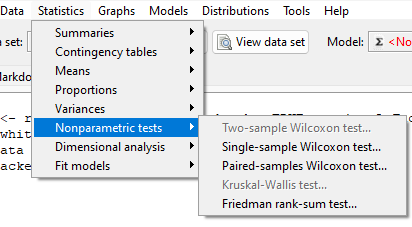
Figure 5. Screenshot of Rcmdr menu. Note Two- sample Wilcoxon test… not available.
The results of the test, copied from the Output window, are shown below.
wilcox.test(Mass ~ Lizard, alternative="two.sided", data=LizardStacked)

Wilcoxon rank sum test
data: Mass by Lizard
W = 14, p-value = 0.1143
alternative hypothesis: true location shift is not equal to 0
The calculation of the Wilcoxon test statistic (W) is straightforward, involving summing the ranks. Obtaining the P-value of the test of the null is a bit more involved as it depends on permutations of all possible combinations of differences. For us, R will do nicely with the details, and we just need to check the P-value.
Here, we see that the medians are 5.6 g for the Anolis, and 2.8 g for the geckos. The associated P-value is 0.1143. Thus, we fail to reject the null hypothesis and conclude that there was no difference in median body mass.
Note 2. This is the same general conclusion we got when we ran a independent t-test on this data set: no difference between day one and day two.
Questions
- Conduct an independent t-test on the Lizard body mass data.
- Make a box plot to display the two groups and describe the middle and variability.
- Compare results of test of hypothesis. do they agree with the Wilcoxon test? If not, list possible reasons why the two tests disagree.
- Using the dataset below, test null hypothesis using independent t-test, Welch’s test, and nonparametric Wilcoxon’s test.
- Make a box plot to display the two groups and describe the middle and variability.
- Compare results of test of hypothesis. do they agree with the Wilcoxon test? If not, list possible reasons why the tests disagree.
Quiz Chapter 15.2
Wilcoxon Rank Sum Test
Data set
| var1 | var2 |
| 5.84 | 5.93 |
| 5.72 | 5.95 |
| 5.75 | 6.02 |
| 5.78 | 5.81 |
| 5.81 | 6.16 |
| 5.81 | 5.95 |
| 5.73 | 6.09 |
| 5.77 | 5.89 |
| 5.76 | 5.99 |
| 5.86 | 5.60 |
| 5.84 | 6.16 |
| 5.83 | 6.16 |
| 5.80 | 6.06 |
| 5.78 | 6.07 |
| 5.89 | 5.66 |
| 5.83 | 6.14 |
| 5.79 | 5.99 |
| 5.84 | 6.15 |
| 5.90 | 5.81 |
| 5.86 | 6.20 |
Chapter 15 contents,
- Introduction
- Kruskal-Wallis and ANOVA by ranks
- Wilcoxon Rank Sum Test
- Wilcoxon signed rank test
- References and suggested readings
14.7 – Rcmdr Multiway ANOVA
Introduction
We have been talking about the two-way randomized, balanced, replicated design. Here, we take you step by step through use of R to conduct the multiway ANOVA.
R code: Multiway ANOVA
Rcmdr: Statistics → Means → Multiway ANOVA… we will review this as Option 1
or
Rcmdr: Statistics → Fit Models → Linear model… we will review this as Option 2
In either case, as a reminder, your data set must be stacked worksheet, like the data in this worksheet
Table 1. Data set, example.14.7†
| Diet | Population | Response |
| A | 1 | 4 |
| A | 1 | 6 |
| A | 1 | 5 |
| A | 2 | 5 |
| A | 2 | 8 |
| A | 2 | 9 |
| B | 1 | 12 |
| B | 1 | 15 |
| B | 1 | 11 |
| B | 2 | 5 |
| B | 2 | 7 |
| B | 2 | 8 |
Option 1
Your first option is to use the ANOVA menus via “Means.” This is a perfectly good way to handle a standard two-way, fully-crossed, fixed effects model. However, other designs will not run with this command and R will return a report of errors for ANOVA models that do not conform to the replicated, balanced, crossed design.
Rcmdr: Statistics → Means → Multiway Analysis of variance …
Factors: highlight “Diet” AND “Population”
Response variable: pick one (in this window, all we see is “Response”)
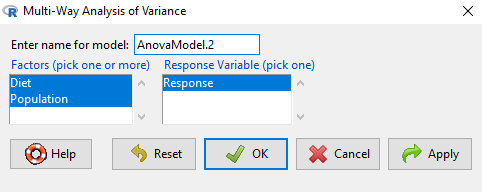
Figure 1. Screenshot Rcmdr multi-way ANOVA.
†Note 1: Don’t forget to convert numeric Population to factor. Assuming Population is part of a data.frame called example.14.7, then example.14.7$Population <- factor(example.14.7$Population).
Interpret the output
AnovaModel.2 <- (lm(Response ~ Diet*Population, data=example.14.7))

Anova(AnovaModel.2)

Anova Table (Type II tests)
Response: Response
                  Sum Sq    Df    F value      Pr(>F)
Diet              36.750     1    12.2500    0.008079 **
Population        10.083     1     3.3611    0.104104
Diet:Population   52.083     1    17.3611    0.003136 **
Residuals         24.000     8
---
Signif. codes: 0 '***' 0.001 '**' 0.01 '*' 0.05 '.' 0.1 ' ' 1
tapply(example.14.7 Response, list(Diet=example.14.7 Diet,
+ Population=example.14.7 Population), mean, na.rm=TRUE) # means
Population
Diet 1 2
A 5.00000 7.333333
B 12.66667 6.666667

tapply(example.14.7 Response, list(Diet=example.14.7 Diet,
+ Population=example.14.7 Population), sd, na.rm=TRUE) # std. deviations
Population
Diet 1 2
A 1.000000 2.081666
B 2.081666 1.527525

tapply(example.14.7 Response, list(Diet=example.14.71 Diet,
+ Population=example.14.7 Population), function(x) sum(!is.na(x))) # counts
Population
Diet 1 2
A 3 3
B 3 3
End R output.
Note 2: What is the “Type II tests”? When you fit a model with categorical predictors using lm() or aov(), you test hypothesis for each effect (main effects and interactions). These tests differ depending on how the model partitions the variance among predictors. See Note 2 in Chapter 12.7 for description of Type I, Type II, and Type III sums of squares.
Summary of multi-way ANOVA command
The multi-way ANOVA command returns our ANOVA table plus the adjusted means, along with standard deviations and number of observations (counts). The adjusted means would then be good to put into a chart to present group comparisons following adjustments from the effects of levels within groups.
Rcmdr: Models → Graphs → Predictor effect plots …
Here’s the chart (hint: 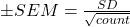 )
)
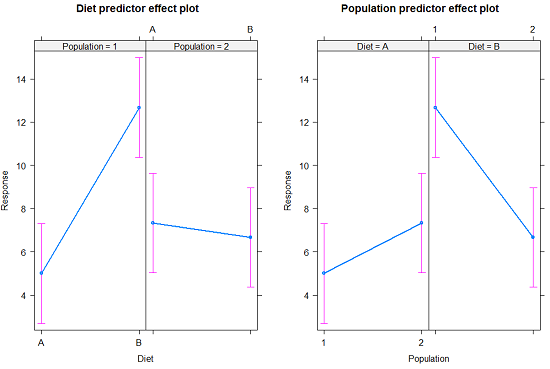
Figure 2. Predictor effect plots, Diet and Population on Response variable.
Option 2
A more general approach is to use the General linear model. This approach can handle the standard 2-way fixed effects ANOVA (above), but any other model as well. The model is Response ~ Diet*Population.
Rcmdr: Statistics → Fit Models → Linear model…
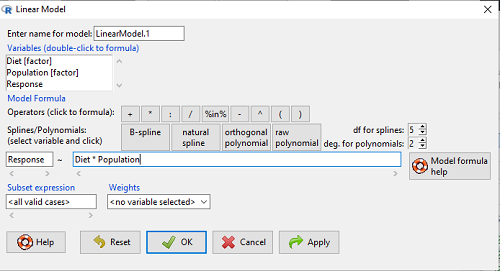
Figure 3. Screenshot Rcmdr linear model menu.
Interpret the output
LinearModel.1 <- lm(Response ~ Diet * Population, data=example.14.7)

summary(LinearModel.1)

Call:
lm(formula = Response ~ Diet * Population, data = example.14.7)

Residuals:
Min 1Q Median 3Q Max
-2.3333 -1.1667 0.1667 1.0833 2.3333

Coefficients:
                        Estimate    Std. Error ..t value .  Pr(>|t|)
(Intercept) .              5.000         1.000 .   5.000    .0.00105 **
Diet[T.B] .                7.667       ..1.414 .   5.421    .0.00063 ***
Population[T.2]           .2.333       ..1.414 .   1.650    .0.13757
Diet[T.B]:Population[T.2] -8.333       ..2.000    -4.167    .0.00314 **
---
Signif. codes: 0 '***' 0.001 '**' 0.01 '*' 0.05 '.' 0.1 ' ' 1

Residual standard error: 1.732 on 8 degrees of freedom
Multiple R-squared: 0.8047, Adjusted R-squared: 0.7315
F-statistic: 10.99 on 3 and 8 DF, p-value: 0.003285
End R output
Lots to sort through, so let’s begin with what is in common between the two approaches, the Multi-way ANOVA command versus the linear model command.
Compare R output from ANOVA and linear model
As a direct output, the linear model option does not provide an ANOVA summary table. Instead of our ANOVA table the linear model returns estimates of coefficients along with t-test results for each coefficient of the model from the lm() command output
Recall that we can get ANOVA tables through the following R commands via Rcmdr.
Rcmdr: Models → Hypothesis tests → ANOVA Table.
Let’s do so for this linear model (accept the default for type of tests = “Type II”).
And the output from lm() stored in the object LinearModel.1 is
Anova(LinearModel.1, type="II")
Anova Table (Type II tests)

Response: Response
                Sum Sq Df F value   Pr(>F)
Diet            36.750  1 12.2500 0.008079 **
Population      10.083  1  3.3611 0.104104
Diet:Population 52.083  1 17.3611 0.003136 **
Residuals       24.000  8
---
Signif. codes:  0 '***' 0.001 '**' 0.01 '*' 0.05 '.' 0.1 ' ' 1
End R output
Now, we’re in business, and, using the lm() function, we have the estimates for each model coefficient plus our ANOVA table.
Same answer! Of course. Which to choose, Option 1 or Option 2? Use the lm() options; more flexible, covers more designs than the multiway ANOVA which is strictly for the crossed fully replicated design.
Note 3: Rcmdr uses Anova(), not anova(). anova() is a generic function, part of the base statistics package, and it returns an ANOVA table. Anova() is not a wrapper to anova(), it is a different function, part of the car package. It uses different default methods and different types of sums of squares: Type-II or Type-III analysis-of-variance tables for model objects produced by lm(), glm(), etc. See Note 2 in Chapter 12.7 for description of Type I, Type II, and Type III sums of squares.
Questions
- Write out the two-way model described for the data in Table 1.
- Write the null hypotheses and provide a summary of the statistical significance of the model.
Quiz Chapter 14.7
Rcmdr Multiway ANOVA
Chapter 14 contents
14.5 – Nested designs
Introduction
Crossed versus nested design
Factors are independent variables whose values we control and wish to study because we believe they have an effect on the dependent variable. While it is logical to think of factors and levels within factors as independent variables fully under our control, a moments reflection will come up with examples in which the groups (levels) depend on the factor.
Crossed – each level of a factor is in each level of the other factor. This was illustrated in Chapter 14.1 on Crossed, balanced, fully replicated two-way ANOVA.
Nested – levels of one factor are NOT the same in each of the levels of the other factor. Nested designs are an important experimental design in science, and they have some advantages over the 2-way ANOVA design (for one), but they also have limitations.
Classic examples of nesting: culturing and passage of cell lines in routine cell colony maintenance means that even repeated experiments are done on different experimental units. Cells derived from one vial are different from cells derived from a different vial. Similarly, although mice from an inbred strain are thought to be genetically identical, environments vary across time, so mice from the same strain but born or purchased at different times are necessarily different. These scenarios involving time create a natural block effect. Thus, cells are nested by block effect passage number and mice are nested by block effect colony time. We introduced randomized block design in the previous Chapter 14.4.
Statistical model
If Factor B is nested within Factor A, then a group or level within Factor B occurs only within a level of Factor A. Like the randomized block model, there will be no way to estimate the interaction in a nested two-way ANOVA. Our statistical model then is

Examples
Example 1. Three different drugs, 6 different sources of the drugs. The researcher obtains three different drugs from 6 different companies and wants to know if one of the drugs is better than another drug (Factor A) in lowering the blood cholesterol in women. There is always the possibility that different companies will be better or worse at making the drug. So the researchers also use the Factor Source (Factor B) to examine this possibility. Unfortunately they can not obtain all drugs from the same sources. This leads to a Nested ANOVA — notice that each drug is obtained from a different source.
We CANNOT perform the typical two-factor ANOVA because we cannot get a mean of the different drugs by combining the same levels of the Sources: the data is NOT crossed. The Sources of the drugs (Factor B) are NESTED within the type of Drug (Factor A): each source is only found in one of the Drug categories. So, we can’t calculate a mean for the Drug levels independent of the SOURCE from which the drug came.
Table 1. Example of a nested design
|
Drug A
|
Drug B
|
Drug C
|
|||
|
Source 1
|
Source 2
|
Source 3
|
Source 4
|
Source 5
|
Source 6
|
|
202.6
|
189.3
|
212.3
|
203.6
|
189.1
|
194.7
|
|
207.8
|
198.5
|
204.4
|
209.8
|
219.9
|
192.8
|
|
190.2
|
208.4
|
221.6
|
204.1
|
196.0
|
226.5
|
|
211.7
|
205.3
|
209.2
|
201.8
|
205.3
|
200.9
|
|
201.5
|
210.0
|
222.1
|
202.6
|
204.0
|
219.7
|
Scroll to end of this page to get the data set in stacked worksheet format, or click here.
Compare Table 1 to CROSSED data structure (Table 2) — a typical two-factor ANOVA — which would look like
Table 2. Contents of Table 1 presented as crossed design
|
Drug A
|
Drug B
|
Drug C
|
|||
|
Source 1
|
Source 2
|
Source 1
|
Source 2
|
Source 1
|
Source 2
|
|
202.6
|
189.3
|
?
|
?
|
?
|
?
|
|
207.8
|
198.5
|
?
|
?
|
?
|
?
|
|
190.2
|
208.4
|
?
|
?
|
?
|
?
|
|
211.7
|
205.3
|
?
|
?
|
?
|
?
|
|
201.5
|
210.0
|
?
|
?
|
?
|
?
|
We can take a mean of the different drugs by combining the same levels of the Sources. Here’s the nested design (Table 3).
Table 3. Group means, nested design
|
Drug A
|
Drug B
|
Drug C
|
|||
|
Source 1
|
Source 2
|
Source 3
|
Source 4
|
Source 5
|
Source 6
|
|
202.76
|
202.3
|
213.92
|
204.38
|
202.86
|
206.92
|
We can take a mean of the different drugs by combining the same levels of the Sources. Here’s the crossed design (Table 4).
Table 4. Groups means by crossed design.
|
Drug A
|
Drug B
|
Drug C
|
|||
|
Source 1
|
Source 2
|
Source 1
|
Source 2
|
Source 1
|
Source 2
|
|
202.76
|
202.3
|
?
|
?
|
?
|
?
|
Why the “?” in Table 2 and 4? Manufacturing source 1 & 2 do not sell Drug B and Drug C. So, there cannot be a crossed design.
Why can’t we just use a One-Way ANOVA? Can’t we just ANALYZE the three DRUGS separately, ignoring the source issue (after all, the drugs are not all made by the same manufacturer)? But it is not a one-way ANOVA problem… Here’s why.
The researcher suspects that the response of a particular drug might be dependent upon the particular source from which the drug was purchased. So, the type of source from which the drug was purchased is another FACTOR. Thus, drugs from one source might have more (less) affect compared to drugs from another source regardless of the type of drug. However, each drug is NOT available from each source. Thus the research design can NOT be crossed and Drug is NESTED within Source.
We can ask ONLY two questions (hypotheses) from this NESTED ANOVA research design:
HO: There is no difference in the average effect of the drugs on (tumor size, cholesterol level, blood pressure, etc.)
HA: There is a difference in the average effect of the drugs on (tumor size, cholesterol level, blood pressure, etc.)
HO: There is no difference in the average effect of the drugs on (tumor size, cholesterol level, blood pressure, etc.) purchased from different manufacturers.
HA: There is a difference in the average effect of the drugs on (tumor size, cholesterol level, blood pressure, etc.) purchased from different manufacturers.
Notice that we do NOT examine the effect of the interaction between Drug type and source of the drug. Why not?
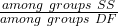
Table 5. Sources of Variation in Nested ANOVA
| Source of Variation |
Sum of Squares
|
DF
|
Mean Squares
|
| Total |  |
 |
|
| Among all subgroups |  |
 |
|
| Among Groups |  |
 |
 |
| Among Subgroups |  |
 |
 |
| Error |
Subtract all of the subgroup Sums of Squares from the Total Sums of Squares
|
 |
 |
Testing nested ANOVA with one main factor
Perhaps surprisingly given the number of terms above, there are only two hypothesis tests, and, only one of REAL interest to us. There are exceptions (eg, quantitative genetics provides many examples), but we are generally most interested in the among group test — this is the test of the main factor. In our example, the main factor was DRUG and whether the drugs differed in their effects on cholesterol levels. The second test is important in the sense that we prefer that it contributes little or no variation to the differences in cholesterol levels. But it might.
Table 6. F statistics for nested ANOVA
| F for the main effect is given as |  |
| F for the subgroup is given by |  |
| and of course, use the appropriate DF when testing the F values!! The Critical Value F0.05 (2), df numerator, df denominator | |
One way to look at this: it would not make sense to conclude that an effect of the main group was significant if the variation in the subgroups was much, much larger. That’s in part why we test the main effect with the subgroups MS and not the error MS. If variation due to the nested variable is not significant, then it is an estimate of the error variance, too.
The nested model we are describing is a two factor ANOVA, but it is incomplete (compared to the balanced, fully crossed 2-way design we’ve talked about before). We don’t have scores in every cell. Instead, each level of nested factor is paired with one and only one level of the other factor. In our example, Source is paired with only one other level of the other factor Drug (eg, Source 1 goes with Drug 1 only), but the main effect is paired with 2 levels of the nesting factor (eg, Drug 1 is manufactured at Source 1 and Source 2).
Note 1. Nesting is strictly one way. Drug is not nested within source, for example.
Some important points about testing the null hypotheses in a nested design. For one, the test of the effect of the nesting factor (Source) is confounded by the interaction between the main factor. We don’t actually know if the interaction is present, but we also get no way to test for it because of the incomplete design. We must therefore be cautious in our interpretation of the effect of the nested factor.
Consider our example. We want to interpret the effect of source as the contribution to the response based on variation among the different suppliers of the drugs. It might be good to know that some drug manufacturer is better (or worse) than others. However, differences among the sources for the different drugs are completely contained in the main effect factor (the test of effects of the different drugs themselves on the response). Therefore, the observed differences between sources COULD be entirely due to the effects of the different drugs and have nothing to do with variation among sources!!
Questions
- Identify the response variable and whether the described factor (in all caps) is suitable for crossed design or nested design
a. In a breeding colony of lab mice, BREEDERS are used to generate up to five LITTERS; effects on offspring REPRODUCTIVE SUCCESS.
b. Effects of individual TEACHERS at different SCHOOLS on STUDENT LEARNING in biology.
c. Lisinopril, an ACE-inhibitor drug prescribed for treatment of high blood pressure, is now a generic drug, meaning a number of COMPANIES can manufacture and distribute the medication. Millions of DOSES of lisinopril are made each year; drug companies are required by the FDA to record when a dose is made and to record these dates by LOT NUMBER. - Work the example data set provide in this page. After loading the data set into Rcmdr (R), use linear model. The command to nest requires use of the forward slash, /. For example, if factor b is nested within factor a, then a/b. The linear model formula then,
Model <- lm(Obs ~ a/b, data=source)
- Describe the problem, i.e., what is a? What is b? What are the hypotheses?
- What is the statistical model?
- Test the model.
- Conclusions?
Quiz Chapter 14.5
Nested designs
Data set used in this page
| Drug | Source | Obs |
| A | s1 | 202.6 |
| A | s1 | 207.8 |
| A | s1 | 190.2 |
| A | s1 | 211.7 |
| A | s1 | 201.5 |
| A | s2 | 189.3 |
| A | s2 | 198.5 |
| A | s2 | 208.4 |
| A | s2 | 205.3 |
| A | s2 | 210 |
| B | s3 | 212.3 |
| B | s3 | 204.4 |
| B | s3 | 221.6 |
| B | s3 | 209.2 |
| B | s3 | 222.1 |
| B | s4 | 203.6 |
| B | s4 | 209.8 |
| B | s4 | 204.1 |
| B | s4 | 201.8 |
| B | s4 | 202.6 |
| C | s5 | 189.1 |
| C | s5 | 219.9 |
| C | s5 | 196 |
| C | s5 | 205.3 |
| C | s5 | 204 |
| C | s6 | 194.7 |
| C | s6 | 192.8 |
| C | s6 | 226.5 |
| C | s6 | 200.9 |
| C | s6 | 219.7 |
Chapter 14 contents
10.1 – Compare two independent sample means
Introduction
We introduced the concept of comparing a sample statistic (mean) against a population parameter (Chapter 6.7, Normal deviate) or one-sample t-test against a specified mean (eg, from published data or from theory, Chapter 8.5).
Consider now a basic experimental design, the randomized control trial, or RCT (Fig 1), introduced in Chapter 2.4.
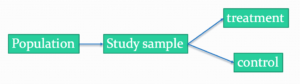
Figure 1. A two group Randomized Control Trial.
Subjects randomly selected from population of interest, then again — random assignment — once recruited into one of two treatment groups. Importantly, subjects belong to one treatment arm only: no subject simultaneously receives the treatment and the control. This is in contrast to the paired design, in which subjects receive both treatments (see Chapter 10.3).
In inferential statistics about an experiment, we are more likely trying to test if sample means are different. For example
- two species grown in common garden, do they differ in growth rate?
- human subjects given a new treatment have better outcomes compare to those receiving a control treatment (eg, placebo).
The equivalent null hypothesis is that two samples are pulled from the same population. We write the null hypothesis as

and the corresponding alternative hypothesis, HA, then must be

Question: Is this a one tailed or two-tailed hypothesis?
Answer: Two-tailed (review Chapter 8.4)
Note 1: In this day and age, there’s really no compelling reason to learn the t-test. First, it is just a special case of the one-way ANOVA, therefore, it’s a special case of the general linear model. Struggling to learn R commands? Well, one solution would be just to learn the general linear model approach — the R function lm() (OK — don’t get too excited — lm() has many options and details). Second, few experiments or observational studies are likely to have only two groups; thus, the temptation to carry out a series of t-tests, taking all groups two at a time, or “pairwise,” while tempting, actually violates a whole bunch of basic statistical rules (discussed in Chapter 12.1). It will also make statisticians go crazy when they see it. That said, if your experiment has but two groups, then by all means, the t-test is a choice. The t-test is also a statistical test that you have likely already used before so we present the discussion here to build on what you may already have learned. We also present the independent t-test as a vehicle.
Worked example
We introduce the two-sample t-test, or better, the independent sample t-test.

where the numerator is the difference between the two sample means and the denominator is the standard error of the differences between the two groups standard errors. The formula for
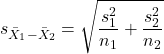
The choice of independent sample over two-sample is best because it emphasizes that the two groups (the two samples), must be comprise of independent sampling units. This is a pretty straight-forward requirement; you have randomly assigned twenty individuals to two groups, a control group (n = 10) and a treatment group (n = 10). Individuals are either in the control group or they are in the treatment group — they cannot simultaneously appear in both groups.
We will work our way through this test by example. For starters, let’s use the same lizard dataset (see Example data set, below), four body mass recordings (grams) each for house geckos (Hemidactylus frenatus, Fig 2) and the Carolina anole (Anolis carolensis, Fig 3), two of many lizard species introduced to Hawaiʻi.
Figure 2. Male Hemidactylus frenatus, central Oahu, M. Dohm.
Figure 3. Male Anolis carolinensis, ʻAkaka Falls, Big Island of Hawaiʻi, M. Dohm.
Example data set
Geckos: 3.186, 2.427, 4.031, 1.995

Anoles: 5.515, 5.659, 6.739, 3.184
Question: How would you go about creating a data frame with the values in long form (stacked worksheet), including a label variable and the body mass?
Note 2: The independent sample t-test in Rcmdr requires a stacked worksheet and not in unstacked worksheet two columns implied by the above pseudo-code. If you need help with worksheet format, then see Part07 in Mike’s Workbook for Biostatistics.
Answer: At the R prompt, type
Geckos <- c(3.186, 2.427, 4.031, 1.995); Anoles = c(5.515, 5.659, 6.739, 3.184) #create two vectors
bmass <- c(Geckos, Anoles)    #combine the two vectors into a single vector holding all of the body mass records
species <- c("gecko", "gecko", "gecko", "gecko", "anole", "anole", "anole", "anole")   #create your label variable
lizards <- data.frame(species, bmass)  #create your data frame
lizards   #print your data frame  species bmass
1   gecko 3.186
2   gecko 2.427
3   gecko 4.031
4   gecko 1.995
5   anole 5.515
6   anole 5.659
7   anole 6.739
8   anole 3.184
Note also that you can enter data into the Data editor by creating the data frame first then adding values. To edit the data frame “lizards” type fix(lizards) at the R prompt, then close the data frame when you have added or changed values as needed.
As always, begin with an exploration of the data, including a graph (Fig 4).
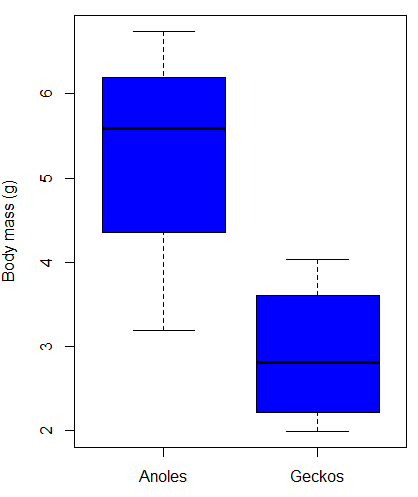
Figure 4. Box plot of lizard body mass.
We can see already that there’s greater spread of data for the Anoles compared to the Geckos, but the median values differ. Small sample sizes can be a problem for analyses as we can only have reduced confidence in our conclusions. However, we press on for the sake of demonstration.
Let’s test the null hypothesis, H0, ie, the two species of lizards have the same mean body mass.
Rcmdr: Statistics → Means → Independent-samples t-test…
In this next image I posted the Rcmdr menu popup for the Independent Samples t-test (Fig 5). Later versions of Rcmdr split the settings for this command into two tabs; the first tab allows for the selection of the variables and setting the hypotheses whereas the second tab, labeled Options, permits additional choices. The default selections need your attention: to actually conduct the t-test you need to answer “No” to the question, “Assume equal variance?” (Fig 6).
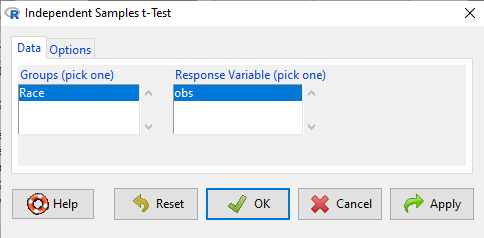
Figure 5. Rcmdr menu for Independent sample t-test.
Select the Options tab (Fig 6) to select null hypothesis and to select the t-test and not the Welch-test (which is the default, ie, No to the prompt “Assume equal variances?”).
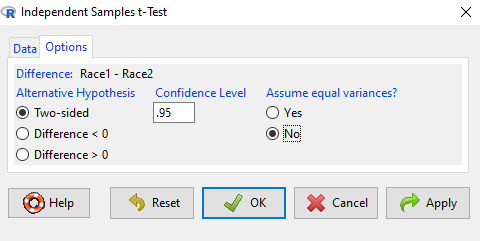
Figure 6. Rcmdr Options menu for Independent sample t-test.
Let’s look at the results and break down the parts of the test.
t.test(Body.mass~Lizard, alternative='two.sided', conf.level=.95,
+ var.equal=TRUE, data=lizards)

Two Sample t-test

data: Body.mass by Lizard
t = 2.7117, df = 6, p-value = 0.03503
alternative hypothesis: true difference in means is not equal to 0
95 percent confidence interval:
0.2308685 4.4981315
sample estimates:
mean in group Anolis mean in group Gecko
5.27425 2.90975
Consider the R session output above and answer the following questions.
Questions for the worked example
- Which lizard group had the greater mean value, Anolis or Gecko?
- What are the assumptions necessary for you to use the independent sample t-test?
- What does “two-sided” mean?
- What was the null hypothesis?
- Was this a one-tailed or two-tailed test of the null hypothesis?
- What is the value of the test statistic?
- How many degrees of freedom?
- What is the critical value for this test?
- What is the value of the lower limit of the 95% confidence interval?
- What is the value of the lower limit of the 99% confidence interval?
- True or False. If the null hypothesis is accepted, then zero is a value included in the 95% confidence interval.
- Do you accept the null hypothesis? Explain your selection.
Try another example
DNA damage, changes in the chemical structure of nucleotide bases or breakage of the DNA chains, occurs in cells under many circumstances. The comet assay, or single-cell gel electrophoresis, is one method for visualizing and measuring DNA strand breaks in cells. Exposed cells are mixed with a low-melting temperature agarose and placed onto a microscope slide. The cells are then lysed with an alkaline detergent and high salts. When current is applied across the slide, undamaged DNA remains in the nucleus, whereas damaged DNA extends towards the anode to form a comet-like tail, with imaging assisted by including a fluorescent dye like Sybr-Green. Examples of comets are shown below (Fig 7).
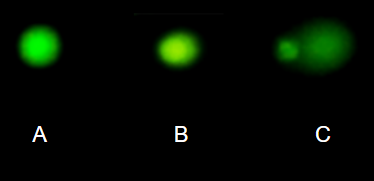
Figure 7. Comet examples. A Intact cell, no DNA damage, B Cell with some DNA damage, a slight tail to the right is evident, C Cell with significant DNA damage, a large tail is evident. M. Dohm.
In an experiment, immortalized lung epithelial cells were exposed to dilute copper solutions for 30 minutes then washed with PBS. The comet assay was applied to these cells and for comparison, to cells without copper exposure but otherwise treated the same way (controls). The data are available at the bottom of this page (scroll down or click here).
Again, you should begin all analyses with an exploration of the data, including a graph (Fig 8).
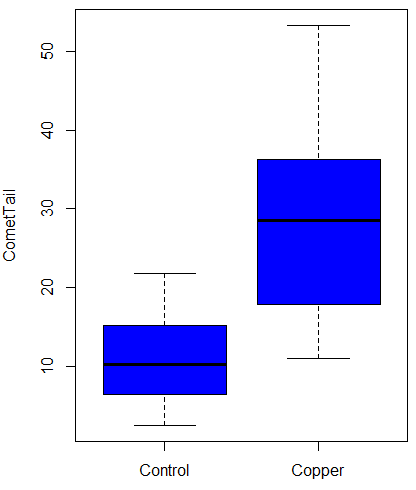
Figure 8. Boxplot of comet tail lengths for cells with and without (control) exposure to copper in the cell medium for 30 minutes.
Let’s look at the R output for the t-test analysis.
    Two Sample t-test

data:  CometTail by Treatment
t = -5.8502, df = 38, p-value = 9.139e-07
alternative hypothesis: true difference in means is not equal to 0
95 percent confidence interval:
 -22.39865 -10.88213
sample estimates:
mean in group Control  mean in group Copper
             11.14533              27.78571
Consider the R session output above and answer the following questions.
Questions for Comet assay data set
- Which cell group had the greater mean value, Copper-exposed or Control-exposed cells?
- What are the assumptions necessary for you to use the independent sample t-test?
- What does “two-sided” mean?
- What was the null hypothesis?
- Was this a one-tailed or two-tailed test of the null hypothesis?
- What is the value of the test statistic?
- How many degrees of freedom?
- What is the critical value for this test?
- What is the value of the lower limit of the 95% confidence interval?
- What is the value of the lower limit of the 99% confidence interval?
- True or False. If the null hypothesis is accepted, then zero is a value included in the 95% confidence interval.
- Do you accept the null hypothesis? Explain your selection.
T test from summary statistics
In some cases you may only have to summary statistics for data, eg, the means and the standard deviations. We can use the equations of the t test to write a simple formula, where the user provides the known means, standard deviations, and sample size. For example, create a simple function with readline for user input.
myTtest <- function() {
   mnx <- as.numeric(readline(prompt="Enter mean of x: "))
   stdevx <- as.numeric(readline(prompt="Enter sd of x: "))
   nx <- as.numeric(readline(prompt="Enter n of x: "))
   mny <- as.numeric(readline(prompt="Enter mean of y: "))
   stdevy <- as.numeric(readline("Enter sd of y: "))
   ny <- as.numeric(readline(prompt="Enter n of y: "))
   myTvalue <- abs(((mnx-mny)-0)/sqrt(((stdevx^2)/nx)+(stdevy^2)/ny))
   myDF <- as.integer(nx+ny-2)
   myPvalue <- pt(myTvalue,myDF,lower.tail=FALSE)*2
   myResults <- c(myTvalue, myDF, myPvalue)
   report <- c("T-test: ", "df: ", "two-tailed p-value: ")
   cat(sprintf("%s %3.3f, ", report, myResults))
}
then run the function by typing myTest() at the R prompt and entering the means, standard deviations, and sample size when prompted.
myTtest()
Enter mean of x: 2.91
Enter sd of x: .895
Enter n of x: 4
Enter mean of y: 5.27
Enter sd of y: 1.497
Enter n of y: 4
T-test: 2.706, df: 6.000, two-tailed p-value: 0.035
P-values from confidence intervals
While we expect certain reporting criteria for published, it is not uncommon that one or more elements are missing. For example, while means plus or minus standard deviations for two groups may be reported, the confidence interval of the difference may not be reported, or, an inexact p-value is reported like “< 0.05,” but we “need” an exact p-value for our meta-analysis. A little math, and these missing statistics can be calculated.
We can use the lizard study as an example; while all of the expected elements were reported, including the p-value (0.03503), let’s say the p value was reported as “statistically significant at p < 0.05.”
We need
lower and upper confidence intervals: 0.2309 and 4.498, respectively.
critical value from t distribution, df = 6 (2 tailed, therefore 0.05/2). A little R code we have:

the standard error, which can be calculated as 
and then the p-value, 
which is pretty close to the result from R (p = 0.03503). The difference is likely due to the small sample size.
Questions
- Don’t forget to work through the Questions for the Comet tail data set (scroll up or click here).
- Microsoft Excel, LibreOffice Calc, and Google sheets spreadsheet software all include t-test functions and return the p-value. Consider two variables big (100, 110, 120, 100, 110, 210, 200) and small (0,1,1,2,0,1,0). (Note — these two groups are obviously very different, calculating a t-test on their difference is silly, just for this question.) If formatting is set to the default two decimal places for Number cell category, the p-value will return as “0.00.” How should you report the p-value in this case?
Quiz Chapter 10.1
Compare two independent sample means
Comet assay data set
| Treatment | CometTail |
| Control | 17.856139 |
| Control | 16.52125 |
| Control | 14.925449 |
| Control | 14.029174 |
| Control | 13.332945 |
| Control | 8.811185 |
| Control | 14.701654 |
| Control | 9.261025 |
| Control | 21.779311 |
| Control | 6.180284 |
| Control | 9.201752 |
| Control | 5.54472 |
| Control | 6.717885 |
| Control | 2.625092 |
| Control | 7.191583 |
| Control | 5.392866 |
| Control | 11.284813 |
| Control | 15.441254 |
| Control | 17.857176 |
| Control | 4.250956 |
| Copper | 53.214287 |
| Copper | 38.92857 |
| Copper | 18.928572 |
| Copper | 30 |
| Copper | 28.928572 |
| Copper | 15.357142 |
| Copper | 17.857143 |
| Copper | 17.5 |
| Copper | 21.071428 |
| Copper | 29.285715 |
| Copper | 28.214285 |
| Copper | 16.785715 |
| Copper | 21.071428 |
| Copper | 37.5 |
| Copper | 38.214287 |
| Copper | 17.857143 |
| Copper | 29.642857 |
| Copper | 11.071428 |
| Copper | 35 |
| Copper | 49.285713 |
Chapter 10 contents
- Introduction
- Compare two independent sample means
- Digging deeper into t-test Plus the Welch test
- Paired t-test
- References and suggested reading