3.5 – Statistics of error
Making sense of error in data.
This page explains how statistics of error help quantify differences between measured and true values, beginning with classical methods like standard error and confidence intervals that rely on large-sample assumptions. Related, statisticians talk about uncertainty — the quantification of doubt about a measurement. We introduce permutation-based approaches, including jackknife and bootstrap resampling, which avoid those assumptions and are especially useful with smaller or complex data sets. Observer variation (intra- and interobserver error) is also highlighted as an important source of measurement error.
Missing values are another common source of uncertainty in biological data sets. Data may be missing because of equipment failure, recording mistakes, sample loss, or biological factors that prevent a measurement from being collected. Even a small number of missing observations can influence summaries, graphs, and statistical tests, especially in smaller studies. In this chapter, we treat missing values mainly as a practical issue to identify and report during exploratory data analysis. Later, in the chapter on experimental design, we examine missing data in greater depth, including differences between random and non-random missingness, as well as approaches such as data imputation and the consequences these choices may have for interpretation.
We conclude with a discussion about confidence intervals as a measure of accuracy and emphasize proper use of significant figures to avoid overstating precision.
Statistics of error.
In statistics, error doesn’t mean mistake, an avoidable human misjudgement or oversight, eg, a typo. An error in statistics means there was a difference between the measured value and the actual value for an object. Efforts by many authors of notable classical statistics developed a large body of calculated statistics, eg, standard error the mean, which allows the user to quantify how large the error of measurement is given assumptions about the distribution of the errors. Thus, classical statistics requires user to make assumptions about the error distribution, the subject of our Chapter 6. A critical issue to understand is that these methods assume large sample sizes are available; they are called asymptotic statistics or large-sample statistics; the properties of the statistical estimates are evaluated as sample size approaches infinity.
Jackknife sampling and bootstrap sampling are permutation approaches to working with data when the Central Limit Theorem — as sample size increases, the distribution of sample means will tend to a normal distribution (see Chapter 6.7) — is unlikely to apply or, rather, we don’t wish to make that assumption (Chapter 19). The jackknife is a sampling method involving repeatedly sampling from the original data set, but each time leaving one value out. The estimator, for example, the sample mean, is calculated for each sample. The repeated estimates from the jackknife approach yield many estimates which, collected, are used to calculate the sample variance. Jackknife estimators tend to be less biased than those from classical asymptotic statistics.
Bootstrapping, and not jackknife resampling, may now be the preferred permutation approach (eg, Google Scholar search “bootstrap statistics” 36K hits; “jackknife statistics” 17K hits), but which method is best depends on qualities of the data set. Bootstrapping involves large numbers of permutations of the original data, which, in short, means we repeatedly take many samples of our data and recalculate our statistics on these sets of sampled data. We obtain statistical significance by comparing our result from the original data against how often results from our permutations on the resampled data sets exceed the originally observed results. By permutation methods, the goal is to avoid the assumptions made by large-sample statistical inference, ie, reaching conclusions about the population based on samples from the population. Since its introduction, “bootstrapping” has been shown to be superior in many — but, importantly, not all — cases for statistics of error compared to the standard, classical approach (Efron 1979, Hesterberg 2015).
There are many advocates for the permutation approaches, and, because we have computers now instead of the hand calculators our statistics ancestors used, permutation methods may be the approach you will take in your own work. However, the classical approach has its strengths — when the conditions, that is, when the assumptions of asymptotic statistics are met by the data, then the classical approaches tend to be less conservative than the permutation methods. By conservative, statisticians mean that a test performs at the level we expect it to. Thus, if the assumptions of classical statistics are met they return the correct answer more often than do the permutation tests.
Error and the observer.
Individual researchers make observations, therefore, we can talk about observer variation as a kind of error measurement. For repeated measures of the same object by an individual, we would expect the individual to return the same results. To the extent repeated measures differ, this is intraobserver error. In contrast, measures of the same object from different individuals is interobserver error. For a new instrument or measurement system, one would need to establish the reliability of the measure: confronted with the same object do researchers get the same measurement? Accounting for interobserver error applies in many fields, eg, histopathology of putative carcinoma slides (Franc et al 2003), liver biopsies for cirrhosis (Rousselet et al 2005), blood cell counts (Bacus 1973).
Confidence in estimates.
A really useful concept in statistics is the idea that you can assign how confident you are to an estimate. This is another way to speak of the accuracy of an estimate. Clearly, we have more confidence in a sample estimate for a population parameter if many observations are made. Another factor in our ability to estimate is the magnitude of observation differences. In general, the larger the differences among values from repeated trials, the less confident we will be in out estimate, unless, again, we make our estimates from a large collection of observations. These two quantities, sample size and variability, along with our level of confidence, eg, 95%, are incorporated into a statistic called the confidence interval.

We will use this concept a lot throughout the course; for now, a simple but approximate confidence interval is to use the 2 x SEM rule (as long as sample size large): twice the standard error of the mean. Take your estimate of the mean, then add (upper limit) or subtract (lower limit) twice the value of the standard error of the mean (if you recall, that’s the standard deviation divided by the square-root of the sample size).
Example. Consider five magnetic darts thrown at a dart board (28 cm diameter, height of 1.68m from the floor) from a distance of 3.15 meters (Fig 1).
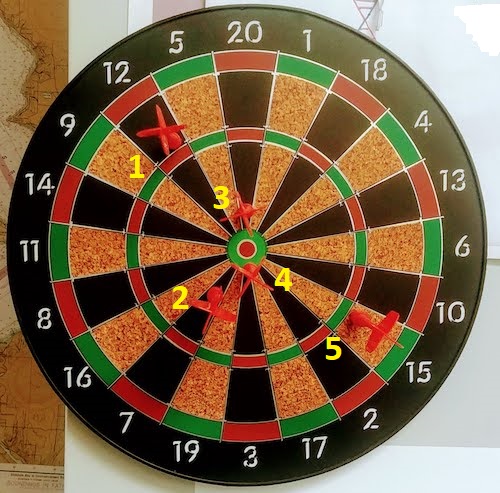
Figure 1. Magnetic dart board with 5 darts. Click image to view full sized image.
The distance in centimeters (cm) between where each of the five darts landed on the board compared to the bullseye is reported in (Table 1),
Table 1. Results of five darts thrown at a target (Figure 2)*
| Dart | Distance |
|---|---|
| 1 | 7.5 |
| 2 | 3.0 |
| 3 | 1.0 |
| 4 | 2.7 |
| 5 | 7.4 |
* distance in centimeters from the center.
Note 1: Use of the coordinate plane, and including the angle measurement in addition to distance (the vector) from center, would be a better analysis. In the context of darts, determining accuracy of a thrower is an Aim-Point targeting problem and part of your calculation would be to get MOA (minute of angle). For the record, the angles (degrees) were
| Dart | Distance | Angle |
|---|---|---|
| 1 | 7.5 | 124.4 |
| 2 | 3.0 | -123.7 |
| 3 | 1.0 | 96.3 |
| 4 | 2.7 | -84.3 |
| 5 | 7.4 | -31.5 |
measured using imageJ. Because there seems to be an R package for just about every data analysis scenario, unsurprisingly, there’s an R package called shotGroups to analyze shooting data.
How precise was the dart thrower? We’ll use the coefficient of variation as a measure of precision. Second, how accurate were the throws? Use R to calculate
darts = c(7.5, 3.0, 1.0, 2.7, 7.4)
#use the coefficient of variation to describe precision of the throws
coefVar = 100*(sd(darts)/mean(darts)); coefVar
[1] 68.46141
Confidence Interval to describe accuracy.
For a game of darts, the true value would be a distance of zero — all bullseyes. We need to calculate the standard error of the mean (SEM), then, we calculate the confidence interval around the sample mean.
#Calculate the SEM
SEM <- sd(darts)/sqrt(length(darts)); SEM
[1] 1.322649
#now, get the lower and upper limit, subtract from the mean
confidence <- c(mean(darts)-2*SEM, mean(darts), mean(darts)+2*SEM); confidence
[1] 1.674702, 4.320000, 6.965298
The mean was 4.3 cm, therefore to get the lower limit of the interval subtract 2.65 (2*SEM = 2.645298) from the mean; for the upper limit add 2.65 to the mean. Thus, we report our approximate confidence interval as (1.7, 7.0), and we read this as saying we are about 95% confident the population value is between these two limits. Five is a very small sample number, so we shouldn’t be surprised to learn that our approximate confidence interval would be less than adequate. In statistical terms, we would use the t-distribution, and not the normal distribution, to make our confidence interval in cases like this.
Note 2: As a rule, implied by Central Limit theory and use of asymptotic statistical estimation, a sample size of 30 or more is safer, but probably unrealistic for many experiments. This is sometimes called as the rule of thirty. (For example, a 96-well PCR array costs about $500; with n = 30, that’s $15,000 US Dollars for one group!). So, what about this rule? This type of thinking should be avoided as “a relic of the pre-computer era,” (Hesterberg, T. (2008). It’s Time To Retire the” n>= 30″ rule.). We can improve on asymptotic statistics by applying bootstrap principles (Chapter 19).
We made a quick calculation of the confidence interval; we can get make this calculation by hand by incorporating the t distribution. We need to know the degrees of freedom, which in this case is 4 (n – 1, where n = 5). We look up critical value of t at 5% (to get our 95% confidence interval), t = 2.78. Subtract for lower limit t*SEM and add for upper limit t*SEM to the sample mean for the 95% confidence interval.
We can get help from R, by using the one-sample t-test with a test against the hypothesis that the true mean is equal to zero. Among a variety of output we will introduce later (see Chapter 8 and 10), the confidence interval is reported (yellow highlight),
#make an attach a data frame object
Ddarts <- data.frame(darts)
t.test(darts,mu=0)
One Sample t-test
data: darts
t = 3.2662, df = 4, p-value = 0.0309
alternative hypothesis: true mean is not equal to 0
95 percent confidence interval:
 0.6477381 7.9922619
sample estimates:
mean of x
 4.32
t.test uses the function qt(), which provides the quantile function. To recreate the 95% CI without the additional baggage output from the t.test, we would simply write
#upper limit
mean(darts)+ qt(0.975,df=4)*sd(darts)/sqrt(5)

#lower limit
mean(darts)+ qt(0.025, df = 4, lower.tail=TRUE)*sd(darts)/sqrt(5)
where sd(darts)/sqrt(5) is the standard error of the mean.
Or, alternatively, download and take advantage of a small package called Rmisc (not to be confused with the RcmdrMisc package) and use the function CI
library(Rmisc)
CI(darts)
     upper     mean     lower
7.9922619 4.3200000 0.6477381
The advantage of using the CI() command from the package Rmisc is pretty clear; I don’t have to specify the degrees of freedom or the standard error of the mean. By default, CI reports the 95% confidence interval. we can specify any interval simply by adding to the command. For example,
CI(darts, ci=0.90)
reports upper and lower limits for the 90% confidence interval.
Try it. On your own, get the 90% confidence interval and the 99% confidence intervals for our dart example. Compare to the 95% confidence interval — what do you conclude about “confidence” in our estimate from 90% to 99%?
Confidence intervals from p-values.
And finally, it is not unusual for a report to provide summary statistics, differences between means (ie, effect size), and p-values (orange highlight), but not report confidence intervals. We discuss p-values and the concept of statistical significance beginning in Chapter 8. But for now, we show how to calculate approximate confidence intervals from the p-value. This may be of use for conducting meta-analysis (Chapter 20.15). See two helpful “how to” articles by Bland and Altman in 2011 BMJ (references listed in Chapter 3.6 – References).
In brief, calculate the test statistic for a normal distribution (letZ), calculate a standard error, and then the lower and upper limits for the 95% confidence interval. We illustrate use of the calculator formulas with the dart example, the p-value was 0.0309; the estimate was 4.32.
R code
letZ = (-0.862 + sqrt(0.743 - 2.404*log(0.0309, base = exp(1)))) = 2.154903
letSE = 4.32/letZ = 2.00473
1.96*letSE = 3.929271 # Add for upper and subtract for lower
The lower limit is 0.39 (4.32 – 3.929271) and the upper limit is 8.25 (4.32 + 3.929271). Although in the ballpark, these calculated estimates are wider than the confidence interval estimated by the t.test command. Small sample size, n = 5, is to blame — the accuracy of these methods, based on asymptotic statistical estimation approaches, assumes the law of large numbers applies.
Significant figures.
And finally, we should respect significant figures, the number of digits which have meaning. Our data were measured to the nearest tenth of a centimeter, or two significant figures. Therefore, if we report the confidence interval as (0.6477381, 7.9922619), then we imply a false level of precision, unless we also report our random sampling error of measurement.
R has a number of ways to manage output. One option would be to set number of figures globally with the options() function — all values reported by R would hold for the entire session. For example, options(digits=3) would report all numbers to three significant figures. Instead, I prefer to use signif() function, which allows us to report just the values we wish and does not change reporting behavior for the entire session.
signif(CI(darts),2)
upper  mean lower
 8.00  4.30  0.65
Note 3: The options() function allows the R user to set a number of settings for an R session. After gaining familiarity with R, the advanced user recognizes that many settings can be changed to make the session work to report in ways more convenient to the user. If curious, submit options() at the R prompt and available settings will be displayed.
The R function signif() applies rounding rules. We apply rounding rules when required to report estimates to appropriate levels of precision. Rounding procedures are used to replace a number with a simplified approximation. Wikipedia provides a comprehensive list of rounding rules. Notable rules include
- directed rounding to an integer, eg, rounding up or down
- rounding to nearest integer, eg, round half up (down) if the number ends with 5
- randomly rounding to an integer, eg, stochastic rounding.
With the exception of stochastic rounding, all rounding methods impose biases on the sets of numbers. For example, the round half up method applied for numbers above 5, round down for numbers below 5 will increase the variance of the sample. In R, use round() for most of your work. If you need one of the other approaches, for example, to round up, the command is ceiling(); to round down we use floor().
When to round?
No doubt your previous math classes have cautioned you about the problems of rounding error and their influence on calculation. So, as a reminder, if reporting calls for rounding, then always round after you’ve completed your calculations, never during the calculations themselves.
A final note about significant figures and rounding. While the recommendations about reporting statistics are easy to come by (and often very proscriptive, eg, Table 1, Cole 2015), there are other concerns. Meta-analysis, which are done by collecting information from multiple studies, would benefit if more and not fewer numbers are reported, for the very same reason that we don’t round during calculations.
Questions
- Calculate the correct 90% and 99% confidence intervals for the dart data using the t-distribution
- by hand
- by one alternative method in R, demonstrated with examples in this page
- How many significant figures should be used for the volumetric pipettor p1000? The p200? The p20 (data at end of this page)?
- Another function,
round(), can be used. Try
round(CI(darts),2)
-
- and report the results: vary the significant figures from 1 to 10 (
signif()will take digits up to 22). - See any output differences between
signif()andround()? Don’t forget to take advantage of R help pages (eg, enter?roundat the R prompt) and see Wikipedia.
- and report the results: vary the significant figures from 1 to 10 (
- Compare rounding by
signif()andround()for the number 0.12345. Can you tell which rounding method the two functions use? - Calculate the coefficient of variation (CV) for each of the three volumetric pipettors from the data at end of this page. Rank the CV from smallest to largest. Which pipettor had the smallest CV and would therefore be judged the most precise?
- (data provided at end of this page, click here).
- Standards distinguish between within run precision and between run precision of a measurement instrument (see Chapter 16.5 – Instrument reliability and validity). The data in Table 1 were all recorded within 15 minutes by one operator. What kind pf precision was measured?
- Calculate the standard error of the means for each of the three pipettors from the data
- (data provided at end of this page, click here).
- Calculate the approximate confidence interval using the 2SE rule and judge which of the three pipettors is the most accurate (narrowest confidence interval)
- Repeat, but this time apply your preferred R method for obtaining confidence intervals.
- Compare approximate and R method confidence intervals. How well did the approximate method work?
- Return to the dart example, but now assume the p-value was p = 0.003 and again for p = 0.0003. Estimate the 95% confidence interval for each case; the difference remains 4.32. How does the change in p-value, from 0.03 to 0.0003 — a two orders of magnitude difference — affect the estimates for the confidence interval (hint: describe the width of the CI)?
Quiz Chapter 3.5
Statistics of error
Data sets
Pipette calibration
| p1000 | p200 | p100 |
|---|---|---|
| 0.113 | 0.1 | 0.101 |
| 0.114 | 0.1 | 0.1 |
| 0.113 | 0.1 | 0.1 |
| 0.115 | 0.099 | 0.101 |
| 0.113 | 0.1 | 0.101 |
| 0.112 | 0.1 | 0.1 |
| 0.113 | 0.1 | 0.1 |
| 0.111 | 0.1 | 0.1 |
| 0.114 | 0.101 | 0.101 |
| 0.112 | 0.1 | 0.1 |
Chapter 3 continues
11.5 – Power analysis in R
Introduction
In R, you can estimate the
- Statistical power — how probable are you to correctly reject the null hypothesis
- Sample size — how many samples or observations must we get to have a reasonable chance to correctly reject a null hypothesis
- Effect size (minimum difference) — how different are the two samples?
Power analysis is recommended before conducting an experiment, but it is also valuable after an experiment.
Base R and pwr package
In Chapter 11.4 we presented functions from BSDA package. R (but not Rcmdr — see the EZR plugin described below) provides all of the basic power analysis we would need for t-tests, one-way ANOVA, etc. as part of the base installation (Everitt and Hothorn 2007). However, the package pwr, provides a more comprehensive package for power analysis. Load and install the R package pwr.
For example, to determine the number of samples for an independent sample t-test (two-tailed), the function is pwr.t.test().
pwr.t.test(n = NULL, d = NULL, sig.level = 0.05, power = NULL, type = c("two.sample", "one.sample", "paired"), alternative = c("two.sided", "less","greater"))
Table 1. Components of pwr.t.test().
| n | Number of observations (per sample) |
| d | Effect size |
| sig.level | Significance level (Type I error probability) |
| power | Power of test (1 minus Type II error probability) |
| type | Type of t test : one- two- or paired-samples |
| alternative | a character string specifying the alternative hypothesis, must be one of “two.sided” (default), “greater” or “less |
The basic question is, how many samples (observations) do I need for each group (k) at Type I error of 5% and type II error of 95%?
To run the test, you fill in all of the “NULL” except the one you wanted solved (ie, leave n = NULL).
For an effect size of 0.2, Type I error (significance level) of 5%, and 95% power, how many observations per group do we need for our study?
pwr.t.test(n = NULL, d =0.2, sig.level = 0.05, power = 0.95, type = c("two.sample"), alternative = c("two.sided"))
Two-sample t test power calculation
n = 650.6974
d = 0.2
sig.level = 0.05 power = 0.95 alternative = two.sided
note: n is number “n” in each group
Wow!
The R pwr package is not as convenient as it could be (have to load and run R scripts): for intro level, try one of the many online sites. Here is a website which can help with power analysis based on a variety of situations. The programs are java-coded. http://www.stat.uiowa.edu/~rlenth/Power/index.html
Note 1: You see what I just did? I “complained” about a free program’s performance! Don’t do that — what I mean by this is that there’s a learning curve with the pwr package, and there are other options to explore outside of the R programming world.
Power analysis with the EZR Rcmdr plugin
The EZR plugin for R Commander provides some facilities to do power analysis (Kanda 2013). First, download and install the RcmdrPlugin.EZR package. The EZR plugin for Rcmdr, RcmdrPlugin.EZR, provides an interface to explore power analyses, along with many other statistical functions (Kanda 2013). After loading the plugin to Rcmdr, additional drop down options are added to the menu bar (Fig 1).
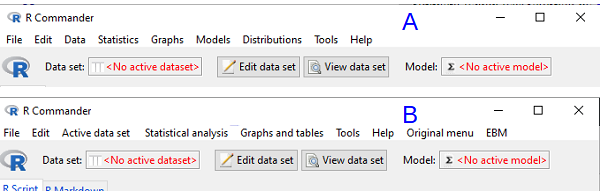
Figure 1. Screenshot of Rcmdr menu bar with (A) and without (B) the EZR plugin.
I’ll demonstrate use of the plugin, but I recommend that you use pwr.t.test() instead. Although EZR uses a drop-down menu system it has many more functions than we need to solve this simple exercise. Thus, EZR is not any easier to apply for what we need here. That said, off we go.
Worked example
Consider a simple data set, wheel running performance in 24-hours for three strains of mice.
Table 2. Wheel running performance in 24-hours for three strains of mice.
| Mouse strain | Average | Standard deviation | n |
| AKR | 395 | 169.7 | 20 |
| CBA | 855 | 77.8 | 20 |
| C57BL/10 | 1135 | 63.6 | 20 |
Consider two groups of mice, AKR vs CBA for wheel running performance. How many samples needed to show a statistical difference for ?
Calculate the pooled standard deviation and calculate a difference between the means (the effect size) for which you wish to say is statistically different. For this example, 132.0 and 460, respectively. With EZR plugin installed and active in R Commander (Fig 2), select
Rcmdr: Statistical analysis → Calculate sample size → Calculate sample size for comparison between two means
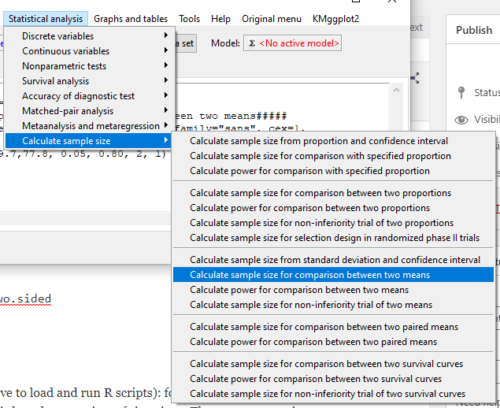
Figure 2. Screenshot of Rcmdr EZR plugin menu.
Select Calculate sample size for comparison between two means, enter the effect size (difference in sample means), standard deviation in each group (or a single value for pooled standard deviation) (Fig 3).
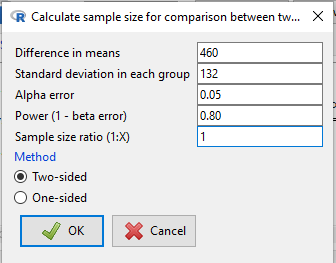
Figure 3. Screenshot of EZR Menu to obtain sample size for the comparison between two (sample) means.
R output from EZR Calculate sample size for comparison between two means
Assumptions
Difference in means 460
Standard deviation 132
Alpha 0.05
two-sided
Power 0.8
N2/N1 1

Required sample size Estimated
N1 2
N2 2
Questions
Recall lizard body mass data set from Chapter 10.1
Geckos <- c(3.186, 2.427, 4.031, 1.995)
Anoles <- c(5.515, 5.659, 6.739, 3.184)
Enter the data into an R data.frame, carry out the independent sample t-test, then
- Calculate power for the comparison between the two means
- Calculate sample size needed to achieve 95% power.
Quiz Chapter 11.5
Power analysis in R
Chapter 11 contents
11.2 – Prospective and retrospective power
Introduction
Statistical power is defined as p = 1 – β. The power of a test is the probability of rejecting a Null Hypothesis when it is false. There is a relationship between Type I error and Type II error. We want β to be Large BUT β is generally not known when we are performing the statistical test. We do know that α is inversely related to β. The smaller the α value we use to Reject the Null Hypothesis the MORE likely we will accept a FALSE Null Hypothesis. If we make α very small (one in a billion) then there would be a very HIGH chance of accepting α Null Hypothesis when it is false (β is high). Note that this is the same discussion that we had about sensitivity of an assay test and the specificity of that assay. If we increase sensitivity of the assay such that we approach 100% detection of the true positives will be detected, we necessarily will increase the number of false positives. The BEST way to reduce both Type I and Type II statistical errors is to INCREASE the sample size!
Power of any statistical test (Z test, T-test, one-way ANOVA…) can be determined BEFORE the experiment is done and data are gathered or AFTER an experiment is completed (Cohen 1992). For now, here’s our first real taste of experimental design — we can evaluate how we can make an experiment to test a particular hypothesis.
Prospective power analysis
Good experimental design should include considerations of power. The design will determine the size of the effect your experiment will be able to detect and the probability of correctly rejecting the null hypothesis. In large part, this will involve decisions of sample size and ways to reduce error variance. Moreover, one needs to decide ahead of time, just how large of an effect does the experiment need to detect??? A one-gram change in body mass before and after a diet treatment is of no concern whatsoever if your study subjects are African elephants, but may be a very large effect for a study of shrews!
Retrospective power analysis
Power analysis can also be done after a test has been conducted and the null hypothesis failed to be rejected. One interpretation that might follow from a retrospective power analysis is that, if the study had low power, the lack of statistical significance could be viewed merely the result of low sample size. However, as forcefully argued Hoenig and Heisey (2001) (see also Colegrave and Ruxton 2003), retrospective or posthoc power tests provide no more information than does the p-value and therefore are redundant. At worse, retrospective power analysis can be misleading as to how well it predicts true power, ie, biologically meaningful differences between different treatment groups (Zhang et al., 2019).
Prospective power is more than effect size between groups
Large effect size, ie, large differences between groups, is not necessarily evidence of important biological differences. The concept of power has limits (Hoenig and Heisey 2001 Yuan and Maxwell 2005). On the other hand, small effect sizes can be important differences, especially if the treatment is difficult or expensive. We work through this conclusion with an example, but emphasize here that providing confidence intervals for the effect size (Colegrave and Ruxton 2003). Suppose the null hypothesis was not rejected from a two sample independent t-test conducted on the test of differences in plant height between two samples of `ohi’a found at different elevations. Was there really no difference or was the sample size in the study simply too small to detect the real and important difference between the samples? By conducting a power analysis, one can determine if a slight increase in sample size would have yielded a statistically significant difference, or it may suggest that the effect size is small enough not to warrant further attention.
R code
Three options for conducting power analysis in R are provided in section 11.5
Questions
- Assuming that a study was done by randomly sampling from a population, and the the primary outcome is found not statistically different with p-value 0.13 between placebo and treatment groups, what can be gained made from a retrospective power analysis?
Quiz Chapter 11.2
Prospective and retrospective power
Chapter 11 contents
- Introduction
- What is Statistical Power?
- Prospective and retrospective power
- Factors influencing statistical power
- Two sample effect size
- Power analysis in R
- References and suggested readings
11 – Power analysis
Introduction
The power of a statistical test is the probability that the test will reject the null hypothesis when the alternative hypothesis is true. Most of us are used to thinking that a hypothesis is either right or it is wrong: a Doctor’s diagnosis is correct, the patient has the disease, or the patient does not; an experimental result is objectively true — ie, true independent of the observer’s subjectivity — or it is false. As we work through a typical science curriculum, we may even take to heart that, unlike mathematicians, scientists don’t prove scientific ideas no matter how well supported by evidence. Our acceptance of scientific theories is provisional; if new evidence comes along, we revise and if warranted, we abandon the theory in favor of new explanation. However, even this point does not completely reflect the point we are making from statistical thinking. One of the more challenging concepts for new statistics students to understand is that outcomes of a Doctor’s diagnosis or that of an experiment are associated with probability.
The concept of statistical power helps to relate how our ability to confidently conclude one outcome over an another. Statistical power depends on
- What Type I error rate we set
- The effect size or difference between affected and unaffected groups
- The sample size
- The variability of the subjects
These concepts have all been introduced before, but the idea that even a well designed experiment may lack the capability of detecting “truth” is a new and important topic to add to your growing statistical thinking tool kit.
Quizzes in this chapter
A total of 28 questions among the several subchapters, a mix of true or false and multiple choice question format.
Chapter 11 contents
- Introduction
- What is Statistical Power?
- Prospective and retrospective power
- Factors influencing statistical power
- Two sample effect size
- Power analysis in R
- References and suggested readings