R packages
What’s on this page?
- How to add packages to base R installation.
- How to select a CRAN mirror site.
- Steps for package installation from selected CRAN mirror site.
- How to load and unload a package.
- How to update installed packages following an upgrade of R.
- List of R packages used in the Mike’s Biostatistics Book.
The instructions on this page chiefly apply to an installation of R on a local computer, Linux, macOS, or winPC. Running R in the cloud (eg, Google CoLab) also requires installing and loading packages, but many of the other instructions on this page do not apply. Look for the CoLab, skip this step: statement; instructions lacking this disclaimer should apply to CoLab. After a skip this step: statement, I’ll start the new section with Applies to all.
Add packages to base R installation
CoLab, skip this step: it is not necessary to set a mirror site for Google CoLab.
Installing R packages is straightforward, assuming the package is part of CRAN. Select a CRAN mirror site, eg, 0-Cloud, RStudio’s mirror site.
chooseCRANmirror()
To find out what CRAN mirror was set for the current session use
findCRANmirror()
A list of mirror sites is stored on your computer once R is installed, see CRAN_mirrors.csv in the doc folder, eg, ~/R-4.3.1/doc.
Applies to all. Once the CRAN mirror is selected, and assuming you have the name of the package, eg, package.name, then
install.packages("package.name")
will work.
Useful additional command options include
install.packages("package.name", dependencies=TRUE)
which will also download and install any additional packages required. And
install.packages("package.name", quiet=TRUE)
which cuts down on the amount of screen output during installation.
If you receive the warning message
Warning: package 'package.name' is not available (for R version 4.3.2)
While it is possible the package has not yet become available, first double-check for typos.
Another warning message may be that a binary version is available, but a more recent source version is available, prompted by the question,
Do you want to install from sources the package which needs compilation?
In most cases, no is the answer. R will install a previous binary version. In order to install from source, RTools must be installed.
Note 1: Do not install RTools if running R in the cloud (eg, Google CoLab). The R environment on CoLab is already set.
RTools contains software tools needed to build some R packages on WinPC.
Start, stop, or remove package
Applies to all. library("package name") is used to start a package. If a package is to be called in a function, then use require("package name"). If the called package is not installed, library() will exit with an error message whereas the function will continue to run if require() is used.
To unload a package without stopping current R session, try detach("package name") or unloadNamespace("package name"). The command remove.packages("package name") will uninstall a package from R.
Update R packages after installing new R version
CoLab, skip this step: After updating to new version of R you’ll need to download and update the user installed packages again. If you are running RStudio, see instructions here. For Win11 users you can download and run a package called installr, for macOS users download and install updateR, which will assist you to update R packages.
I prefer to run a script I modified from R-Bloggers.com. This script works on any operating system, but updates only CRAN packages (eg, not devtools github or Bioconductor packages). For github, try . dtupdate. For Bioconductor, see BiocManager::install() ).
Before installing the new version of base R, start up your current R installation and set your working directory, setwd(). Enter the following script to gather and save all installed R packages. Select CRAN mirror when prompted.
tmp <- installed.packages()
installedpkgs <- as.vector(tmp[is.na(tmp[,"Priority"]), 1])
save(installedpkgs, file="installed_old.rda")
Shutdown R, then install and start the new version of R (see Install R for help).
In the new version of R, set your working directory as above. Enter the following script
load(file="installed_old.rda")
tmp <- installed.packages()
installedpkgs.new <- as.vector(tmp[is.na(tmp[,"Priority"]), 1])
missing <- setdiff(installedpkgs, installedpkgs.new)
install.packages(missing)
update.packages(ask=FALSE)
Should be good to go. You can remove old R version installation.
Note 2: to check installed packages, just view the object installedpkgs created earlier.
R packages used in Mike’s Biostatistics Book
list updated 12 August 2024
| package | chapter |
|---|---|
| agRee | 16.5 – Instrument reliability and validity |
| ape | 20.11 - Plot a Newick tree |
| baseline | 20.3 - Baseline correction |
| BiocManager | 20.11 - Plot a Newick tree |
| Bioconductor | 20.11 - Plot a Newick tree |
| BiodiversityR | 5.6 - Sampling from Populations |
| boot | 19.2 - Bootstrap sampling |
| bootstrap | 19.1 - Jackknife sampling |
| BSDA | 11.4 - Two sample effect size |
| cairoDevice | 13.3 – Test assumption of normality |
| car | 4.3 - Box plot |
| carData | 4.1 - Bar (column) charts |
| cholera | 2.3 - A brief history of (bio)statistics |
| clipr | 4 – How to report statistics |
| combinat | 6.3 - Combinations and permutations |
| confintr | 19.2 - Bootstrap sampling |
| contingencytables | 9.6 – McNemar’s test |
| correlation | 16.6 - Similarity and Distance |
| cranlogs | 2.2 – Why do we use R Software? |
| datasets | 4.5 - Scatter plots |
| digitize | 12.3 - Fixed effects, random effects, and ICC |
| drc | 20.10 - Growth equations and dose response calculations |
| effectsize | 12.5 – Effect size for ANOVA |
| effsize | 11.4 - Two sample effect size |
| epiR | 5.4 - Clinical trials |
| epitools | 7.4 – Epidemiology: Relative risk and absolute risk, explained |
| exact2x2 | 9.6 – McNemar’s test |
| factoextra | 20.6 – Dimensional analysis |
| findpeaks | 20.2 - Peak detection |
| forecast | 20.5 - Time series |
| geepack | 20.1 - Area under the curve |
| geeM | 20.1 - Area under the curve |
| geodist | 16.6 - Similarity and Distance |
| ggplot2 | 4.1 - Bar (column) charts |
| ggtree | 20.11 - Plot a Newick tree |
| gplots | 4.1 - Bar (column) charts |
| gtools | 6.3 - Combinations and permutations |
| GrapheR | 4.10 - Graph software |
| HH | 12.4 - ANOVA from "sufficient statistics" |
| HistData | 3.2 - Measures of Central Tendency |
| lattice | 4.10 - Graph software |
| lmboot | 19.1 - Jackknife sampling |
| irr | 12.3 - Fixed effects, random effects, and ICC |
| MASS | 12.4 - ANOVA from "sufficient statistics" |
| Matrix | 20.1 - Area under the curve |
| mcp | 12.6 - ANOVA posthoc tests |
| MESS | 20.1 - Area under the curve |
| mlr3misc | 8.2 – The controversy over proper hypothesis testing |
| modeest | 3.2 - Measures of Central Tendency |
| multcomp | 12.6 - ANOVA posthoc tests |
| NCStats | 3.3 - Measures of dispersion |
| nlopt | 20.10 - Growth equations and dose response calculations |
| nortest | 13.3 – Test assumption of normality |
| PairedData | 10.3 – Paired t-test |
| peakDetection | 20.2 - Peak detection |
| Phylotools | 20.11 - Plot a Newick tree |
| Phytools | 20.11 - Plot a Newick tree |
| plotly | 4.10 - Graph software |
| plyr | 4.1 - Bar (column) charts |
| polychor | 16.4 – Spearman and other correlations |
| propCIs | 7.6 - Confidence intervals |
| psa | 20.6 – Dimensional analysis |
| psy | 12.3 - Fixed effects, random effects, and ICC |
| psych | 3.2 - Measures of Central Tendency |
| pwr | 11.5 - Power analysis in R |
| random | 6.6 - Continuous distributions |
| rattle | 13.3 – Test assumption of normality |
| Rcmdr | 1.1 – A quick look at R and R Commander |
| RcmdrMisc | 1.1 – A quick look at R and R Commander |
| RcmdrPlugin.EBM | 4.4 - Mosaic plots |
| RcmdrPlugin.EZR | 11.5 - Power analysis in R |
| RcmdrPlugin.HH | 12.4 - ANOVA from "sufficient statistics">/a> |
| RcmdrPlugin.KMggplot2 | 4.1 - Bar (column) charts |
| RcmdrPlugin.mosaic | 4.4 - Mosaic plots |
| RcmdrPlugin.survival | 20.9 - Survival analysis |
| Rcolorbrewer | 4.4 - Mosaic plots |
| reshape2 | 4.6 - Adding a second Y axis |
| rgl | 18.1 - Multiple Linear Regression |
| Rmisc | 3.5 - Statistics of error |
| ROCR | 20.1 - Area under the curve |
| rptR | 12.3 - Fixed effects, random effects, and ICC |
| RGtk2 | 13.3 – Test assumption of normality |
| season | 20.5 – Time series |
| shotGroups | 3.5 - Statistics of error |
| stats | 4 – How to report statistics |
| survival | 3.1 - Data types |
| tanggle | 20.11 - Plot a Newick tree |
| Ternary | 4.8 - Ternary plots |
| testequavar | 13.4 – Tests for Equal Variances |
| tidyverse | 4.3 - Box plot |
| tigerstats | 8.4 – Tails of a test |
| timeseries | 20.5 – Time series |
| TOSTER | 16.1 – Product moment correlation |
| vegan | 20.8 - Diversity indexes |
| WRS2 | 3.3 – Measures of dispersion |
11.4 – Two sample effect size
Introduction
An effect size is a measure of the strength of the difference between two samples. Effect size tells us the practical importance of a result, say, the difference in outcome between a control group and the treatment group. A combined effect size is a common goal of any meta-analysis (Chapter 20.15).
Note 1: To calculate a combined effect size in meta-analysis, pool individual study effect sizes into a single summary effect. If sample size differs widely across the studies, use a weighted average. Thus, studies with more precision get more weight.
By including effect sizes, this complement inferential statistics such as p-values. Importantly, effect size moves us beyond “significant” or “not significant.” Significance tells us a difference is likely between the groups, but offers no information about the practicality of the observed difference. After all, large studies inherently have more statistical power, which, by definition implicates even small differences can be statistically significant.
In statistics there are many estimates of effect size: for categorical data, odds ratio and relative risk between exposed and unexposed groups; for quantitative data, correlation, regression slope are effect size measures, in addition to the difference between group means. For differences in means between groups, Cohen’s d (and Hedge’s g) are common statistics. In ANOVA, eta-squared ( ) and omega-squared (
 ), summarizes the proportion of total variance in the dependent variable explained by the independent variables while
  the coefficient of determination, represents the proportion of variance in the outcome explained by the predictors. Advice and help for understanding “effect size” is an enormously popular topic — nearly 3 million hits in Google Scholar and about forty-five thousand papers in Pubmed. Two highly cited papers are those by Durlak (2009) and Ferguson (2009).
The effect size statistic, Cohen’s d, is calculated by subtracting one sample mean from the other and dividing by the pooled standard deviation.
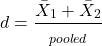
where spooled is the pooled standard deviation for the two sample means.
Hedge’s d, which uses the spooled is the pooled standard deviation for the two sample means instead of the pooled population standard deviation, is written as
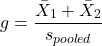
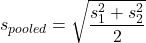
The  used in d is from an equation for pooled standard deviation was provided in Chapter 3.3, but we’ll give it again here.
An alternative version of Cohen’s d is available for the t-test test statistic value

A d of one (1) indicates the effect size is equal to one standard deviation; a d of two (2) indicates the effect size between two sample means is equal to two standard deviations, and so on.
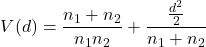
The variance of Cohen’s d,  , can be estimated as
Hedges’ g (Hedges 1981), which includes a Bessel’s correction for bias in small samples, includes “ in the denominator of the pooled standard deviation calculation.
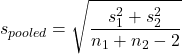
The “-2” forces the pooled variance to be larger — that makes g more conservative than d, which is of use for small sample studies.
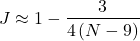
A simple modification converts d to g. Multiple d by a small-sample size correction factor J (Durlak 2009):
Note 2: Fall 2025 update: this section is actively being modified to better reflect what Cohen, Hedges, and others actually meant. In particular, formulas presented here should be considered as provisional awaiting confirmation and improvements to better reflect historical definitions and modern implementations.
What makes a large effect size?
Cohen cautiously suggested that values of d can be interpreted as
0.2 – small effect size
0.5 – medium effect size
0.8 – large effect size
That is, if the two group means don’t differ by much more than 0.2 standard deviations, than the magnitude of the treatment effect is small and unlikely to be biologically important, whereas a d = 0.8 or more would indicate a difference of 0.8 standard deviations between the sample means and, thus, likely to be an important treatment effect. Cohen (1992) provided these guidelines based on the following argument. The small effect 0.2 comes from the idea that it is much worse to conclude there is an effect when in fact there is no effect of the treatment rather than the converse (conclude no effect when there is an effect). The ratio of the Type II error (0.2) divided by the Type I error (0.05) gives us the penalty of 4. Similarly, for a moderate effect,  equals 10. Clearly, these are only guidelines (see Lakens 2013).
Examples
The difference in average body size between six week old females of two strains of lab mice is 0.4 g (Table 1), and increases to 1.38 g by 16 weeks (Table 2).
Table 1. Average body weights of 6 week old female mice of two different inbred strains.†
| Strain |  |
s |
| C57BL/6J | 18.5 | 0.9 |
| CBA/J | 18.1 | 1.27 |
†Source: Jackson Laboratories: C57BL/6J; CBA/J
Table 2. Average body weights of 16 week old female mice of two different inbred strains.†
| Strain | |
s |
| C57BL/6J | 23.9 | 2.3 |
| CBA/J | 25.38 | 3.76 |
†Source: Jackson Laboratories: C57BL/6J; CBA/J
The descriptive statistics are based on weights of 360 individuals in each strain (Jackson Labs).
The differences are both statistically significant from a independent t-test, i.e., p-value less than 0.05. I’ll show you how to calculate independent t-test given summary statistics (means, standard deviations), for Table 1 data, then will ask you to do this on your own in Questions.
Write an R script, example data from Table 1
sdd1 = 0.9
var1 = sdd1^2
sdd2 = 1.27
var2 = sdd2^2
mean1 = 18.5
mean2 = 18.1
n1 = 360
n2 = 360
dff = n1+n2-2
pooledSD <-sqrt((var1+var2)/2)
pooledSEM <-sqrt(var1/n1 + var2/n2); pooledSEM
tdiff<-(mean1-mean2)/pooledSEM; tdiff
pt(tdiff, df=dff, lower.tail=FALSE)
#get two-tailed p-value
2*0.0000006675956
#get cohen's d
2*tdiff/sqrt(dff)
Results from the calculations we report (value of the test statistic, degrees of freedom, p-value), and the effect size, then are
t = 4.875773, df = 718, p-value = 0.0000006675956
cohen's d = 0.364
Now, I’m from the school of “don’t reinvent the wheel” or “someone has already solved your problems” (Freeman et al 2008), when it comes to coding problems. And, as you would expect, of course someone has written a function to calculate the t-test given summary statistics. In addition to base R and the pwr package (see Chapter 11.5), the package BSDA contains several nice functions for power calculations.
To follow this example, install BSDA, then run the following code
require(BSDA)
tsum.test(mean1, sdd1, n1, mean2, sdd2, n2, alternative = "two.sided", mu = 0, var.equal = TRUE, conf.level = 0.95)
R output
Standard Two-Sample t-Test

data: Summarized x and y
t = 4.8758, df = 718, p-value = 0.000001335
alternative hypothesis: true difference in means is not equal to 0
95 percent confidence interval:
0.2389364 0.5610636
sample estimates:
mean of x mean of y
18.5 18.1
Similarly, Cohen’s d is available from a package called effsize.
Note 3: One reason to “re-invent the wheel,” I only needed the one function; the BSDA package contains more 330 different objects/functions. A simple way to check how many objects in a package, eg, BSDA, run
ls("package:BSDA")
BSDA stands for “Basic Statistics and Data Analysis,” and was intended to accompany the 2002 book of the same title by Larry Kitchens.
And of course, if using some else’s code, give proper citation!
Questions
- We needed an equation to calculate pooled standard error of the mean (
pooledSEMin the R code). Read the code and write the equation used to calculate the pooled SEM. - Calculate the t-test and the effect size for the Table 1 data, but at three smaller sample sizes. Change from 360 for n1 = n2 = 20, repeat for n1 = n2 = 50, and finally, repeat for n1 = n2 = 100. Use your own code, or use the
tsum.testfunction from theBSDApackage. - Calculate Cohen’s effect size d for each new calculation based on different sample size.
- Create a table to report the p-values from the t-tests, the effect size, for each of the four n1 = n2 = (20, 50, 100, 360).
- True or false. The mean difference between sample means remains unaffected by sample size.
- True or false. The effect size between sample means remains unaffected by sample size.
- Based on comparisons in your table, what can you conclude about p-value and “statistical significance?” About effect size?
- Repeat questions 2 – 7 for Table 2.
Quiz Chapter 11.4
Two sample effect size