16.2 – Causation and Partial correlation
Introduction
Science driven by statistical inference and model building is largely motivated by the the drive to identify pathways of cause and effect linking events and phenomena observed all around us. (We first defined cause and effect in Chapter 2.4) The history of philosophy, from the works of Ancient Greece, China, Middle East and so on is rich in the language of cause and effect. From these traditions we have a number of ways to think of cause and effect, but for us it will be enough to review the logical distinction among three kinds of cause-effect associations:
- Necessary cause
- Sufficient cause
- Contributory cause
Here’s how the logic works. If A is a necessary cause of B, then the mere fact that B is present implies that A must also be present. However, that the presence of A does not imply that B will occur. If A is a sufficient cause of B, then the presence of A necessarily implies the presence of B. However, another cause C may alternatively cause B. Enter the contributory or related cause: A cause may be contributory if the presumed cause A (1) occurs before the effect B, and (2) changing A also changes B. A contributory cause does not need to be necessary nor must it be sufficient; contributory causes play a role in cause and effect.
Thus, following this long tradition of thinking about causality we have the mantra, “Correlation does not imply causation.” The exact phrase was written as early as emphasized by Karl Pearson who invented the statistic back in the late 1800s. This well-worn slogan deserves to be on T-shirts and bumper stickers*, and perhaps to be viewed as the single most important concept you can take from a course in philosophy/statistics. But in practice, we will always be tempted to stray from this guidance. The developments in genome-wide-association studies, or GWAS, are designed to look for correlations, as evidenced by statistical linkage analysis, between variation at one DNA base pair and presence/absence of disease or condition in humans and animal models. These are costly studies to do and in the end, the results are just that, evidence of associations (correlations), not proof of genetic cause and effect. We are less likely to be swayed by a correlation that is weak, but what about correlations that are large, even close to one? Is not the implication of high, statistically significant correlation evidence of causation? No, necessary, but not sufficient.
Note 1. A helpful review on causation in epidemiology is available from Parascandola and Weed (2001); see also Kleinberg and Hripcsak (2011). For more on “correlation does not imply causation”, try the Wikipedia entry. Obviously, researchers who engage in genome wide association studies are aware of these issues: see for example discussion by Hu et al (2018) on causal inference and GWAS.
Causal inference (Pearl 2009; Pearl and Mackenzie 2018), in brief, employs a model to explain the association between dependent and multiple, likely interrelated candidate causal variable, which is then subject to testing — is the model stable when the predictor variables are manipulated, when additional connections are considered (eg, predictor variable 1 covaries with one or more other predictor variables in the model). Wright’s path analysis, now included as one approach to Structural Equation Modeling, is used to relate equations (models) of variation in observed variables attributed to direct and indirect effects from predictor variables.
* And yes, a quick Google search reveals lots of bumper stickers and T-shirts available with the causation  sentiment.
Spurious correlations
Correlation estimates should be viewed as hypotheses in the scientific sense of the meaning of hypotheses for putative cause-effect pairings. To drive the point home, explore the web site “Spurious Correlations” at https://www.tylervigen.com/spurious-correlations , which allows you to generate X-Y plots and estimate correlations among many different variables. Some of my favorite correlations from “Spurious Correlations” include (Table 1):
Table 1. Spurious correlations, https://www.tylervigen.com/spurious-correlations
| First variable | Second variable | Correlation |
| Divorce rate in Maine, USA | Per capita USA consumption of margarine | +0.993 |
| Honey producing bee colonies USA | Juvenile arrests for marijuana possession | -0.933 |
| Per capita USA consumption of mozzarella cheese | Civil engineering PhD awarded USA | +0.959 |
| Total number of ABA lawyers USA | Cost of red delicious apples | +0.879 |
These are some pretty strong correlations (cf. effect size discussion, Ch11.4 and 16.1), about as close to +1 as you can get. But really, do you think the amount of cheese that is consumed in the USA has anything to do with the number of PhD degrees awarded in engineering or that apple prices are largely set by the number of lawyers in the USA? Cause and effect implies there must also be some plausible mechanism, not just a strong correlation.
But that does NOT ALSO mean that a high correlation is meaningless. The primary reason a correlation cannot tell about causation is because of the problem (potentially) of an UNMEASURED variable (a confounding variable) being the real driving force (Fig 1).
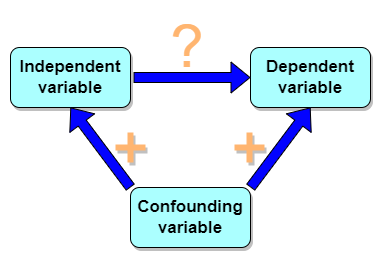
Figure 1. Unmeasured confounding variables influence association between independent and dependent variables, the characters or traits we are interested in.
Here’s a plot of running times for the best, fastest men and women runners for the 100-meter sprint. Running times over 100 meters of top athletes since the 1920s. The data are collated for you and presented at end of this page (scroll or click here).
Here’s a scatterplot (Fig 2).
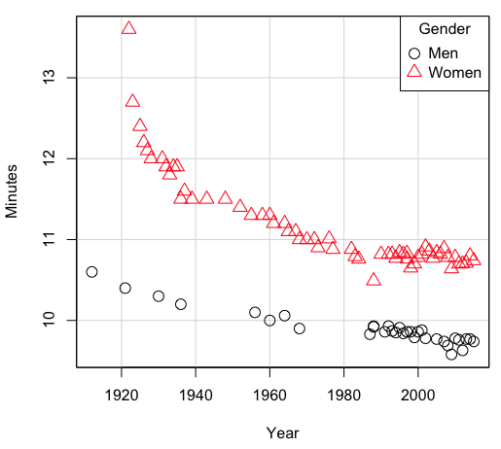
Figure 2. Running times over 100 meters of top athletes since the 1920s.
There’s clearly a negative correlation between years and running times. Is the rate of improvement in running times the same for men and women? Is the improvement linear? What, if any, are the possible confounding variables? Height? weight? Biomechanical differences? Society? Training? Genetics? … Performance enhancing drugs…?
If we measure potential confounding factors, we may be able to determine the strength of correlation between two variables that share variation with a third variable.
The partial correlation
There are several ways to work this problem. The partial correlation is a useful way to handle this problem, i.e., where a measured third variable is positively correlated with the two variable you are interested in.

Without formal mathematical proof presented, r12.3 is the correlation between variables 1 and 2 INDEPENDENT of any covariation with variable 3.
For our running data set, we have the correlation between women’s time for 100m over 9 decades, (r13 = -0.876), between men’s time for 100m over 9 decades (r23 = -0.952), and finally, the correlation we’re interested in, whether men’s and women’s times are correlated (r12 = +0.71). When we use the partial correlation, however, I get r12.3 = -0.819… much less than 0 and significantly different from zero. In other words, men’s and women’s times are not positively correlated independent of the correlation both share with the passage of time (decades)! The interpretation is that men are getting faster at a rate faster than women.
In conclusion, keep your head about you when you are doing analyses. You may not have the skills or knowledge to handle some problems (partial correlation), but you can think simply — why are two variables correlated? One causes the other to increase (or decrease) OR the two are both correlated with another variable.
Testing the partial correlation
Like our simple correlation, the partial correlation may be tested by a t-test, although modified to account for the number of pairwise correlations (Wetzels and Wagenmakers 2012). The equation for the t test statistic is now
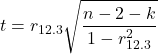
with k equal to the number of pairwise correlations and n – 2 – k degrees of freedom.
Examples
Lead exposure and low birth weigh. The data set is numbers of low birth weight births (< 2,500 g regardless of gestational age) and numbers of children with high levels of lead (10 or more micrograms of lead in a deciliter of blood) measured from their blood. Data used for 42 cities and towns of Rhode Island, United States of America (data at end of this page, scroll or click here to access the data).
A scatterplot of number of children with high lead is shown below (Fig 3).
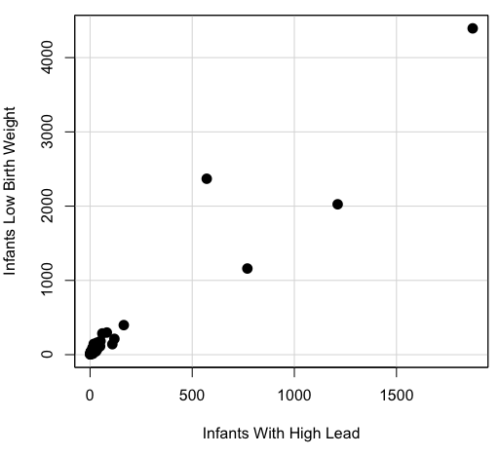
Figure 3. Scatterplot birth weight by lead exposure.
The product moment correlation was r = 0.961, t = 21.862, df = 40, p < 2.2e-16. So, at first blush looking at the scatterplot and the correlation coefficient, we conclude that there is a significant relationship between lead and low birth weight, right?
However, by the description of the data you should recall that counts were reported, not rates (eg, per 100,000 people). Clearly, population size varies among the cities and towns of Rhode Island. West Greenwich had 5085 people whereas Providence had 173,618. We should suspect that there is also a positive correlation between number of children born with low birth weight and numbers of children with high levels of lead. Indeed there are.
Correlation between Low Birth Weight and Population, r = 0.982
Correlation between High Lead levels and Population, r = 0.891
The question becomes, after removing the covariation with population size is there a linear association between high lead and low birth weight? One option is to calculate the partial correlation. To get partial correlations in Rcmdr, select
Statistics → Summaries → Correlation matrix
then select “partial” and select all three variables (select + Ctrl key; (Windows or macOS) (Fig 4).
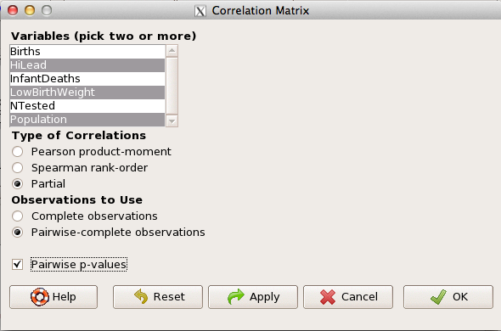
Figure 4. Screenshot Rcmdr partial correlation menu
Results are shown below.
partial.cor(leadBirthWeight[,c("HiLead","LowBirthWeight","Population")], tests=TRUE, use="complete")

Partial correlations:
                 HiLead LowBirthWeight Population
HiLead          0.00000        0.99181   -0.97804
LowBirthWeight  0.99181        0.00000    0.99616
Population     -0.97804        0.99616    0.00000
Thus, after removing the covariation we conclude there is indeed a strong correlation between lead and low birth weights.
Note 2. Some verbiage about correlation tables (matrices). The matrix is symmetric and the information is repeated. I highlighted the diagonal in green. The upper triangle (red) is identical to the lower triangle (blue). When you publish such matrices, don’t publish both the upper and lower triangles; it’s also not necessary to publish the on-diagonal numbers, which are generally not of interest. Thus, the publishable matrix would be
Partial correlations:
                LowBirthWeight Population
HiLead                 0.99181   -0.97804
LowBirthWeight                    0.99616
Another example
Do Democrats prefer cats? The question I was interested in, Do liberals really prefer cats, was inspired by a Time magazine 18 February 2014 article. I collated data on a separate but related question: Do states with more registered Democrats have more cat owners? The data set was compiled from three sources: 2010 USA Census, a 2011 Gallup poll about religious preferences, and from a data book on survey results of USA pet owners (data at end of this page, scroll or click here to access the data).
Note 3: This type of data set involves questions about groups, not individuals. We have access to aggregate statistics for groups (city, county, state, region), but not individuals. Thus, our conclusions are about groups and cannot be used to predict individual behavior, eg, knowing a person votes Green Party does not mean they necessarily share their home with a cat). See ecological fallacy.
This data set also demonstrates use of transformations of the data to improve fit of the data to statistical assumptions (normality, homoscedacity).
The variables, and their definitions, were:
ASDEMS = DEMOCRATS. Democrat advantage: the difference in registered Democrats compared to registered Republicans as a percentage; to improve the distribution qualities the arcsine transform was applied..
ASRELIG = RELIGION. Percent Religious from a Gallup poll who reported that Religion was “Very Important” to them. Also arcsine-transformed to improve normality and homoescedasticity (there you go, throwing $3 words around 🤠 ).
LGCAT = Number of pet cats, log10-transformed, estimated for USA states by survey, except Alaska and Hawaiʻi (not included in the survey by the American Veterinary Association).
LGDOG = Estimated number of pet dogs, log10-transformed for states, except Alaska and Hawaiʻi (not included in the survey by the American Veterinary Association).
LGIPC = Per capita income, log10-transformed.
LGPOP = Population size of each state, log10 transformed.
As always, begin with data exploration. All of the variables were right-skewed, so I applied data transformation functions as appropriate: log10 for the quantitative data and arc sine transform for the frequency variables. Because Democrat Advantage and Percent Religious variables were in percentages, the values were first divided by 100 to make frequencies, then the R function asin() was applied. All analyses were conducted on the transformed data, therefore conclusions apply to the transformed data.
Note 4: As we’ve discussed before, to relate the results to the original scales, back transformations would need to be run on any predictions. Back transformation for log10 would be power of ten; for the arcsine-transform the inverse of the arcsine would be used.
A scatter plot matrix (KMggplo2) plus histograms of the variables along the diagonals shows the results of the transforms and hints at the associations among the variables. A graphic like this one is called a trellis plot; a layout of smaller plots in a grid with the same (preferred) or at least similar axes. Trellis plots (Fig 5) are useful for finding the structure and patterns in complex data. Scanning across a row shows relationships between one variable with all of the others. For example, the first row Y-axis is for the ASDEMS variable; from left to right along the row we have, after the histogram, what look to be weak associations between ASDEMS and ASRELIG, LGCAT, LGDOG, and LGDOG.
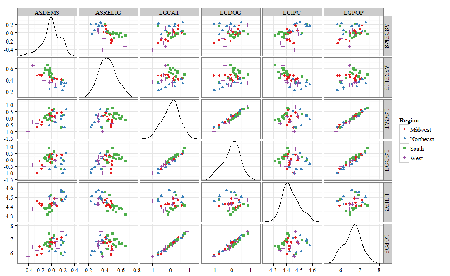
Figure 5. Trellis plot, correlations among variables.
A matrix of partial correlations was produced from the Rcmdr correlation call. Thus, to pick just one partial correlation, the association between DEMOCRATS and RELIGION (reported as “very important”) is negative (r = -0.45) and from the second matrix we retrieve the approximate P-value, unadjusted for the multiple comparisons problem, of p = 0.0024. We quickly move past this matrix to the adjusted P-values and confirm that this particular correlation is statistically significant even after correcting for multiple comparisons. Thus, there is a moderately strong negative correlation between those who reported that religion was very important to them and the difference between registered Democrats and Republicans in the 48 states. Because it is a partial correlation, we can conclude that this correlation is independent of all of the other included variables.
And what about our original question: Do Democrats prefer cats over dogs? The partial correlation after adjusting for all of the other correlated variables is small (r = 0.05) and not statistically different from zero (P-value greater than 5%).
Are there any interesting associations involving pet ownership in this data set? See if you can find it (hint: the correlation you are looking for is also in red).
Partial correlations:
         ASDEMS  ASRELIG LGCAT   LGDOG   LGIPC   LGPOP
ASDEMS   0.0000 -0.4460  0.0487  0.0605  0.1231 -0.0044
ASRELIG -0.4460  0.0000 -0.2291 -0.0132 -0.4685  0.2659
LGCAT    0.0487 -0.2291  0.0000  0.2225 -0.1451  0.6348
LGDOG    0.0605 -0.0132  0.2225  0.0000 -0.6299  0.5953
LGIPC    0.1231 -0.4685 -0.1451 -0.6299  0.0000  0.6270
LGPOP   -0.0044  0.2659  0.6348  0.5953  0.6270  0.0000
Raw P-values, Pairwise two-sided p-values:
         ASDEMS ASRELIG  LGCAT   LGDOG   LGIPC   LGPOP
ASDEMS           0.0024  0.7534  0.6965  0.4259  0.9772
ASRELIG  0.0024          0.1347  0.9325  0.0013  0.0810
LGCAT    0.7534  0.1347          0.1465  0.3473  <.0001
LGDOG    0.6965  0.9325  0.1465          <.0001  <.0001
LGIPC    0.4259  0.0013  0.3473  <.0001          <.0001
LGPOP    0.9772  0.0810  <.0001  <.0001  <.0001
Adjusted P-values, Holm’s method (Benjamini and Hochberg 1995)
         ASDEMS ASRELIG  LGCAT   LGDOG   LGIPC   LGPOP
ASDEMS           0.0241  1.0000  1.0000  1.0000  1.0000
ASRELIG  0.0241          1.0000  1.0000  0.0147  0.7293
LGCAT    1.0000  1.0000          1.0000  1.0000  <.0001
LGDOG    1.0000  1.0000  1.0000          <.0001  0.0002
LGIPC    1.0000  0.0147  1.0000  <.0001          <.0001
LGPOP    1.0000  0.7293  <.0001  0.0002  <.0001
A graph (Fig 6) to summarize the partial correlations: green lines indicate positive correlation, red lines show negative correlations; Strength of association indicated by the line thickness, with thicker lines corresponding to greater correlation.
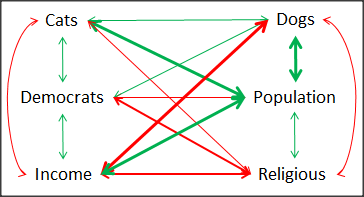
Figure 6. Causal paths among variables.
As you can see, partial correlation analysis is good for a few variables, but as the numbers increase it is difficult to make heads or tails out of the analysis. Better methods for working with these highly correlated data in what we call multivariate data analysis, for example Structural Equation Modeling or Path Analysis.
Questions
- Write up three learning outcomes for this page. Hint: Point your favorite generative AI to this page and ask for help.
- Spurious correlations can be challenging to recognize, and, sometimes, they become part of a challenge to medicine to explain away. A classic spurious correlation is the correlation between rates of MMR vaccination and autism prevalence. Here’s a table of numbers for you
| Year | Herb Supplement Revenue, millions $ | Fertility rate per 1000 births, women age 35 and older+ | MMR per 100K children age 0 -5 | UFC revenue, millions $ | Autism Prevalence per 1000 |
|---|---|---|---|---|---|
| 2000 | 4225 | 47.7 | 179 | 6.7 | |
| 2001 | 4361 | 48.6 | 183 | 4.5 | |
| 2002 | 4275 | 49.9 | 190 | 8.7 | 6.6 |
| 2003 | 4146 | 52.6 | 196 | 7.5 | |
| 2004 | 4288 | 54.5 | 199 | 14.3 | 8 |
| 2005 | 4378 | 55.5 | 197 | 48.3 | |
| 2006 | 4558 | 56.9 | 198 | 180 | 9 |
| 2007 | 4756 | 57.6 | 204 | 226 | |
| 2008 | 4800 | 56.7 | 202 | 275 | 11.3 |
| 2009 | 5037 | 56.1 | 201 | 336 | |
| 2010 | 5049 | 56.1 | 209 | 441 | 14.4 |
| 2011 | 5302 | 57.5 | 212 | 437 | |
| 2012 | 5593 | 58.7 | 216 | 446 | 14.5 |
| 2013 | 6033 | 59.7 | 220 | 516 | |
| 2014 | 6441 | 61.6 | 224 | 450 | 16.8 |
| 2015 | 6922 | 62.8 | 222 | 609 | |
| 2016 | 7452 | 64.1 | 219 | 666 | 18.5 |
| 2017 | 8085 | 63.9 | 213 | 735 | |
| 2018 | 65.3 | 220 | 800 | 25 |
- Make scatterplots of autism prevalence vs
- Herb supplement revenue
- Fertility rate
- MMR vaccination
- UFC revenue
- Calculate and test correlations between autism prevalence vs
- Herb supplement revenue
- Fertility rate
- MMR vaccination
- UFC revenue
- Interpret the correlations — is there any clear case for autism vs MMR?
- What additional information is missing from Table 2? Add that missing variable and calculate partial correlations for autism prevalence vs
- Herb supplement revenue
- Fertility rate
- MMR vaccination
- UFC revenue
- Do a little research: What are some reasons for increase in autism prevalence? What is the consensus view about MMR vaccine and risk of autism?
Quiz Chapter 16.2
Causation and Partial correlation
Data sets
Data used in this page, 100 meter running times since 1900.
| Year | Men | Women |
|---|---|---|
| 1912 | 10.6 | |
| 1913 | ||
| 1914 | ||
| 1915 | ||
| 1916 | ||
| 1917 | ||
| 1918 | ||
| 1919 | ||
| 1920 | ||
| 1921 | 10.4 | |
| 1922 | 13.6 | |
| 1923 | 12.7 | |
| 1924 | ||
| 1925 | 12.4 | |
| 1926 | 12.2 | |
| 1927 | 12.1 | |
| 1928 | 12 | |
| 1929 | ||
| 1930 | 10.3 | |
| 1931 | 12 | |
| 1932 | 11.9 | |
| 1933 | 11.8 | |
| 1934 | 11.9 | |
| 1935 | 11.9 | |
| 1936 | 10.2 | 11.5 |
| 1937 | 11.6 | |
| 1938 | ||
| 1939 | 11.5 | |
| 1940 | ||
| 1941 | ||
| 1942 | ||
| 1943 | 11.5 | |
| 1944 | ||
| 1945 | ||
| 1946 | ||
| 1947 | ||
| 1948 | 11.5 | |
| 1949 | ||
| 1950 | ||
| 1951 | ||
| 1952 | 11.4 | |
| 1953 | ||
| 1954 | ||
| 1955 | 11.3 | |
| 1956 | 10.1 | |
| 1957 | ||
| 1958 | 11.3 | |
| 1959 | ||
| 1960 | 10 | 11.3 |
| 1961 | 11.2 | |
| 1962 | ||
| 1963 | ||
| 1964 | 10.06 | 11.2 |
| 1965 | 11.1 | |
| 1966 | ||
| 1967 | 11.1 | |
| 1968 | 9.9 | 11 |
| 1969 | ||
| 1970 | 11 | |
| 1972 | 10.07 | 11 |
| 1973 | 10.15 | 10.9 |
| 1976 | 10.06 | 11.01 |
| 1977 | 9.98 | 10.88 |
| 1978 | 10.07 | 10.94 |
| 1979 | 10.01 | 10.97 |
| 1980 | 10.02 | 10.93 |
| 1981 | 10 | 10.9 |
| 1982 | 10 | 10.88 |
| 1983 | 9.93 | 10.79 |
| 1984 | 9.96 | 10.76 |
| 1987 | 9.83 | 10.86 |
| 1988 | 9.92 | 10.49 |
| 1989 | 9.94 | 10.78 |
| 1990 | 9.96 | 10.82 |
| 1991 | 9.86 | 10.79 |
| 1992 | 9.93 | 10.82 |
| 1993 | 9.87 | 10.82 |
| 1994 | 9.85 | 10.77 |
| 1995 | 9.91 | 10.84 |
| 1996 | 9.84 | 10.82 |
| 1997 | 9.86 | 10.76 |
| 1998 | 9.86 | 10.65 |
| 1999 | 9.79 | 10.7 |
| 2000 | 9.86 | 10.78 |
| 2001 | 9.88 | 10.82 |
| 2002 | 9.78 | 10.91 |
| 2003 | 9.93 | 10.86 |
| 2004 | 9.85 | 10.77 |
| 2005 | 9.77 | 10.84 |
| 2006 | 9.77 | 10.82 |
| 2007 | 9.74 | 10.89 |
| 2008 | 9.69 | 10.78 |
| 2009 | 9.58 | 10.64 |
| 2010 | 9.78 | 10.78 |
| 2011 | 9.76 | 10.7 |
| 2012 | 9.63 | 10.7 |
| 2013 | 9.77 | 10.71 |
| 2014 | 9.77 | 10.8 |
| 2015 | 9.74 | 10.74 |
| 2016 | 9.8 | 10.7 |
| 2017 | 9.82 | 10.71 |
| 2018 | 9.79 | 10.85 |
| 2019 | 9.76 | 10.71 |
| 2020 | 9.86 | 10.85 |
| 2021 | 9.77 | 10.54 |
| 2022 | 9.76 | 10.62 |
| 2023 | 9.83 | 10.65 |
| 2024 | 9.77 | 10.72 |
Data used in this page, birth weight by lead exposure
| CityTown | Core | Population | NTested | HiLead | Births | LowBirthWeight | InfantDeaths |
|---|---|---|---|---|---|---|---|
| Barrington | n | 16819 | 237 | 13 | 785 | 54 | 1 |
| Bristol | n | 22649 | 308 | 24 | 1180 | 77 | 5 |
| Burrillville | n | 15796 | 177 | 29 | 824 | 44 | 8 |
| Central Falls | y | 18928 | 416 | 109 | 1641 | 141 | 11 |
| Charlestown | n | 7859 | 93 | 7 | 408 | 22 | 1 |
| Coventry | n | 33668 | 387 | 20 | 1946 | 111 | 7 |
| Cranston | n | 79269 | 891 | 82 | 4203 | 298 | 20 |
| Cumberland | n | 31840 | 381 | 16 | 1669 | 98 | 8 |
| East Greenwich | n | 12948 | 158 | 3 | 598 | 41 | 3 |
| East Providence | n | 48688 | 583 | 51 | 2688 | 183 | 11 |
| Exeter | n | 6045 | 73 | 2 | 362 | 6 | 1 |
| Foster | n | 4274 | 55 | 1 | 208 | 9 | 0 |
| Glocester | n | 9948 | 80 | 3 | 508 | 32 | 5 |
| Hopkintown | n | 7836 | 82 | 5 | 484 | 34 | 3 |
| Jamestown | n | 5622 | 51 | 14 | 215 | 13 | 0 |
| Johnston | n | 28195 | 333 | 15 | 1582 | 102 | 6 |
| Lincoln | n | 20898 | 238 | 20 | 962 | 52 | 4 |
| Little Compton | n | 3593 | 48 | 3 | 134 | 7 | 0 |
| Middletown | n | 17334 | 204 | 12 | 1147 | 52 | 7 |
| Narragansett | n | 16361 | 173 | 10 | 728 | 42 | 3 |
| Newport | y | 26475 | 356 | 49 | 1713 | 113 | 7 |
| New Shoreham | n | 1010 | 11 | 0 | 69 | 4 | 1 |
| North Kingstown | n | 26326 | 378 | 20 | 1486 | 76 | 7 |
| North Providence | n | 32411 | 311 | 18 | 1679 | 145 | 13 |
| North Smithfield | n | 10618 | 106 | 5 | 472 | 37 | 3 |
| Pawtucket | y | 72958 | 1125 | 165 | 5086 | 398 | 36 |
| Portsmouth | n | 17149 | 206 | 9 | 940 | 41 | 6 |
| Providence | y | 173618 | 3082 | 770 | 13439 | 1160 | 128 |
| Richmond | n | 7222 | 102 | 6 | 480 | 19 | 2 |
| Scituate | n | 10324 | 133 | 6 | 508 | 39 | 2 |
| Smithfield | n | 20613 | 211 | 5 | 865 | 40 | 4 |
| South Kingstown | n | 27921 | 379 | 35 | 1330 | 72 | 10 |
| Tiverton | n | 15260 | 174 | 14 | 516 | 29 | 3 |
| Warren | n | 11360 | 134 | 17 | 604 | 42 | 1 |
| Warwick | n | 85808 | 973 | 60 | 4671 | 286 | 26 |
| Westerly | n | 22966 | 140 | 11 | 1431 | 85 | 7 |
| West Greenwich | n | 5085 | 68 | 1 | 316 | 15 | 0 |
| West Warwick | n | 29581 | 426 | 34 | 2058 | 162 | 17 |
| Woonsoket | y | 43224 | 794 | 119 | 2872 | 213 | 22 |
Data in this page, Do Democrats prefer cats?
Chapter 16 contents
- Introduction
- Product moment correlation
- Causation and Partial correlation
- Data aggregation and correlation
- Spearman and other correlations
- Instrument reliability and validity
- Similarity and Distance
- References and suggested readings
16.1 – Product moment correlation
Introduction.
A correlation is used to describe the direction  magnitude of linear association and the between two variables. There are many types of correlations, some are based on ranks, but the one most commonly used is the product-moment correlation (r). The Pearson product-moment correlation is used to describe association between continuous, ratio-scale data, where “Pearson” is in honor of Karl Pearson (b 1857 – d. 1936).
There are many other correlations, including Spearman’s and Kendall’s tau (τ) (Chapter 16.4) and ICC, the intraclass correlation (Chapter 12.3 and Chapter 16.4).
The product moment correlation is appropriate for variables of the same kind — for example, two measures of size, like the correlation between body weight and brain weight.
Spearman’s and Kendall’s tau correlation are nonparametric and would be alternatives to the product moment correlation. The intraclass correlation, or ICC, is a parametric estimate suitable for repeat measures of the same variable.
The correlation coefficient.

The numerator is the sum of products and it quantifies how the deviates from X and Y means covary together, or change together. The numerator is known as a “covariance.”

The denominator includes the standard deviations of X and Y; thus, the correlation coefficient is the standardized covariance.
The product moment correlation, r, is an estimate of the population correlation, ρ (pronounced rho), the true relationship between the two variables.
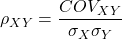
where COV(X,Y) refers to the covariance between X and Y.
Effect size.
Estimates for r range from -1 to +1; the correlation coefficient has no units. A value of 0 describes the case of no statistical correlation, ie, no linear association between the two variables. Usually, this is taken as the null hypothesis for correlation — “No correlation between two variables,” with the alternative hypothesis (2-tailed) — “There is a correlation between two variables.”
Like mean difference effect size, we can report the strength of correlation between two variables. Consider the magnitude and not the direction . Like Cohen’s effect size:
| Absolute value | Magnitude of association |
| 0.10 | small, weak |
| 0.30 | moderate |
| > 0.50 | strong, large |
Note that one should not interpret a “strong, large” correlation as evidence that the association is necessarily real. See Ch16.c for more on spurious correlations.
Standard error of the correlation.
An approximate standard error for r can be obtained using this simple formula
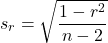
This standard error can be used for significance testing with the t-test. See below.
Confidence interval.
Like all situations in which an estimate is made, you should report the confidence interval for r. The standard error approximation is appropriate when the hull hypothesis is  , because the joint distribution is approximately normal. However, as the estimate approaches the limits of the closed interval
  , the distribution becomes increasingly skewed.
The approximate confidence interval for the correlation is based on Fisher’s z-transformation. We use this transformation to stabilize the variance over the range of possible values of the correlation and, therefore, better meet the assumptions of parametric tests based on the normal distribution.
The transform is given by the equation
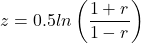
where ln is the natural logarithm. In the R language we get the natural log by log(x), where x is a variable we wish to transform.
Equivalently, z can be rewritten as

the inverse hyperbolic tangent function. In R language this function is called by atanh(r) at the R prompt.
The standard error for z is about
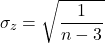
We take z to be the estimate of the population zeta, ζ. We take the sampling distribution of z to be approximately normal and thus we may then use the normal table to generate the 95% confidence interval for zeta.

Why 1.96? We want 95% confidence interval, so that at Type I α = 0.05, we want the two tails of the Normal distribution (see Appendix 20.1), or + 0.025. Thus +0.025 is +1.96 and -1.96 corresponds to 0.025 (α = 0.05/2 tails = 0.025).
Significance testing.
Significance testing of correlations is straightforward, with the noted caveat about the need to transform in cases where the estimate is close to  . For the typical test of null hypothesis, the correlation, r, is equal to 0, the t distribution can be used (ie, it’s a t-test).

which has degrees of freedom, DF = n – 2.
Use the t-table critical values to test the null hypothesis involving product moment correlation (eg, Appendix 20.3; for Spearman rank correlation  , see Table G, p. 686 in Whitlock & Schluter).
Alternatively (and preferred), we’ll just use R and Rcmdr’s facilities without explanation; the t distribution works OK as long as the correlations are not close to , in which case other things need to be done — and this is also true if you want to calculate a confidence interval for the correlation.
You are sufficiently skilled at this point to evaluate whether a correlation is statistically significantly different from zero — just check out whether the associated P-value is less than or greater than alpha (usually set at 5%). A test of whether or not the correlation, r1, is equal to some value, r2, other than zero is also possible. For an approximate test, replace zero in the above test statistic calculation with the value for r2, and calculate the standard error of the difference. Note that use of the t-test for significance testing of the correlation is an approximate test — if the correlations are small in magnitude using the Fisher’s Z transformation approach will be less biased, where the test statistic z now is

and standard error of the difference is

and look up the critical value of z from the normal table.
R code.
To calculate correlations in R and Rcmdr, have ratio-scale data ready in the columns of a R and Rcmdr data frame. We’ll introduce the commands with an example data set from my genetics laboratory course.
Question. What is the estimate of the product moment correlation between Drosophila fly wing length and area?
Data (thanks to some of my genetics students!)
Area <- c(0.446, 0.876, 0.390, 0.510, 0.736, 0.453, 0.882, 0.394, 0.503, 0.535, 0.441, 0.889, 0.391, 0.514, 0.546, 0.453, 0.882, 0.394, 0.503, 0.535)
Length <- c(1.524, 2.202, 1.520, 1.620, 1.710, 1.551, 2.228, 1.460, 1.659, 1.719, 1.534, 2.223, 1.490, 1.633, 1.704, 1.551, 2.228, 1.468, 1.659, 1.719)
Create your data frame, eg,
FlyWings <- data.frame(Area, Length)
And here’s the scatterplot (Fig 1). We can clearly see that Wing Length and Wing Area are positively correlated, with one outlier (Fig 1).
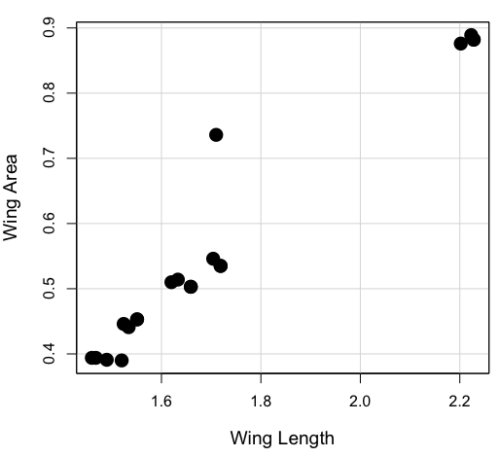
Figure 1. Scatterplot of Drosophila wing area by wing length.
The R command for correlation is simply cor(x,y). This gives the “pearson” product moment correlation, the default. To specify other correlations, use method = "kendall", or method = "spearman" (See Chapter 16.4).
Question. What are the Pearson, Spearman, and Kendall’s tau estimates for the correlation between fly Wing Length and Wing Area?
At the R prompt, type
cor(Length,Area)
[1] 0.9693334
cor(Length,Area, method="kendall")
[1] 0.8248008
cor(Length,Area, method="spearman")
[1] 0.9558658
Note that we entered Length first. On your own, confirm that the order of entry does not change the correlation estimate. To both estimate test the significance of the correlation between Wing Area and Wing Length, at the R prompt type
cor.test(Area, Length, alternative="two.sided", method="pearson")
R returns with
Pearson's product-moment correlation

data: Area and Length

t = 16.735, df = 18, p-value = 2.038e-12>
alternative hypothesis: true correlation is not equal to 0
95 percent confidence interval:
0.9225336 0.9880360
sample estimates:
   cor
0.9693334
Alternatively, to calculate and test the correlation, use R Commander, Rcmdr: Statistics → Summaries→ Correlation test
Note 1. R’s cor.test uses Fisher’s z transformation; note if we instead use the approximate calculation instead how poor the approximation works in this example. The estimated correlation was 0.97, thus the approximate standard error was 0.058. The confidence interval (t-distribution, alpha=0.05/2 and 18 degrees of freedom) was between 0.848 and 1.091, which is greater than the z transform result and returns an out-of-bounds upper limit.
Alternative packages to base R provide more flexibility and access to additional approaches to significance testing of correlations (Goertzen and Cribbie 2010). For example, z_cor_test() from the TOSTER package.
z_cor_test(Area, Length)

Pearson's product-moment correlation
data:  Area and Length
z = 8.5808, N = 20, p-value < 2.2e-16
alternative hypothesis: true correlation is not equal to 0
95 percent confidence interval:
0.9225336 0.9880360
sample estimates:
      cor
0.9693334
To confirm, check the critical value for z = 8.5808, two-tailed, with
> 2*pnorm(c(8.5808), mean=0, sd=1, lower.tail=FALSE)
[1] 9.421557e-18
Note the difference is that Fisher’s z is used for hypothesis testing; cor.test and z_cor_test return same confidence intervals.
and by bootstrap resampling (see Chapter 19.2),
boot_cor_test(Area, Length)

Bootstrapped Pearson's product-moment correlation

data: Area and Length
N = 20, p-value < 2.2e-16
alternative hypothesis: true correlation is not equal to 0
95 percent confidence interval:
0.8854133 0.9984744
sample estimates:
cor
0.9693334
The z-transform confidence interval would be preferred over the bootstrap confidence interval because it is narrower.
Assumptions of the product-moment correlation.
Interestingly enough, there are no assumptions for estimating a statistic. You can always calculate an estimate, although of course, this does not mean that you have selected the best calculation to describe the phenomenon in question, it just means that assumptions are not applicable for estimation. Whether it is the sample mean or the correlation, it is important to appreciate that, look, you can always calculate it, even if it is not appropriate!
Statistical assumptions and those technical hypotheses we evaluate apply to statistical inference — being able to correctly interpret a test of statistical significance for a correlation estimate depends on how well assumptions are met. The most important assumption for a null hypothesis test of correlation is that samples were obtained from a “bivariate normal distribution.” It is generally sufficient to just test normality of the variables one at a time (univariate normality), but the student should be aware that testing the bivariate normality assumption can be done directly (eg, Doornick and Hansen 2008).
Testing two independent correlations
Extending from a null hypothesis of the correlation is equal to zero to the correlation equals a particular value should not be a stretch for you. For example, since we use the t-test to evaluate the null hypothesis that the correlation is equal to zero, you should be able to make the connection that, like the two sample t-test, we can extend the test of correlation to any value. However, using the t-test without considering the need to stabilize the variance.
When two correlations come from independent samples, we can test whether or not the two correlations are equal. Rather than use the t-test, however, we use a modification of Fisher’s Z transformation. Calculate z for each correlation separately, then use the following equation to obtain Z. We then look up Z from our table of standard normal distribution (Appendix 20.1, or better — use the normal distribution functions in Rcmdr) and we can obtain the p-value of the test of the hypothesis that the two correlations are equal.
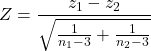
Example. Two independent correlations are r1 = 0.2 and r2 = 0.34. Sample sizes for group 1 was 14 and for group 2 was 21. Test the hypothesis that the two correlations are equal. Using R as a calculator, here’s what we might write in the R script window and the resulting output. It doesn’t matter which correlation we set as r1 or r2, so I prefer to calculate the absolute value of Z and then get the probability from the normal table for values greater or equal to |Z| (ie, the upper tail).
z1 = atanh(0.2)
z2 = atanh(0.34)
n1 = 14
n2 = 21
Z = abs((z1-z2)/sqrt((1/(n1-3))+(1/(n2-3))))
Z = 0.3954983
From the normal distribution table we get a p-value of 0.3462 for the upper tail. Because this p-value is not less than our typical Type I error rate of 0.05, we conclude that the two correlations are not in fact significantly different.
Rcmdr: Distributions → Continuous distributions → Normal distribution → Normal probabilities…
pnorm(c(0.3954983), mean=0, sd=1, lower.tail=FALSE)
R returns
[1] 0.3462376
To make this two-tailed, of course all we have to do is multiple the one-tailed p-value by two, in this case two-tailed p-value = 0.69247.
Write a function in R
There’s nothing wrong with running the calculations as written. But R allows users to write their own functions. Here’s one possible function we could write to test two independent correlations. Write the R function in the script window.
test2Corr = function(r1,r2,n1,n2) {
z1=atanh(r1); z2=atanh(r2)
Z = abs((z1-z2)/sqrt((1/(n1-3))+(1/(n2-3))))
pnorm(c(Z), mean=0, sd=1, lower.tail=FALSE)
}
After submitting the function, we then invoke the function by typing at the R prompt
p = test2Corr(0.2,0.34,14,21); p
Again, R returns the one-tailed p-value
[1] 0.3462376
Unsurprisingly, these simple functions are often available in an R package. In this case, the psych package provides a function called r.test() which will accommodate the test of the equality hypothesis of two independent correlations. Assuming that the psych package has been installed, at the R prompt we type
require(psych)
r.test(14,.2,.34,n2=21,twotailed=TRUE)
And R returns
Correlation tests
Call:r.test(n = 14, r12 = 0.20, r34 = 0.34, n2 = 21, twotailed = TRUE)
Test of difference between two independent correlations
z value 0.4 with probability 0.69
More on testing correlations
The discussion above, as stated, assumes the two correlations are independent of each other. In ecological studies, for example, it is not uncommon to have estimates for correlations among multiple pairs of traits. Thus, our approach would not be appropriate for testing whether the difference in correlations between body mass/ornament size and body mass/swimming performance of male killifish because both correlations include the same variable (body mass). A better solution would be to use William’s t-test (Williams 1959, Diedenhofen and Musch 2015).
Note 2: This example was selected from Sowersby et al 2022 — I’m not implying here that the authors analyzed their results incorrectly, I just like the example of traits to illustrate the point!
The null hypothesis was evaluated using Williams’ (1959)  -test for overlapping dependent correlations with
  degrees of freedom, calculated as:
(1) 
Where  represents the determinant of the
  correlation matrix, defined as:
(2) 
The r.test() in psyche package can be modified to handle this. R code for a made up example:
# 1. Define your sample size (N)
sample_size <- 65 # Example: 65 male killifish

# 2. Define the three correlation coefficients (r)
# r12 = correlation between body mass and ornament size
# r13 = correlation between body mass and swimming performance
# r23 = correlation between ornament size and swimming performance
r_mass_ornament <- 0.55
r_mass_swim <- 0.30
r_ornament_swim <- 0.40

# 3. Run Williams' t-test using r.test()
result <- psych::r.test(
   n = sample_size,
   r12 = r_mass_ornament,
   r13 = r_mass_swim,
  r23 = r_ornament_swim
)

# 4. View the results
print(result)
R output
Correlation tests
Call:[1] "r.test(n = 65 , r12 = 0.55 , r23 = 0.4 , r13 = 0.3 )"
Test of difference between two correlated correlations
t value 2.13 with probability < 0.037NULL
And we would conclude that the two correlations are indeed statistically different from each other.
Alternatively, use the cocor.dep.groups.overlap() from the cocor package. This generates all of the proposed tests of such correlations.
For our example then,
library(cocor)

# 1. Define sample size (N)
sample_size <- 65
# 2. Define individual correlations (r)
# r.jk = correlation between body mass (j) and ornament size (k)
# r.jh = correlation between body mass (j) and swimming performance (h)
# r.kh = correlation between ornament size (k) and swimming performance (h)
r_mass_ornament <- 0.55
r_mass_swim <- 0.30
r_ornament_swim <- 0.40
#3. Note: j is the overlapping/shared variable (body mass)
my_result <- cocor.dep.groups.overlap(
    r.jk = r_mass_ornament,
    r.jh = r_mass_swim,
   r.kh = r_ornament_swim,
   n = sample_size,
   alternative = "two.sided",
   alpha = 0.05
)

# 4. View the full comparison report
show(my_result)
Note 3: To extract and print ONLY Williams’ t-test results use my_results@williams1959.
R output (rearranged, brought William’s t-test up to the top for comparisons).
Results of a comparison of two overlapping correlations based on dependent groups

Comparison between r.jk = 0.55 and r.jh = 0.3
Difference: r.jk - r.jh = 0.25
Related correlation: r.kh = 0.4
Group size: n = 65
Null hypothesis: r.jk is equal to r.jh
Alternative hypothesis: r.jk is not equal to r.jh (two-sided)
Alpha: 0.05

williams1959: Williams' t (1959)
t = 2.1291, df = 62, p-value = 0.0372
Null hypothesis rejected

pearson1898: Pearson and Filon's z (1898)
z = 2.1217, p-value = 0.0339
Null hypothesis rejected

hotelling1940: Hotelling's t (1940)
t = 2.1635, df = 62, p-value = 0.0344
Null hypothesis rejected

olkin1967: Olkin's z (1967)
z = 2.1217, p-value = 0.0339
Null hypothesis rejected

dunn1969: Dunn and Clark's z (1969)
z = 2.0926, p-value = 0.0364
Null hypothesis rejected

hendrickson1970: Hendrickson, Stanley, and Hills' (1970) modification of Williams' t (1959)
t = 2.1635, df = 62, p-value = 0.0344
Null hypothesis rejected

steiger1980: Steiger's (1980) modification of Dunn and Clark's z (1969) using average correlations
z = 2.0795, p-value = 0.0376
Null hypothesis rejected

meng1992: Meng, Rosenthal, and Rubin's z (1992)
z = 2.0675, p-value = 0.0387
Null hypothesis rejected
95% confidence interval for r.jk - r.jh: 0.0161 0.6017
Null hypothesis rejected (Interval does not include 0)

hittner2003: Hittner, May, and Silver's (2003) modification of Dunn and Clark's z (1969) using a backtransformed average Fisher's (1921) Z procedure
z = 2.0741, p-value = 0.0381
Null hypothesis rejected

zou2007: Zou's (2007) confidence interval
95% confidence interval for r.jk - r.jh: 0.0155 0.4877
Null hypothesis rejected (Interval does not include 0)
Note 4: show() not summary() because cocor.dep.groups.overlap() returns an S4 object.
Questions
- Write up three learning outcomes for this page. Hint: Point your favorite generative AI to this page and ask for help.
- True or False. Generally, the null hypothesis of a test of a correlation is Ho: r = 0, although in practice, one could test a null of r = any value.
- Return to the fly wing example. What was the estimate of the value of the product moment correlation? The Spearman Rank correlation? The Kendall’s tau?
- OK, you have three correlation estimates for test of the same null hypothesis, ie, correlation between Length and Area is zero. Which estimate is the best estimate?
- Apply the Fisher z transformation to the estimated correlation, what did you get?
- For the fly wing example, what were the degrees of freedom?
- For the fly wing example, calculate the approximate standard error of the product moment correlation.
- Return one last time to the fly wing example. What was the value of the lower limit of the 95% confidence interval for the estimate of the product moment correlation? And the value of the upper limit?
- Assume that another group of students (n = 15) made measurements on fly wings and the correlation was 0.86. Is the difference between the two correlations for the two groups of students equal? Obtain the probability using the Z calculation and R (Chapter 6.7) or the normal table.
Quiz Chapter 16.1
Product moment correlation
Chapter 16 contents
2.1 – Why (Bio)Statistics?
- What are the basic elements of biostatistics? .
- Why we require you to take Biostatistics as part of your major?.
- But, I’m pre-med and plan to apply to medical school ….
- With machine learning and AI, why learn biostatistics?.
- In what disciplines are biostatisticians employed?.
- Conclusions.
- Questions.
- Quiz.
- Chapter 2 contents
What are the basic elements of biostatistics?
.
What will you learn from an introductory course on (bio)statistics? Concepts and skills: An understanding (concepts) about the purpose and limits of descriptive statistics, inferential statistics, and statistical modeling for answering questions in biology and how to use elements of R programming (skills) applied to biology-related data sets to accomplish these tasks (see Table 1). Related, you will learn how (skills) to collect and manage data from projects, and why (concepts) statistical analysis can help answer questions, even inform decisions in public health. Thus, assessment in BI-311 of student learning includes both formative and summative assignments, exams, and culminates with a student research project.
Note 1: From time to time in this book I write “(bio)statistics” instead of “biostatistics.” It’s my subtle way of highlighting that whatever argument or statement is attached applies more generally to the statistical discipline, not just biostatistics. However, I’m not particularly consistent with this typology in the book.
What skills are you going to get from all of this? You will get different opinions on the elements of an essential first course in statistics or biostatistics. Certainly the basics are a foundation in probability and a breadth of classical elementary statistical procedures, which will include descriptive statistics, analysis of variance and linear regression, and an introduction to multivariate analysis. In preparation for your course in epidemiology you will also be introduced to risk analysis and survival analysis. However, the primary return for your time, I hope, will be a deeper appreciation for how to think about problems in biology from experimental design and data analysis perspectives. Practical skills you will learn include how to process and clean data for analysis, data visualization, and a foundation in parametric and nonparametric statistical methods.
The data sets described and provided in this course are small, with sample sizes in the tens to thousands (rarely). This framework is consistent with the development of the discipline of (bio)statistics, which originated to help interpret experiments conducted in agriculture, industry, and medical research (see Chapter 2.3). But, as you now know, because of genomics and other data-intensive disciplines, data sets can be very large, much beyond the kinds of data sets used prior to use of the computer in data analysis. However, as we will argue later on this page, learning foundational skills in (bio)statistics with small data sets facilitates working with and gaining insights from larger data sets. For example, we will emphasize during our work this semester how to develop a workflow with small data sets; these same workflows then can be scaled up and would include pipelines — based on tools and techniques developed in the broader discipline of bioinformatics — to large data sets, including use of Artificial Intelligence and machine learning.
Note 2: In data science, a workflow refers to the entire, end-to-end process needed in a project, from data collection, data processing, to descriptive statistics and modeling or inferential statistics, and report writing. A pipeline described elements of a workflow that can be automated.
Why we require you to take (Bio)statistics as part of your major?
.
At Chaminade University we require all biology students to take biostatistics, and we do so with an emphasis on use of data analysis skill development. This requirement aligns our program to national expectations of biology undergraduate education (eg, AAAS, NAS, NIH, NSF). As stated in Bio2010: Transforming Undergraduate Education for Future Research Biologists,
“Biology majors should be adept at using computers to acquire and process data, carry out statistical characterization of the data and perform statistical tests, and graphically display data in a variety of representations (p. 15).”
Learning biostatistics from a course like BI311 — which relies heavily on use of the R programming language and data sets — helps the biology student develop these skills.
In the next pages I will outline a history of statistics (Chapter 2.3), but here I wish to make the point that biostatistics is now considered to be a core skill set for biologists. Biostatistics as a discipline came into its own in the 1930’s, but extensive reliance on statistics in research really dates to more recent times because of the ubiquity of personal computers (Salsburg 2002). Modern biological and biomedical research requires computational and quantitative methods to collect, process, analyze, and interpret large data sets. And yet, even a casual survey of required courses for entry into graduate programs in biology (eg, only recommended for admissions to Marine Biology and Cell and Molecular Biology programs at University of Hawaiʻi – Manoa) will reveal that biostatistics is not required of candidates; so, what gives?
The first point is that programs list only minimum requirements. The second point is that many programs (genomics, ecology, etc) will expect the graduate student to take a year or more of (bio)statistics. The need is so crucial that at Harvard Medical School, all biology graduate students are expected to take a crash-course in computing and statistics to work with data (Stefan et al 2015).
Moreover, while graduate programs are not listing statistics as a requirement, many biology undergraduate curricula now require a course in (bio)statistics to reflect the increasingly data driven modern biology — where the jobs are!
My BI-311 students, I’ll make you a bet — or at least, I’ll make this part of your required homework (see BI311 Workbook)! Even a causal search of a research journal article in a biology discipline of your choosing will prove that there is no doing biology research today without an understanding of statistics.
But, I’m pre-med and plan to apply to medical school …
.
Even a cursory look at the literature will result in finding many authors strongly calling for this kind of preparation for a successful career in medicine (eg, Brieger and Hardin 2012). It’s obvious, but needs stating — you’re applying to medical school to become a doctor — you’ll spend the majority of your adult life as a doctor. Statistical thinking is crucial to answering the daily question: “My patient tested positive for biomarker X, what’s the chance that the patient has disease Y?”
Note 3: Following work done by Biomarkers and Surrogate Endpoint Working Group (Clin. Pharmacol. Ther. 69(3), 89–95 2001), biomarkers are biological characteristics that can be “… objectively measured and evaluated as an indicator of normal biological processes, pathogenic processes, or pharmacological responses to a therapeutic intervention” (Naylor 2003). Compare to biomarkers are “[a] defined characteristic that is measured as an indicator of normal biological processes, pathogenic processes, or responses to an exposure or intervention, including therapeutic interventions” (2016 by FDA-NIH Biomarker Working Group in BEST (Biomarkers, EndpointS, and other Tools) Resource).
If your answer today is, the patient has the disease, then you objectively need this course! Hint: there are four possible outcomes, not two, of a test, see Chapter 7.3 – Conditional Probability and Evidence Based Medicine.
Need more convincing? Take a look at the targets of questions intended to evaluate Skill 4 of the Scientific Inquiry and Reasoning Skills standard of the revised MCAT2015 Exam (p. 107, What’s on the MCAT2015 exam?).
- Using, analyzing, and interpreting data in figures, graphs, and tables.
- Evaluating whether representations make sense for particular scientific observations and data.
- Using measures of central tendency (mean, median, and mode) and measures of dispersion (range, interquartile range, and standard deviation) to describe data.
- Reasoning about random and systematic error.
- Reasoning about statistical significance and uncertainty (eg, interpreting statistical significance levels, interpreting a confidence interval).
- Using data to explain relationships between variables of make predictions.
- Using data to answer research questions and draw conclusions.
- Identifying conclusions that are supported by research results.
- Determining the implications of results for real-world situations.
Before we move on, there’s another justification for learning biostatistics we need to discuss.
With machine learning and AI, why learn biostatistics?
Oh, my goodness. If I was starting over, I would definitely want to pursue expertise in machine learning, ML (Fig 2). Machine learning is about finding patterns in large data sets, and modern biological research may be characterized by the impact of large datasets. The machine learning field, and artificial intelligence, AI, in general, are rapidly evolving, but built on more than 20 years of algorithm and computer discoveries. So why not skip biostatistics and go directly to data science?
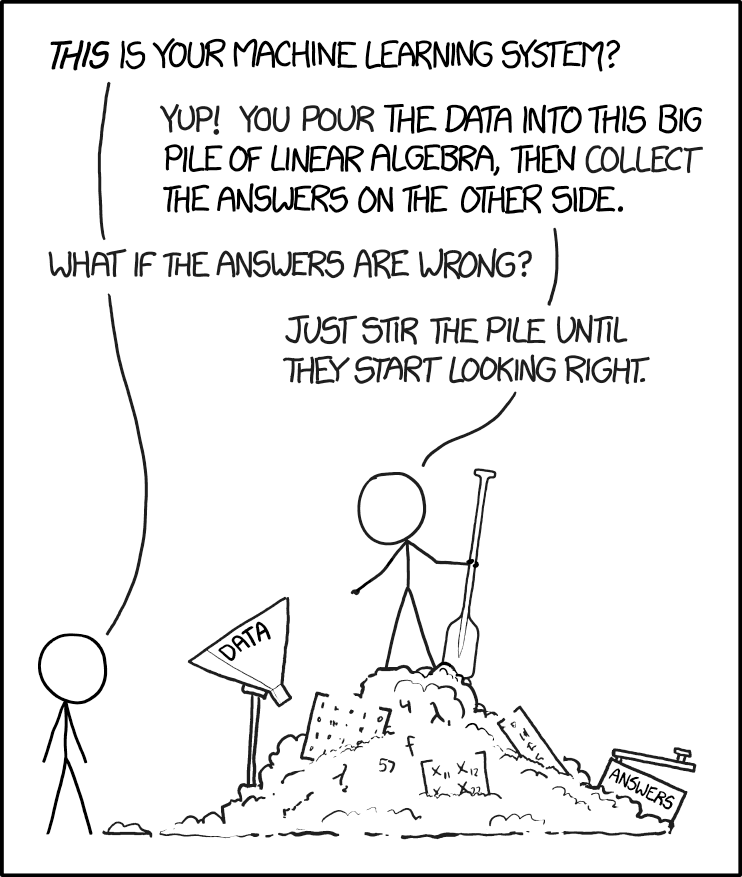
Figure 2. “Machine learning,” https://xkcd.com/1838/.
The parable presented in Figure 2 is about right: Without understanding the statistical foundations behind machine learning algorithms, you’re using tools without really knowing how they work (Lin et al 2025, more generally, see Downey 2024). We have a lot of work ahead of us, but, from time to time, we will exploit the power of AI and ML. For a start, I asked ChatGPT (August 2025), “What statistics is most relevant for ML?”, AI listed responses mapped to “Mike’s Biostatistics Book” are provided in Table 1.
Table 1. AI recommended core statistical topics matched to Mike’s Biostatistics Book
| ChatGPT recommended core statistics topics | Mike's Biostatistics Book |
|---|---|
| Descriptive statistics | Chapter 3 |
| Probability theory | Chapter 6 - 7 |
| Common probability distributions | Chapter 6 |
| Statistical inference | Chapter 8 |
| Estimation and Likelihood | Chapter 3, 6, 17 - 20 |
| Regression analysis | Chapter 17 - 18 |
| Analysis of Variance (ANOVA) | Chapter 12 - 14 |
| Resampling methods | Chapter 19 |
| Dimensionality reduction | Chapter 16, 20 |
| Time series and autocorrelation | Chapter 17 - 18, 20 |
| Optional: Bayesian statistics | Chapter 8 - 9, 18, 20 |
Biostatistics is embedded in bioinformatics and data science, in general. Thus, as implied by Figure 2, a critical step in working with datasets, whether small or large, is to ensure the inputs are valid. This holds across the dat science disciplines. Learning data processing tasks, data cleaning and, more generally, data wrangling are included in our biostatistics course.
Note 4: For larger data sets in the course we will introduce you to rattle, an R package that helps with data processing and data mining with access to simple hypothesis tests (eg, do groups differ?), and pattern detection (eg, correlations and dendrograms). For their required project, students in BI311 may elect to work with the R package targets to build automated data pipelines (eg, calculating growth rates for tomato germination experiments or the essential genes project in Genomics class (BI-308).
In what disciplines are biostatisticians employed?
.
One way to begin this discussion is to think about where statisticians work. The job market includes:
Health Science.
- Drug design, causes of diseases (many “causes” of cancers).
- Health Professional (nurses, physical therapists).
- Type of care and recovery period (importance of a person’s mood on health).
- Exercise regime and recovery from injury.
- Nutrition:- vitamins and health: diet and health.
Ecology & Evolution.
- Causes of changes in population sizes (conservation biology).
- Effects of pollution on organisms and ecosystems.
- Evolution of traits in populations over time.
- Global environmental changes and changes in population sizes or species diversity.
Genetics & Molecular Biology.
- Identifying genes that influence traits (eg, breast cancer, cystic fibrosis).
- Nature vs. nurture (heredity and environment effects on phenotypes).
- Multiple sequence alignment in comparative genomics.
Agriculture.
- Fertilizer effects on plant growth and productivity.
- Compare farming and harvesting methods (eg, organic vs conventional farming).
- Compare plant hybrids for differences in productivity.
Here’s a web site that keeps track of statistics jobs Biostatistics. I would go on to add that experience and competence in statistics would also translate to employment in non-biology fields, eg, business analytics.
Conclusions.
.
Moving forward, we have much to do — you will be exposed to many specific examples of statistical tests, how to calculate estimators, and how to make inferences from experiments. An important goal of this course is for you to be introduced and develop your ability to design experiments. why should you, as biologists and future health care providers, learn biostatistics?
- Develop statistical reasoning skills. Most, if not all graduate students will need to take several courses in statistics.
- Statements about research findings, new and better products, sociological and political issues often depend in large part on some form of statistical analysis.
- By learning a little about experimental design, sampling, and statistical testing, you will be much closer to being able to participate fully in these debates.
- Most, if not all graduate students will need to take several courses in statistics.
- Most, if not all jobs in biology require some training in statistics.
So, there’s really no doing biology without at least some knowledge of statistics. You’re getting a head start!
Questions
- Write up three learning outcomes for this page. Hint: Point your favorite generative AI to this page and ask for help.
- Explore current “biostatistics,” “bioinformatics,” and “data science” job prospects at Indeed.com or other recruiting sites. Search your area/city and also try a wider search.
- Given the rise of AI, now is a great time to explore current thinking about the future and need for biostatistics skills. Write a one paragraph perspective, your “worldview” about pros/cons of developing statistics and data science skill sets.
.
Quiz Chapter 2.1
Why (bio)statistics?
Chapter 2 contents
.
15.3 – Wilcoxon signed rank test
Introduction
When experimental units are repeated or paired, they lack independence and evaluating any difference between paired groups without accounting for the association between the repeat measures or between the pairs of related subjects would lead to incorrect inferences. A familiar pairing of experimental units occurs in clinical observational research in which control subjects and treatment subjects are matched by many characteristics.
In such cases, the parametric paired t-test would be used to evaluate inferences about the differences between repeat measures or between treatment and matched control subjects for some measured outcome. A nonparametric alternative to the paired t-test is the Wilcoxon signed rank test, also called paired Wilcoxon test.
Another common example of paired sampling units would be that individuals are measured more than once for the same character or feature. For example, Chapter 10.3 we presented results of running pace in minutes to complete the race of 15 women for repeated trials (different years) at a 5K race held annually in Honolulu (Table 1).
Table 1. 5K repeat measures running data.
| ID | First race | Second race |
|---|---|---|
| 1 | 15.28 | 15.61 |
| 2 | 11.22 | 11.19 |
| 3 | 8.80 | 9.14 |
| 4 | 8.88 | 5.46 |
| 5 | 9.81 | 10.50 |
| 6 | 6.12 | 5.69 |
| 7 | 8.31 | 8.71 |
| 8 | 6.26 | 7.42 |
| 9 | 17.16 | 16.41 |
| 10 | 16.23 | 15.82 |
| 11 | 5.90 | 7.12 |
| 12 | 8.31 | 10.48 |
| 13 | 5.93 | 8.64 |
| 14 | 10.54 | 5.99 |
| 15 | 9.53 | 8.69 |
Note 1. Data set introduced in Chapter 10.3
To get the paired Wilcoxon test in R Commander, select Rcmdr: Statistics → Nonparametric tests → Paired Wilcoxon Test
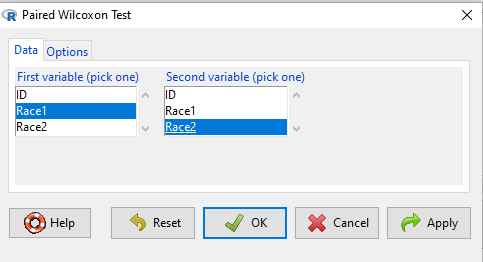
Figure 1. R Commander paired Wilcoxon test menu (aka Wilcoxon signed rank sum test). Rcmdr version 2.7.
Select first variable (eg, Race1), second variable (eg, Race2). Next, select Options tab and set null hypothesis. Accept defaults (Fig 2).
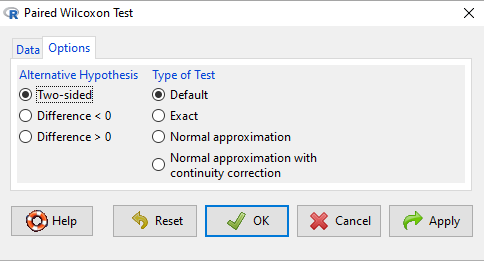
Figure 2. R Commander Options, select null hypothesis.
For the nonparametric paired Wilcoxon test we choose among the options to set our conditions; from the context menu a two-tailed test and we elect to use the defaults for the tests and calculations of P-values.
The results, copied from the Output window, are shown below. The calculation of the Wilcoxon test statistic (V) is straightforward, involving summing the ranks. Obtaining the P-value of the test of the null is a bit more involved as it depends on permutations of all possible combinations of differences. For us, R will do nicely with the details, and we just need to check the P-value.
with(repeat15_banana5K, wilcox.test(Race.1, Race.2, alternative='two.sided', paired=TRUE))
# median difference
[1] -0.3313126

Wilcoxon signed rank exact test
data: Race.1 and Race.2
V = 58, p-value = 0.9341
alternative hypothesis: true location shift is not equal to 0
End R output
Here, we see that the median difference is small (-0.33), and the associated P-value is 0.93. Thus, we failed to reject the null hypothesis and should conclude that there was no difference in median running pace during the first and second trials.
Note that this is the same general conclusion we got when we ran a paired t-test on this data set: no difference between day one and day two.
R code
example.ch10.3 <- read.table(header=TRUE, text = "
ID Race1 Race2
1 15.28 15.61
2 11.22 11.19
3 8.80 9.14
4 8.88 5.46
5 9.81 10.50
6 6.12 5.69
7 8.31 8.71
8 6.26 7.42
9 17.16 16.41
10 16.23 15.82
11 5.90 7.12
12 8.31 10.48
13 5.93 8.64
14 10.54 5.99
15 9.53 8.69
")
Questions
- This question lists all fourteen statistical tests we have been introduced to so far
a. Mark yes or no as to whether or not the test is a parametric test
b. Identify the nonparametric test(s) with their equivalent parametric test(s). If there are no equivalency, simply write “none.”
|
|
Parametric test? |
If nonparametric, write the number(s) of the tests that the nonparametric test serves as an alternate for |
|
1. ANOVA by ranks |
|
|
|
2. Bartlett Test |
|
|
|
3. Chi-squared contingency table |
|
|
|
4. Chi-squared goodness of fit |
|
|
|
5. Fisher Exact test |
|
|
|
6. Independent sample T-test |
|
|
|
7. Kruskal-Walis test |
|
|
|
8. Levene Test |
|
|
|
9. One-sample T-test |
|
|
|
10. One-way ANOVA |
|
|
|
11. Paired T-test |
|
|
|
12. Shapiro-Wilks test |
|
|
|
13. Tukey posthoc comparisons |
|
|
|
14. Welch’s test |
|
|
Quiz Chapter 15.3
Wilcoxon Signed Rank Test
Chapter 15 contents
- Introduction
- Kruskal-Wallis and ANOVA by ranks
- Wilcoxon Rank Sum Test
- Wilcoxon signed rank test
- References and suggested readings
15.2 – Wilcoxon Rank Sum Test
Introduction
Wilcoxon rank sum test also called the two sample Wilcoxon test. It is equivalent to another nonparametric tests called the Mann-Whitney test, which was independently derived. We get the Wilcoxon test statistic in Rcmdr through the Statistics submenu.
Rcmdr: Statistics → Nonparametric tests → Two-sample Wilcoxon Test
I’ll show you the test with an example. We’ll use the same data set introduced in chapter 10.3, body mass (g) for four geckos (Hemidactylus frenatus, Fig 1) and four green anolis lizards (Anolis carolinensis, Fig 2).

Figure 1. Female common house gecko, Hemidactylus frenatus, central Oahu, M. Dohm 2018.

Figure 2. Male Anolis carolinensis, ʻAkaka Falls, Hawaiʻi, M. Dohm 2018.
Wilcoxon test, worked example
Geckos: 3.186, 2.427, 4.031, 1.995
Anoles: 5.515, 5.659, 6.739, 3.184
Note 1. This test in Rcmdr requires that data were stacked worksheet and not in unstacked worksheet two columns. If you need help with worksheet format, then see Part07 in Mike’s Workbook for Biostatistics.
We choose from the Rcmdr Nonparametric statistics menu the Two sample Wilcoxon test (Fig 3), then a two-tailed test of the null hypothesis (Fig 4) and elect to use the defaults for the tests and calculations of P-values.
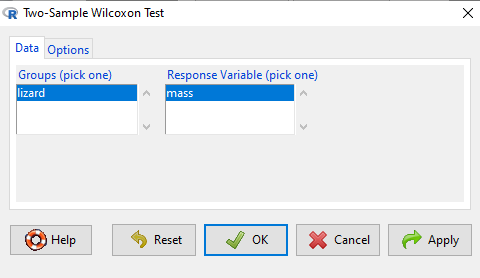
Figure 3. Screenshot Rcmdr menu 2 sample Wilcoxon test. Options are selected by clicking on “Options” tab (see Fig 4).
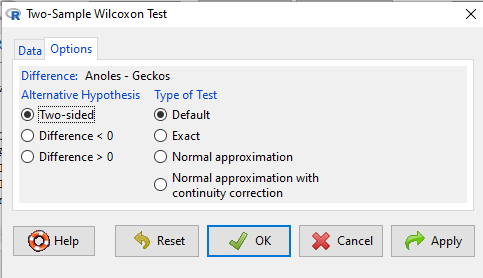
Figure 4. Screenshot of options tab Rcmdr menu 2 sample Wilcoxon test. Keep defaults to run the “Wilcoxon test.”
Don’t forget to stack the data. Rcmdr won’t produce an error message if the data set is in the unstacked, improper conformation. Instead, Rcmdr menu options will not be available. For example, Fig 5 shows a Two-sample Wilcoxon test… dimmed from view, not available for selection.
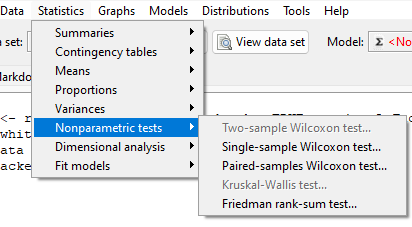
Figure 5. Screenshot of Rcmdr menu. Note Two- sample Wilcoxon test… not available.
The results of the test, copied from the Output window, are shown below.
wilcox.test(Mass ~ Lizard, alternative="two.sided", data=LizardStacked)

Wilcoxon rank sum test
data: Mass by Lizard
W = 14, p-value = 0.1143
alternative hypothesis: true location shift is not equal to 0
The calculation of the Wilcoxon test statistic (W) is straightforward, involving summing the ranks. Obtaining the P-value of the test of the null is a bit more involved as it depends on permutations of all possible combinations of differences. For us, R will do nicely with the details, and we just need to check the P-value.
Here, we see that the medians are 5.6 g for the Anolis, and 2.8 g for the geckos. The associated P-value is 0.1143. Thus, we fail to reject the null hypothesis and conclude that there was no difference in median body mass.
Note 2. This is the same general conclusion we got when we ran a independent t-test on this data set: no difference between day one and day two.
Questions
- Conduct an independent t-test on the Lizard body mass data.
- Make a box plot to display the two groups and describe the middle and variability.
- Compare results of test of hypothesis. do they agree with the Wilcoxon test? If not, list possible reasons why the two tests disagree.
- Using the dataset below, test null hypothesis using independent t-test, Welch’s test, and nonparametric Wilcoxon’s test.
- Make a box plot to display the two groups and describe the middle and variability.
- Compare results of test of hypothesis. do they agree with the Wilcoxon test? If not, list possible reasons why the tests disagree.
Quiz Chapter 15.2
Wilcoxon Rank Sum Test
Data set
| var1 | var2 |
| 5.84 | 5.93 |
| 5.72 | 5.95 |
| 5.75 | 6.02 |
| 5.78 | 5.81 |
| 5.81 | 6.16 |
| 5.81 | 5.95 |
| 5.73 | 6.09 |
| 5.77 | 5.89 |
| 5.76 | 5.99 |
| 5.86 | 5.60 |
| 5.84 | 6.16 |
| 5.83 | 6.16 |
| 5.80 | 6.06 |
| 5.78 | 6.07 |
| 5.89 | 5.66 |
| 5.83 | 6.14 |
| 5.79 | 5.99 |
| 5.84 | 6.15 |
| 5.90 | 5.81 |
| 5.86 | 6.20 |
Chapter 15 contents,
- Introduction
- Kruskal-Wallis and ANOVA by ranks
- Wilcoxon Rank Sum Test
- Wilcoxon signed rank test
- References and suggested readings
15.1 – Kruskal-Wallis and ANOVA by ranks
Introduction
When the data are NOT normally distributed OR When the variances in the different samples are unequal, one option is to opt for a nonparametric alternative use the Kruskal-Wallis test. The test is the same as an ANOVA on ranks. The tests are used to test whether or not groups can be viewed as having come from the same sample distribution. This is a terse page with emphasis on examples.
It is known that the an ANOVA on ranks (in blue) of the original data (in black) will yield the same results.
Kruskal-Wallis
Rcmdr: Statistics → Nonparametric test → Kruskal-Wallis test…
Rcmdr Output of Kruskal-Wallis test
tapply(Pop_data$Stuff, Pop_data$Pop, median, na.rm=TRUE)

Pop1 Pop2 Pop3 Pop4
 146   90  122  347
kruskal.test(Stuff ~ Pop, data=Pop_data)
Kruskal-Wallis rank sum test
data: Stuff by Pop
Kruskal-Wallis chi-squared = 25.6048, df = 3, p-value = 1.154e-05
End of R output
So, we reject — “provisionally, of course! — the null hypothesis, right?
Compare parametric test and alternative non-parametric test
Let’s compare the nonparametric test results to those from an analysis of the ranks (ANOVA of ranks).
To get the ranks in R Commander (example.15.1 data set is available at bottom of this page; scroll down or click here).
Rcmdr: Data → Manage variables in active data set → Compute new variable …
The command for ranks is…. wait for it …. rank(). In the popup menu box, name the new variable (Ranks) and in the Expression to compute box enter rank(Values).
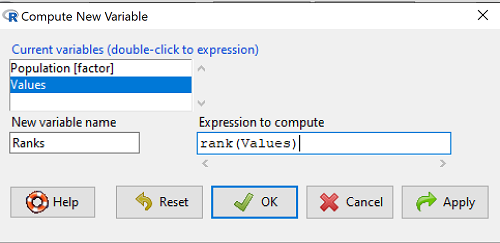
Figure 1. Screenshot Rcmdr menu create new variable.
Note 1: Not a good idea to name an object, Ranks, that’s similar to a function name in R, rank.
And the R code is simply
example.15.1$Ranks <- with(example.15.1, rank(Values))
Note 2: The object example.15.1$Ranks adds our new variable to our data frame.
That’s one option, rank across the entire data set. Another option would be to rank within groups.
R code
example.15.1$xRanks <- ave(Values, Population, FUN=rank)
Note 3: The ave() function averages within subsets of the data and applies whatever summary function (FUN) you choose. In this case we used rank. Alternative approaches could use split or lapply or variations of dplyr. ave() is in the base package and at least in this case is simply to use to solve our rank within groups problem. xRanks would then be added to the existing data frame.
Here are the results of ranking within groups (Table 1).
Table 1. Original and ranked data set.
| Population 1 | Rank1 | Population 2 | Rank2 | Population 3 | Rank3 | Population 4 | Rank4 |
| 105 | 11.5 | 100 | 9 | 130 | 17.5 | 310 | 33 |
| 132 | 19 | 65 | 4 | 95 | 7 | 302 | 32 |
| 156 | 22 | 60 | 2.5 | 100 | 9 | 406 | 38 |
| 198 | 29 | 125 | 16 | 124 | 15 | 325 | 34 |
| 120 | 13.5 | 80 | 5.5 | 120 | 13.5 | 298 | 31 |
| 196 | 28 | 140 | 21 | 180 | 26 | 412 | 39.5 |
| 175 | 24 | 50 | 1 | 80 | 5.5 | 385 | 39.5 |
| 180 | 26 | 180 | 26 | 210 | 30 | 329 | 35 |
| 136 | 20 | 60 | 2.5 | 100 | 9 | 375 | 37 |
| 105 | 115 | 130 | 17.5 | 170 | 23 | 365 | 36 |
Question 1. Which do you choose, rank across groups (Ranks) or rank within groups (xRanks)? Recall that this example began with a nonparametric alternative to the one-way ANOVA, and we were testing the null hypothesis that the group means were the same

Answer 1. Rank the entire data set, ignoring the groups. The null hypothesis here is that there is no difference in median ranks among the groups. Ranking within groups simply shuffles observations within the group. This is basically the same thing as running Kruskal-Wallis test.
Run the one-way ANOVA, now on the Ranked variable. The ANOVA table is summarized Table 2.
Table 2. ANOVA table on ranked variable.
| Source | DF | SS | MS | F | P† |
| Population | 3 | 3495.1 | 1165.0 | 22.94 | < 0.001 |
| Error | 36 | 1828.0 | 50.8 | ||
| Total | 39 | 5323.0 |
Note 4: † The exact p-value returned by R was 0.0000000178. This level of precision is a bit suspect given that calculations of p-values are subject to bias too, like any estimate. Thus, some advocate to report p-values to three significant figures and if less than 0.001, report as shown in this table. Occasionally, you may see P = 0.000 written in a journal article. This is a definite no-no; p-values are estimates of the probability of getting results more extreme then our results and the null hypothesis holds. It’s an estimate, not certainty; p-values cannot equal zero.
So, how do you choose between the parametric ANOVA and the non-parametric Kruskal-Wallis (ANOVA by Ranks) test? Think like a statistician — It is all about the type I error rate and potential bias of a statistical test. The purpose of statistics is to help us separate real effects from random chance differences. If we are employing the NHST approach, then we must consider our chance that we are committing either a Type I error or a Type II error, and conservative tests, eg, tests based on comparing medians and not means, implies an increased chance of committing Type II errors.
Questions
- Saying that nonparametric tests make fewer assumptions about the data should not be interpreted that they make no assumptions about the data. Thinking about our discussions about experimental design and our discussion about test assumptions, what assumptions must hold regardless of the statistical test used?
- Go ahead and carry out the one-way ANOVA on the within group ranks (
xRanks). What’s the p-value from the ANOVA? - One could take the position that only nonparametric alternative tests should be employed in place of parametric tests, in part because they make fewer assumptions about the data. Why is this position unwarranted?
Quiz Chapter 15.1
Kruskal-Wallis and ANOVA by ranks
Data used in this page
Dataset for Kruskal-Wallis test
| Population | Values |
|---|---|
| Pop1 | 105 |
| Pop1 | 132 |
| Pop1 | 156 |
| Pop1 | 198 |
| Pop1 | 120 |
| Pop1 | 196 |
| Pop1 | 175 |
| Pop1 | 180 |
| Pop1 | 136 |
| Pop1 | 105 |
| Pop2 | 100 |
| Pop2 | 65 |
| Pop2 | 60 |
| Pop2 | 125 |
| Pop2 | 80 |
| Pop2 | 140 |
| Pop2 | 50 |
| Pop2 | 180 |
| Pop2 | 60 |
| Pop2 | 130 |
| Pop3 | 130 |
| Pop3 | 95 |
| Pop3 | 100 |
| Pop3 | 124 |
| Pop3 | 120 |
| Pop3 | 180 |
| Pop3 | 80 |
| Pop3 | 210 |
| Pop3 | 100 |
| Pop3 | 170 |
| Pop4 | 310 |
| Pop4 | 302 |
| Pop4 | 406 |
| Pop4 | 325 |
| Pop4 | 298 |
| Pop4 | 412 |
| Pop4 | 385 |
| Pop4 | 329 |
| Pop4 | 375 |
| Pop4 | 365 |
Chapter 15 contents
- Introduction
- Kruskal-Wallis and ANOVA by ranks
- Wilcoxon Rank Sum Test
- Wilcoxon signed rank test
- References and suggested readings
17 – Linear Regression
Introduction
Regression is a toolkit for developing models of cause and effect between one ratio scale data type dependent response variables, and one (simple linear regression) or more or more (multiple linear regression) ratio scale data type independent predictor variables. By convention the dependent variable(s) is denoted by Y, the independent variable(s) represented by X1, X2,  Xn for n independent variables. Like ANOVA, linear regression is simply a special case of the general linear model, first introduced in Chapter 12.7.
Components of a statistical model
Regression statistical methods return model estimates of the intercept and slope coefficients, plus statistics of regression fit (eg, R2, aka “R-squared,” the coefficient of determination).
Chapter 17.1 – 17.9 cover the simple linear model

Chapter 18.1 – 18.5 cover the multiple regression linear model

where α or β0 represent the Y-intercept and β or β1, β2, … βn represent the regression slopes.
Regression and correlation test linear hypotheses
We state that the relationship between two variables is linear (the alternative hypothesis) or it is not (the null hypothesis). The difference? Correlation is a test of linear association (are variables correlated, we ask?), imply possible causation, but are not sufficient evidence for causation: we do not imply that one variable causes another to vary, even if the correlation between the two variables is large and positive, for example. Correlations are used in statistics on data sets not collected from explicit experimental designs incorporated to test specific hypotheses of cause and effect.
Linear regression, however, is to cause and effect as correlation is to association. With regression and ANOVA, we are indeed making a case for a particular understanding of the cause of variation in a response variable: modeling cause and effect is the goal. Regression, ANOVA, and other general linear models are designed to permit the statistician to control for the effects of confounding variables provided the causal variables themselves are uncorrelated.
When to use correlation and when to apply linear regression to data set? For two ratio scale variables, one can always apply either approach. Correlation is always appropriate if both variables are measured in the course of the study whereas a regression modeling approach would be implied where one variable was the result of manipulation by the researcher.
Assumptions of linear regression
The key assumption in linear regression is that a straight line indeed is the best fit of the relationship between dependent and independent variables. The additional assumptions of parametric tests (Chapter 13) also hold. In Chapter 18 we conclude with an extension of regression from one to many predictor variables and the special and important topic of correlated predictor variables or multicollinearity.
Build a statistical model, make predictions
In our exploration of linear regression we begin with simple linear regression, also called ordinary least squares regression, starting with one predictor variable. Practical aspects of model diagnostics are presented. Regression may be used to describe or to provide a predictive statistical framework. In Chapter 18 we conclude with an extension of regression from one to many predictor variables. We conclude with a discussion of model selection. Throughout, use of Rcmdr and R have multiple ways to analyze linear regression models are presented; we will continue to emphasize the general linear model approach, but note that use of linear model in Rcmdr provides a number of default features that are conveniently available.
Questions
1. Write up three learning outcomes for this page. Hint: Point your favorite generative AI to this page and ask for help.
Suggested homework
Homework 11: Simple linear regression.
Quiz
In addition to the quiz on this page, a total of 81 questions among the several subchapters, a mix of true or false and multiple choice question format.
Quiz Chapter 17
Linear Regression
References
Linear regression is a huge topic; references I include are among my favorite on the subject, but are only a small and incomplete sampling. For simplicity, I merged references for Chapter 17 and Chapter 18 into one page at References and suggested readings (Ch17 & 18)
Chapter 17 contains
- Introduction
- Simple Linear Regression
- Relationship between the slope and the correlation
- Estimation of linear regression coefficients
- OLS, RMA, and smoothing functions
- Testing regression coefficients
- ANCOVA – analysis of covariance
- Regression model fit
- Assumptions and model diagnostics for Simple Linear Regression
- References and suggested readings (Ch17 & 18)
14.8 – More on the linear model in Rcmdr
Introduction
During the last lectures, we could have used the Two-Way ANOVA command in R or Rcmdr
R code: How to analyze multifactorial ANOVA problems
Rcmdr: Statistics → Means → Multiway ANOVA
To analyze our two factor data sets. As long as the design meets the following conditions, by all means use this command because it is simple and precisely correct.
- Both factors are fixed, not random.
- Each level of first factor is crossed with each level of the second factor.
- No missing data (the design is fully replicated and balanced).
If any of the three points do not fit your two-way design, then you’ll need a different, more general and powerful ANOVA procedure in R and Rcmdr to analyze these types of designs. You’ll need the lm() function (Fig 1).
Rcmdr: Statistics → Fit models → Linear model…
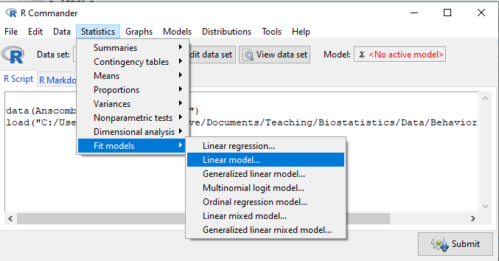
Figure 1. Linear model menu in Rcmdr, version 2.7.0
Some R basics with the lm() function, the general linear model.

Response  is specified by linear predictor(s), either factors or covariates (ratio-scale predictor variables). We communicate to R what the model is by using operators. The four more commonly used operators are
 the basic way to include the model terms, ie, the mode predictors
 which is interpreted as the interaction of all the variables and the factors in the term
 is interpreted as factor crossing
Not shown, but  indicates the term on the left is nested within the term on the right.
A few examples: we’ll have three factors, A, B, and C. For our one-way ANOVA, the model specification would be

For our crossed, balanced two-way ANOVA, the model specification would be

or equivalently

And for our block ANOVA problem?
Click here to get entire List of model commands in R.
How would we analyze our snake experiment?
Table 1. The snake data set
| Snake | Source | flick |
| 1 | dH2O | 3 |
| 2 | dH2O | 0 |
| 3 | dH2O | 0 |
| 4 | dH2O | 5 |
| 5 | dH2O | 1 |
| 6 | dH2O | 2 |
| 1 | fish | 6 |
| 2 | fish | 22 |
| 3 | fish | 12 |
| 4 | fish | 24 |
| 5 | fish | 16 |
| 6 | fish | 16 |
| 1 | worm | 6 |
| 2 | worm | 22 |
| 3 | worm | 12 |
| 4 | worm | 24 |
| 5 | worm | 16 |
| 6 | worm | 16 |
We have two factors, but one factor is a Block (repeated measures on individuals). We need to tell R and Rcmdr what our model is. We’ll return to talk about models next time, a very important topic!! For now, think of a model as adding the independent variables together to predict the response variable.
In our Snake example, it’s a two-way ANOVA, but one factor is individual snake, the other is a treatment, and we have repeat measures, so there cannot be an interaction.
We tell R and Rcmdr which columns contain the Response, and under Model, we enter the columns with the two factors.
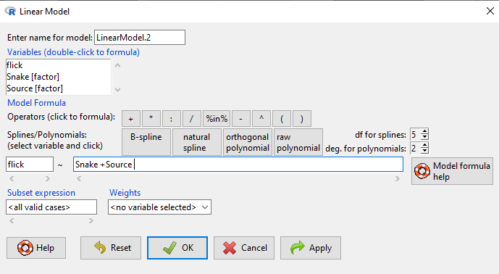
Figure 2. Menu of linear model with repeat measures model, Rcmdr, version 2.7.0.
You must also tell R and Rcmdr which factors in the model (if any) are random to get the correct F statistics. Almost without exception, blocking factors are always treated as Random
The output looks like this (see below). More complicated, true (which means more information!), but things marked in red we’ve seen before.
LinearModel.2 <- lm(flick ~ Snake +Source, data=L16SnakeTaste)

summary(LinearModel.2)

Call:
lm(formula = flick ~ Snake + Source, data = L16SnakeTaste)

Residuals:
Min 1Q Median 3Q Max
-5.2222 -0.7222 0.0278 1.5694 7.4444

Coefficients:
             Estimate Std. Error t value Pr(>|t|)
(Intercept)    -4.444      2.523  -1.762 0.10862
Snake[T.2]      9.667      3.090   3.128 0.01072 *
Snake[T.3]      3.000      3.090   0.971 0.35451
Snake[T.4]     12.667      3.090   4.099 0.00215 **
Snake[T.5]      6.000      3.090   1.942 0.08085 .
Snake[T.6]      6.333      3.090   2.050 0.06755 .
Source[T.fish] 14.167      2.185   6.484 0.0000704 ***
Source[T.worm] 14.167      2.185   6.484 0.0000704 ***
---
Signif. codes: 0 '***' 0.001 '**' 0.01 '*' 0.05 '.' 0.1 ' ' 1

Residual standard error: 3.784 on 10 degrees of freedom
Multiple R-squared: 0.8858, Adjusted R-squared: 0.8058
F-statistic: 11.08 on 7 and 10 DF, p-value: 0.0005337
Contrast coding
When a factor (categorical variable) is used in a linear model (lm() or aov()), R must convert the factor into one or more numeric predictor variables. Contrast coding tells us how to represent the factor in the model, how to interpret the coefficients associated with the factor, how the hypothesis tests of the coefficients are handled, and whether or not Type III sums of squares tests are valid. R can handle contrast coding in a couple of ways, either as a dummy contrast (each group if the factor is contrasted to a baseline) or effects coding, where group means are compared to the grand mean. The command summary(lm()) reports contrast coding that was used in the linear model. Every kind of contrast leads to the same fitted values and same overall F-test, but coefficient estimates and t-tests change.
Note 1: Type I sums of squares tests are affected by the order of the predictors in the model, not by type of contrast coding used. R Commander defaults to Type II tests, which are generally unaffected by coding contrasts used. In contrast, Type III tests are affected by the type of coding contrasts used — Type III tests require sum-to-zero (effects) contrasts.
For the ANOVA table, we call up the command via
Rcmdr: Models → Hypothesis tests → ANOVA table… (Fig 3).
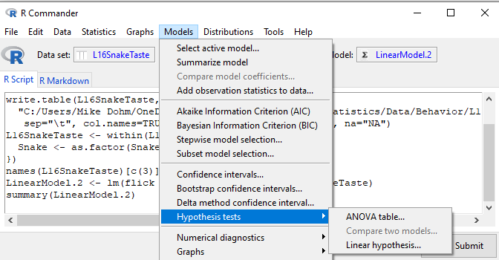
Figure 3. Rcmdr: Models → Hypothesis tests → ANOVA table… Rcmdr, version 2.7.0
Confirm that the model object is active (in this case, the object was LinearModel.2), accept the defaults about types of tests and marginality, and submit OK. The output is
Anova(LinearModel.2, type="II")
Anova Table (Type II tests)

Response: flick
          Sum Sq Df F value Pr(>F)
Snake     307.61  5  4.2956 0.02396 *
Source    802.78  2 28.0256 0.00007954 ***
Residuals 143.22 10
---
Signif. codes: 0 '***' 0.001 '**' 0.01 '*' 0.05 '.' 0.1 ' ' 1
End R output
You do not need to know all of the output; all of that output is there for a reason, of course, but for now, here’s what R and Rcmdr has to say (from the help menu):
The sequential sums of squares is the added sums of squares given that prior terms are in the model. These values depend upon the model order. The adjusted sums of squares are the sums of squares given that all other terms are in the model. These values do not depend upon the model order.
You should try our snake example again, but this time, remove the tongue flick response to the dH2O for the first snake — a missing value. (just type into the cell NA).
How would you use GLM to analyze a simple two-way ANOVA, a fully crossed, fully replicated (“balanced”) design? We could use the Two-way ANOVA command in R and Rcmdr, or we could use lm(). Try it with the data set from random vs nonrandom lecture.
Another example
Below, you see how the model is entered. To let R know that I wish R and Rcmdr to test the interaction, I need to add a Model term for that source of variation. I accomplish this by typing “Diet*Drug” (without the quotes).

Figure 4. Crossed, balanced design. Linear model menu, Rcmdr, version 1.9.2
After clicking OK, the following output from the lm function is returned. How does this compare to output from the two-way ANOVA command in R and Rcmdr?
You should try both and compare!
Rcmdr: Models → Hypothesis tests → ANOVA table
Anova(LinearModel.17, type="II")
Anova Table (Type II tests)
Response: chol_randomized
             Sum Sq  Df F value   Pr(>F)
diet         141.08   2  1.3061 0.28745
drug         351.88   2  3.2577 0.05403 .
diet:drug    235.50   4  1.0901 0.38124
Residuals   1458.19  27
End R output
Nested ANOVA
The nested ANOVA may be analyzed in multiple ways in R and Rcmdr, but I prefer the lm() function because it is the most general. For Nested ANOVA, we can also use lm(). Here’s where it gets a little tricky. Put in the Response variable (Chol), then click in the box for model: Select both factors, then type in / after the factor that’s nesting factor. For our nested model example (14.5 – Nested designs), Manufacturer Source was nested within Drug.
Table 3. Nested design example data set from Chapter 14 – Nested design
| Drug | Source | Chol |
| 1 | 1 | 202.6 |
| 1 | 1 | 207.8 |
| 1 | 1 | 190.2 |
| 1 | 1 | 211.7 |
| 1 | 1 | 201.5 |
| 1 | 2 | 189.3 |
| 1 | 2 | 198.5 |
| 1 | 2 | 208.4 |
| 1 | 2 | 205.3 |
| 1 | 2 | 210 |
| 2 | 3 | 212.3 |
| 2 | 3 | 204.4 |
| 2 | 3 | 221.6 |
| 2 | 3 | 209.2 |
| 2 | 3 | 222.1 |
| 2 | 4 | 203.6 |
| 2 | 4 | 209.8 |
| 2 | 4 | 204.1 |
| 2 | 4 | 201.8 |
| 2 | 4 | 202.6 |
| 3 | 5 | 189.1 |
| 3 | 5 | 219.9 |
| 3 | 5 | 196 |
| 3 | 5 | 205.3 |
| 3 | 5 | 204 |
| 3 | 6 | 194.7 |
| 3 | 6 | 192.8 |
| 3 | 6 | 226.5 |
| 3 | 6 | 200.9 |
| 3 | 6 | 219.7 |
Note 2: If you were working with a CROSSED model, then you would enter the two factors and indicate the interaction by typing Drug*Source (if these are the two factors involved in the interaction).
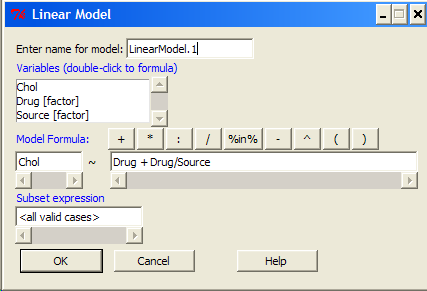
Figure 5. Nested design, linear model menu, Rcmdr, version 1.9.2
Fortunately, R and Rcmdr’s help system is quite extensive here, so when in doubt, check the help box…
Output from the linear model for the Nested Example looks like the one below.
The General Linear Model function in R and therefore Rcmdr returns information about our design plus Sums of Squares, Mean squares, and P-values. R and Rcmdr default’s to use of sequential evaluation of effects. Adjusted evaluation is useful for when you have a covariate (like body size or another confounding variable) that should be evaluated first before the factors are evaluated. We will use the sequential analysis.
Rcmdr: Models → Hypothesis tests → ANOVA table
Anova(LinearModel.15, type="II")
Anova Table (Type II tests)
Response: Chol
             Sum Sq Df F value Pr(>F)
Drug         225.14  2  1.1743 0.3262
Drug:Source  269.27  3  0.9363 0.4385
Residuals   2300.61 24
End R output
Repeatability and ANOVA
We need to tell Rcmdr how to structure the error term; you need the data frame to be arranged so
aovRes <- aov(dH2O ~ Source + Error(Source/Subject), data=SnakeTaste)
#Print the results
aovRes
Anova Table (Type II tests)
Response: dH2O
            Sum Sq Df F value   Pr(>F)
Subject     307.61  5  4.2956 0.02396 *
Source      802.78  2 28.0256 0.00007954 ***
Residuals   143.22 10
---
Signif. codes:  0 '***' 0.001 '**' 0.01 '*' 0.05 '.' 0.1 ' ' 1
#What components are available in the aovRes object?
names(aovRes)
[1] "Sum Sq"  "Df"      "F value" "Pr(>F)"
How do I extract the “F value” for Subjects?
str(aovRes)
Questions
1. What are three learning objectives from this page?
2. Be able to distinguish use of lm() and aov() and the summary output with respect to testing of linear models.
Quiz Chapter 14.8
More on the linear model in Rcmdr
Data sets
Table 1. The snake data set
| Snake | Source | flick |
| 1 | dH2O | 3 |
| 2 | dH2O | 0 |
| 3 | dH2O | 0 |
| 4 | dH2O | 5 |
| 5 | dH2O | 1 |
| 6 | dH2O | 2 |
| 1 | fish | 6 |
| 2 | fish | 22 |
| 3 | fish | 12 |
| 4 | fish | 24 |
| 5 | fish | 16 |
| 6 | fish | 16 |
| 1 | worm | 6 |
| 2 | worm | 22 |
| 3 | worm | 12 |
| 4 | worm | 24 |
| 5 | worm | 16 |
| 6 | worm | 16 |
Chapter 14 contents
14.7 – Rcmdr Multiway ANOVA
Introduction
We have been talking about the two-way randomized, balanced, replicated design. Here, we take you step by step through use of R to conduct the multiway ANOVA.
R code: Multiway ANOVA
Rcmdr: Statistics → Means → Multiway ANOVA… we will review this as Option 1
or
Rcmdr: Statistics → Fit Models → Linear model… we will review this as Option 2
In either case, as a reminder, your data set must be stacked worksheet, like the data in this worksheet
Table 1. Data set, example.14.7†
| Diet | Population | Response |
| A | 1 | 4 |
| A | 1 | 6 |
| A | 1 | 5 |
| A | 2 | 5 |
| A | 2 | 8 |
| A | 2 | 9 |
| B | 1 | 12 |
| B | 1 | 15 |
| B | 1 | 11 |
| B | 2 | 5 |
| B | 2 | 7 |
| B | 2 | 8 |
Option 1
Your first option is to use the ANOVA menus via “Means.” This is a perfectly good way to handle a standard two-way, fully-crossed, fixed effects model. However, other designs will not run with this command and R will return a report of errors for ANOVA models that do not conform to the replicated, balanced, crossed design.
Rcmdr: Statistics → Means → Multiway Analysis of variance …
Factors: highlight “Diet” AND “Population”
Response variable: pick one (in this window, all we see is “Response”)
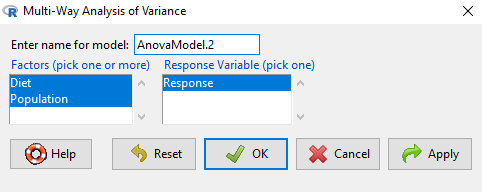
Figure 1. Screenshot Rcmdr multi-way ANOVA.
†Note 1: Don’t forget to convert numeric Population to factor. Assuming Population is part of a data.frame called example.14.7, then example.14.7$Population <- factor(example.14.7$Population).
Interpret the output
AnovaModel.2 <- (lm(Response ~ Diet*Population, data=example.14.7))

Anova(AnovaModel.2)

Anova Table (Type II tests)
Response: Response
                  Sum Sq    Df    F value      Pr(>F)
Diet              36.750     1    12.2500    0.008079 **
Population        10.083     1     3.3611    0.104104
Diet:Population   52.083     1    17.3611    0.003136 **
Residuals         24.000     8
---
Signif. codes: 0 '***' 0.001 '**' 0.01 '*' 0.05 '.' 0.1 ' ' 1
tapply(example.14.7 Response, list(Diet=example.14.7 Diet,
+ Population=example.14.7 Population), mean, na.rm=TRUE) # means
Population
Diet 1 2
A 5.00000 7.333333
B 12.66667 6.666667

tapply(example.14.7 Response, list(Diet=example.14.7 Diet,
+ Population=example.14.7 Population), sd, na.rm=TRUE) # std. deviations
Population
Diet 1 2
A 1.000000 2.081666
B 2.081666 1.527525

tapply(example.14.7 Response, list(Diet=example.14.71 Diet,
+ Population=example.14.7 Population), function(x) sum(!is.na(x))) # counts
Population
Diet 1 2
A 3 3
B 3 3
End R output.
Note 2: What is the “Type II tests”? When you fit a model with categorical predictors using lm() or aov(), you test hypothesis for each effect (main effects and interactions). These tests differ depending on how the model partitions the variance among predictors. See Note 2 in Chapter 12.7 for description of Type I, Type II, and Type III sums of squares.
Summary of multi-way ANOVA command
The multi-way ANOVA command returns our ANOVA table plus the adjusted means, along with standard deviations and number of observations (counts). The adjusted means would then be good to put into a chart to present group comparisons following adjustments from the effects of levels within groups.
Rcmdr: Models → Graphs → Predictor effect plots …
Here’s the chart (hint: 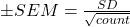 )
)
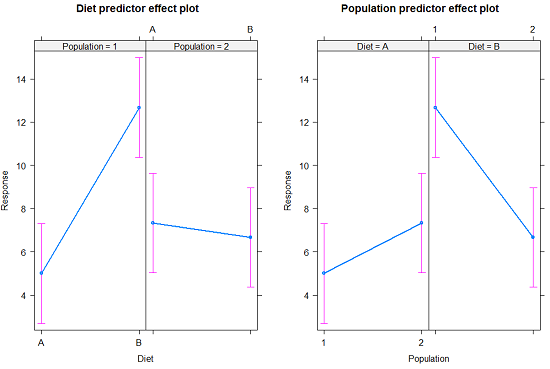
Figure 2. Predictor effect plots, Diet and Population on Response variable.
Option 2
A more general approach is to use the General linear model. This approach can handle the standard 2-way fixed effects ANOVA (above), but any other model as well. The model is Response ~ Diet*Population.
Rcmdr: Statistics → Fit Models → Linear model…
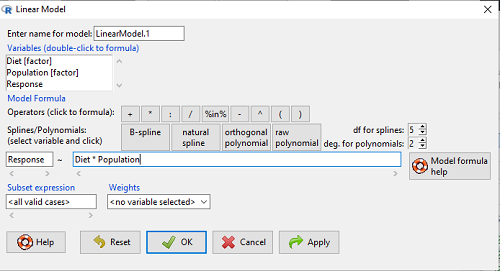
Figure 3. Screenshot Rcmdr linear model menu.
Interpret the output
LinearModel.1 <- lm(Response ~ Diet * Population, data=example.14.7)

summary(LinearModel.1)

Call:
lm(formula = Response ~ Diet * Population, data = example.14.7)

Residuals:
Min 1Q Median 3Q Max
-2.3333 -1.1667 0.1667 1.0833 2.3333

Coefficients:
                        Estimate    Std. Error ..t value .  Pr(>|t|)
(Intercept) .              5.000         1.000 .   5.000    .0.00105 **
Diet[T.B] .                7.667       ..1.414 .   5.421    .0.00063 ***
Population[T.2]           .2.333       ..1.414 .   1.650    .0.13757
Diet[T.B]:Population[T.2] -8.333       ..2.000    -4.167    .0.00314 **
---
Signif. codes: 0 '***' 0.001 '**' 0.01 '*' 0.05 '.' 0.1 ' ' 1

Residual standard error: 1.732 on 8 degrees of freedom
Multiple R-squared: 0.8047, Adjusted R-squared: 0.7315
F-statistic: 10.99 on 3 and 8 DF, p-value: 0.003285
End R output
Lots to sort through, so let’s begin with what is in common between the two approaches, the Multi-way ANOVA command versus the linear model command.
Compare R output from ANOVA and linear model
As a direct output, the linear model option does not provide an ANOVA summary table. Instead of our ANOVA table the linear model returns estimates of coefficients along with t-test results for each coefficient of the model from the lm() command output
Recall that we can get ANOVA tables through the following R commands via Rcmdr.
Rcmdr: Models → Hypothesis tests → ANOVA Table.
Let’s do so for this linear model (accept the default for type of tests = “Type II”).
And the output from lm() stored in the object LinearModel.1 is
Anova(LinearModel.1, type="II")
Anova Table (Type II tests)

Response: Response
                Sum Sq Df F value   Pr(>F)
Diet            36.750  1 12.2500 0.008079 **
Population      10.083  1  3.3611 0.104104
Diet:Population 52.083  1 17.3611 0.003136 **
Residuals       24.000  8
---
Signif. codes:  0 '***' 0.001 '**' 0.01 '*' 0.05 '.' 0.1 ' ' 1
End R output
Now, we’re in business, and, using the lm() function, we have the estimates for each model coefficient plus our ANOVA table.
Same answer! Of course. Which to choose, Option 1 or Option 2? Use the lm() options; more flexible, covers more designs than the multiway ANOVA which is strictly for the crossed fully replicated design.
Note 3: Rcmdr uses Anova(), not anova(). anova() is a generic function, part of the base statistics package, and it returns an ANOVA table. Anova() is not a wrapper to anova(), it is a different function, part of the car package. It uses different default methods and different types of sums of squares: Type-II or Type-III analysis-of-variance tables for model objects produced by lm(), glm(), etc. See Note 2 in Chapter 12.7 for description of Type I, Type II, and Type III sums of squares.
Questions
- Write out the two-way model described for the data in Table 1.
- Write the null hypotheses and provide a summary of the statistical significance of the model.
Quiz Chapter 14.7
Rcmdr Multiway ANOVA
Chapter 14 contents
14.6 – Some other ANOVA designs
Introduction
There are several additional ANOVA models in common use. The crossed, balanced design is but one example of the two-way ANOVA. And, from a consideration of two factors it logically follows that there can be more than two factors as part of the design of an experiment. As the number of factors increase, the number of two-way, three-way, and even higher-order interactions are possible and at least in principle may be estimated.
Our purpose here is to highlight several, but certainly not all possible experimental designs from the perspective of ANOVA. Examples are provided. Keep in mind that the general linear model approach unifies these designs.
Some of the classical experimental ANOVA designs one sees include
- Two-way randomized complete block design
- Two-way factorial with no replication design
- Repeat-measures ANOVA with one factor
- Nested ANOVA
- Three-way ANOVA
- Split-plot ANOVA
- Latin squares ANOVA
Put simply, these designs differ in how the groups are arranged and how members of the groups are included.
Two-way randomized complete block design
This design refers to the “textbook” design. For each, factor A and factor B, there are multiple levels, in this example three levels of Factor A and three levels of Factor B, and subjects (sampling units) are randomly assigned to each level. However, one of the factors is, perhaps, of less interest, yet certainly accounts for variation in the response variable.
| Factor B | ||||
| 1 | 2 | 3 | ||
| Factor A | 1 |  |
 |
 |
| 2 |  |
 |
 |
|
| 3 |  |
 |
 |
|
where n1,1, n2,1, etc. represents the number of subjects in each cell. Thus, in this design there are nine groups. Typically, minimum replication would be three subjects per group.
Two-way factorial with no replication design
While it may seem obvious that a good experiment should have replication, there are situations in which replication is impossible. While this seems rather odd, this scenario very much describes a typical microarray, gene expression project.
| Factor B | ||||
| 1 | 2 | 3 | ||
| Factor A | 1 | |
|
|
| 2 | |
|
|
|
| 3 | |
|
|
|
where, again, n1,1, n2,1, etc., represents the number of subjects in each cell and there are nine groups in this study. With no replication, then no more than one subject per group.
Repeated-measures ANOVA
When subjects in the study are measured multiple times for the dependent variable, this is called a repeated-measures design. We introduced the design for the simple case of before and after measures on the same individuals in Chapter 12.3. It’s straight-forward to extend the design concept to more than two measures on the subjects. The blocking effect is the individual (see Chapter 14.4), and, therefore, a random effect (see Chapters 12.3 and 14.3) in this type of experimental design.
Although straightforward in concept, repeated measure designs have many complications in practice. For example, long-term studies can expect for subjects to drop out of the study, resulting in censored data. Another complication, the assumption is that there is no carry over effect — it doesn’t matter the order different treatments are applied to the subjects. Think of this assumption as akin to the equal variances assumption in ANOVA; just like unequal variances effects Type I error rates in ANOVA, deviations from sphericity inflate Type I error rates in repeated-measures designs.
Sphericity assumption is described in two ways:
Assumption of sphericity — the ranking of individuals remains the same across treatment levels — no interaction between individual and treatment. Sphericity assumption is always met if there are just two levels of the repeated measure, eg, before and after.
Compound symmetry assumption — the variances and covariances are equal across the study: the changes experienced by the subjects are the same across the study regardless of the order of treatments.
Tests for sphericity include:
Mauchly test: mauchly.test(object)
If results of tests for violations of sphericity warrant, corrections are available. One recommended correction is called Greenhouse-Giesser correction, which adjusts the degrees of freedom and so results in a better p-value estimate. A second correction is called Huyhn-Feldt correction; this correction, too, adjusts the degrees of freedom to improve the p-value estimate.
Three-way ANOVA
It is relatively straightforward to imagine an experiment that involves three or more factors. The analysis and interpretation of such designs, while feasible, becomes somewhat complicated especially for the mixed models (Model III).
Consider just the case of a fixed-effects 3-way ANOVA. How many tests of null hypotheses are there?
- Three tests for main effects.
- Three tests of two-way interactions.
- A test for a three-way interaction.
Thus, there are seven separate null hypotheses from a three-way ANOVA with fixed effects! As you can imagine, large sample sizes are needed for such designs, and the “higher-order” interactions (eg, three-way interaction) can be difficult to interpret and may lack biological significance.
ANOVA designs without random assignment to treatment levels
Latin square design
We have introduced you to several ANOVA experimental designs that employed randomization for assignment of subjects to treatment groups. The purpose of randomization is even out differences due to confounding variables. However, if we know in advance something about the direction of the influence of these confounding variables, strictly random assignment is not in fact the best design. For example, the Latin square design is common in agriculture research and is very useful for situations in which two gradients are present (eg, soil moisture levels, soil nutrient levels).
| Dry soil ←→ Wet soil | ||||
| Soil Nutrients
low |
T1 | T4 | T3 | T2 |
| T3 | T2 | T1 | T4 | |
| T2 | T3 | T4 | T1 | |
| T4 | T1 | T2 | T3 | |
Split-Plot Design
Another design from agriculture research is especially useful to ecotoxicology research. We mentioned the repeated measures design in which individuals are measured more than once and each individual receives all levels of the treatment in a random order (cross-over design). However, this design assumes that there are no carry-over effects (see Hills and Armitage 1979; For ecology/evolution definition see O’Connor et al 2014). While this assumption may hold for many experiments, we can also imagine many more situations in which this is undoubtedly false. For example, if we wish to measure the effects of ozone and relative humidity on frog behavior, we might consider using the individual as its own control. But we also wish to compare frog behavior following ozone exposure against behavior exhibited in clean air. But we are likely to violate the carry-over assumption. If a frog receives ozone then air, the effects of ozone may inhibit activity for several days after the initial exposure, which would then influence subsequent measures. The solution to this dilemma is to use what’s called a split plot design. The design combines elements of nesting.
Consider our frog experiment. There would be three factors:
Factor 1 = Exposure (air or ozone),
Factor 2 = Saturation (dry, intermediate, wet),
Factor 3 = Individual (each frog is measured 3 times).
The design table would look like
| Exposure | |||||||
| Air | Ozone | ||||||
| Humidity | Dry | Frog1 | Frog2 | Frog3 | Frog4 | Frog5 | Frog6 |
| Intermediate | Frog1 | Frog2 | Frog3 | Frog4 | Frog5 | Frog6 | |
| Wet | Frog1 | Frog2 | Frog3 | Frog4 | Frog5 | Frog6 | |
Thus, the design is crossed for one factor (saturation), but nested for another factor (individuals are nested within Exposure factor).
Questions
- Which of the study designs mentioned so far are sensitive to carry-over effects?
- With respect to how levels of Factors are assigned, distinguish the split-plot design from the Latin square design.
Quiz Chapter 14.6
Some other ANOVA designs