20.2 – Peak detection
Introduction
Peak detection refers to the automated process of identifying localized maxima within continuous time-series data. Whether analyzing an electrocardiogram (ECG) in a biomedical setting or tracking wildlife movement frequencies in ecology (eg, see Movebank), data streams are inherently composite — consisting of a meaningful signal superimposed with environmental or instrumental noise. As you can imagine, this is an enormous field, with many review and field-specific reports available should you wish to learn more — a sampling are included at the end in the references section (used to construct this page). My intent here is to introduce the subject and provide examples how R can be used to identify peaks in a time series trace.
Note 1. The maximum and minimum of a function are the greatest and least value, respectively, taken by the function (Wikipedia). Local (or relative) maximum (or minimum) refers to greatest (least) value(s) in a given range, whereas global (or absolute) maximum (or minimum) refers greatest (or least) value(s) over the the entire domain of the function.
To successfully isolate biological events from background variance, a mathematical algorithm must systematically scan the data and extract characteristics unique to the target phenomena. The algorithm achieves this by evaluating data segments across a specified window length to analyze the geometric shape and localized trajectory of the wave.
Raw biological data is rarely pristine. For example, with an ECG recording, the target signal — the electrical activity of the heart — is constantly corrupted by physiological and environmental noise. When a subject moves, their muscle contractions create electrical interference called electromyographic artifacts. Breathing causes the baseline of the ECG graph to wander up and down. If the algorithm is uncalibrated, it might misinterpret these noisy, low-intensity fluctuations as additional heartbeats, leading to a false diagnosis of tachycardia. Thus, filtering parameters are used to prevent false positives. By establishing thresholds based on intensity (such as minimum peak height) and duration, the algorithm successfully discards low-amplitude noise while retaining the true physiological or ecological milestones. Ultimately, peak detection transforms a continuous, chaotic data stream into a discrete, quantifiable set of biological occurrences.
R code for a time series example
pracma package, function findpeaks() .
findpeaks() uses a finite difference and regular expression pattern-matching algorithm (R documentation).
Example
library(pracma)
#1. Create dummy time series data
data <- sin(seq(0, 10, length.out=100)) + rnorm(100, sd=0.1)

#2. Find peaks with a minimum height of 0.5
peaks <- findpeaks(data, minpeakheight = 0.5)

# 3. Plot the main time series line
plot(data, type = "l", col = "gray40", lwd = 2,
main = "Peak Detection using pracma::findpeaks",
xlab = "Index", ylab = "Value")

# Add red points exactly at the peak locations. Example:
# peaks[, 2] gives X (indices), peaks[, 1] gives Y (values)
points(x = peaks[, 2], y = peaks[, 1],
col = "red", pch = 19, cex = 1.5)
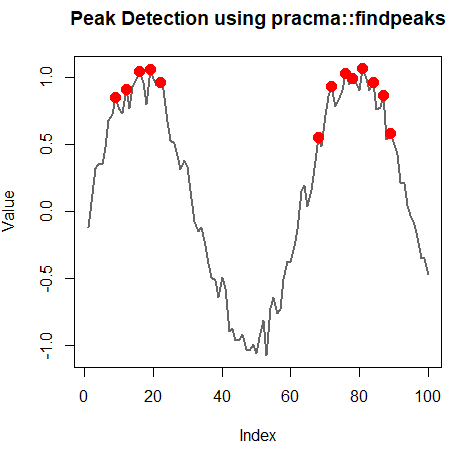
Figure 1. Plot findpeaks for a simulated time series data set.
To interpret Figure 1, our goal is to separate a true signal from background noise. The continuous gray line represents our raw data. The algorithm analyzes this line, accounts for minor fluctuations (noise) to evaluate the overall shape and intensity of the spikes. Red dots were added to highlight the extracted characteristics of the data. By adjusting settings like minpeakheight, you can filter out low-intensity background noise so that only the true mathematical peaks are marked. The spacing between the peaks depends heavily on our data’s frequency. While not explicitly drawn, the algorithm implicitly evaluates the minimum distance (window length) between data points to ensure two red dots aren’t placed too close together on a single, broad peak shape.
Relating Peak Detection to Zenith and Nadir Intervals
Zenith (Global Maximum Interval) captures the absolute highest crest within a specific timeframe, such as a 60-second window. In peak detection, this identifies the precise timestamp of maximum signal intensity alongside the surrounding cluster of peak stress or capacity. For example, in a metabolic ramp test, the zenith isolates the exact window where oxygen consumption peaks, $\dot{V}O2max$, confirming the subject’s absolute cardiorespiratory ceiling, or the zenith reveals how long an individual can sustain peak intensity before exhaustion forces a decline.
Conversely, Nadir (Global Minimum Interval) tracks the absolute lowest trough within that same window. Monitoring this baseline exposes the exact point of lowest physiological activity, representing either maximum recovery or complete exhaustion. For example, tracking the nadir during extended, fasted resting periods filters out temporary spikes (like movement or minor stress) to isolate the true baseline of minimal resting metabolic rate.
R code provided in the next chapter on 20.3 – Baseline correction.
An ECG simulation and use of findpeaks.
Among my teaching duties as Chaminade University I am asked from time to time to teach in our Human A&P series. Thus, the ECG is an important lab activity and sets of exercises we present. This work benefits from having more analytical opportunities included, so I’m including R code here, created by me with lots of help from Gemini AI (Fall 2026).
First, a plot of a simple simulated ECG trace (Fig 2), a final plot with peaks (P wave and QRS complex or R wave) and PR interval displayed (Fig 3), followed by the code and a brief “readme” should anyone wish to take the code further. Of course, it goes without saying, this code in no way should be viewed as an appropriate tool for anaylizing real-world data — just intended for teaching purposes.
Note 2. A much better implementation is provided at https://github.com/tanzirhasan/ECG_Simulation. Python implmentation, see the NeuroKit2 library.
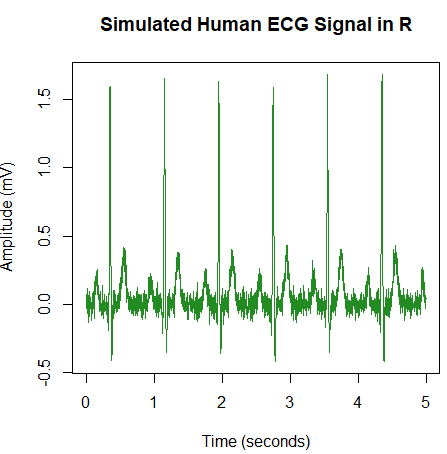
Figure 2. Simulated ECG with R.
R code simulated ECG
# Simulate ECG.
# Parameters
fs <- 500 # Sampling frequency in Hz
duration <- 5 # Duration in seconds
hr <- 75 # Heart rate in beats per minute
t <- seq(0, duration, by = 1/fs)

# Function to generate a Gaussian wave component
gaussian_wave <- function(t, t0, a, s) {
a * exp(-((t - t0)^2) / (2 * s^2))
}

# Simulate a single heartbeat template (P, Q, R, S, T peaks relative to cardiac cycle start)
generate_beat <- function(t_cycle) {
# P wave, Q wave, R wave, S wave, T wave parameters (timing, amplitude, spread)
p <- gaussian_wave(t_cycle, 0.15, 0.20, 0.02)
q <- gaussian_wave(t_cycle, 0.32, -0.15, 0.005)
r <- gaussian_wave(t_cycle, 0.35, 1.60, 0.007)
s <- gaussian_wave(t_cycle, 0.38, -0.35, 0.006)
t_wave <- gaussian_wave(t_cycle, 0.55, 0.35, 0.03)

return(p + q + r + s + t_wave)
}

# Repeat the heartbeat pattern based on heart rate
rr_interval <- 60 / hr # Time between beats in seconds
ecg_signal <- numeric(length(t))

for (i in seq_along(t)) {
# Map time t into the local phase of the cardiac cycle [0, rr_interval]
phase <- t[i] %% rr_interval
ecg_signal[i] <- generate_beat(phase)
}

# Add slight Gaussian noise to mimic real recording conditions
set.seed(42)
ecg_noisy <- ecg_signal + rnorm(length(t), mean = 0, sd = 0.05)

# Plot the simulated ECG
plot(t, ecg_noisy, type = 'l', col = 'forestgreen',
xlab = 'Time (seconds)', ylab = 'Amplitude (mV)',
main = 'Simulated Human ECG Signal in R')
End R code.
Finding peaks and interval in the ECG trace
This script (begins below Fig 3) provides a highly customizable framework for simulating a human ECG signal and extracting key clinical landmarks, such as the P wave peak, R wave peak, and the clinical PR interval (measured from P-wave onset to QRS onset).
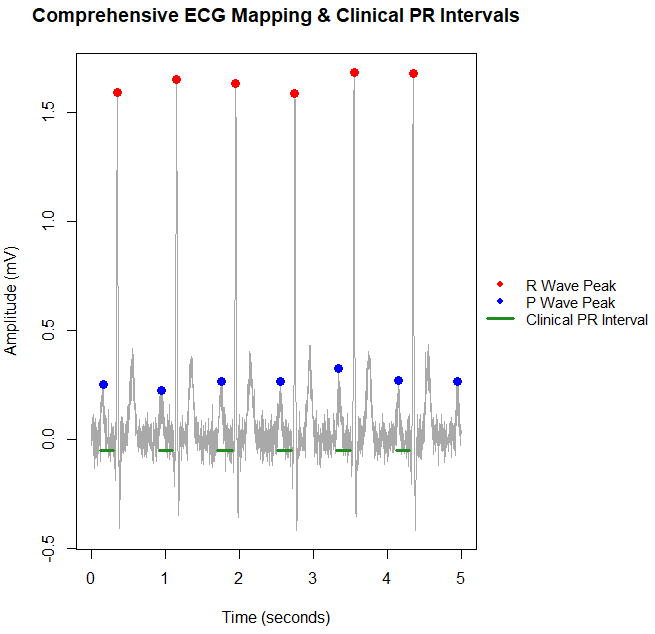
Figure 3. Peak detection P wave (Blue), R wave (red), and PR interval (green line).
R code: Find peaks and identify PR interval
# Find P wave and R wave
# Calculate the PR interval
# library(pracma)

# 1. Identify R Wave Peaks (Our rock-solid anchor points)
r_peaks <- findpeaks(
ecg_noisy,
nups = 2,
minpeakheight = 1.0,
minpeakdistance = fs * 0.5
)
r_indices <- r_peaks[, 2]

# Initialize tracking vectors
p_indices <- c()
p_onset_indices <- c()
qrs_onset_indices <- c()

# 2. Extract P Peaks and Clinical Onsets Relative to R Anchors
for (r_idx in r_indices) {

# A. FIND QRS ONSET (Start of Q wave deflection)
q_window_start <- max(1, r_idx - as.integer(fs * 0.1))
q_segment <- ecg_noisy[q_window_start:r_idx]

if (length(q_segment) > 0) {
q_local_idx <- which.min(q_segment)
q_global_idx <- q_window_start + q_local_idx - 1
qrs_onset <- max(1, q_global_idx - as.integer(fs * 0.02))
qrs_onset_indices <- c(qrs_onset_indices, qrs_onset)
}

# B. FIND P PEAK AND P ONSET
p_window_start <- max(1, qrs_onset - as.integer(fs * 0.25))
p_window_end <- max(1, qrs_onset - as.integer(fs * 0.05))
p_segment <- ecg_noisy[p_window_start:p_window_end]

if (length(p_segment) > 0) {
local_max_idx <- which.max(p_segment)
p_global_idx <- p_window_start + local_max_idx - 1

if (ecg_noisy[p_global_idx] > 0.05) {
p_indices <- c(p_indices, p_global_idx)

p_onset_search <- ecg_noisy[p_window_start:p_global_idx]
below_baseline <- which(p_onset_search < 0.02)

if (length(below_baseline) > 0) {
p_onset <- p_window_start + max(below_baseline) - 1
} else {
p_onset <- p_window_start
}
p_onset_indices <- c(p_onset_indices, p_onset)
}
}
}

# 3. Explicitly check for an orphaned P wave at the very end of the data
last_r_idx <- max(r_indices)
end_window_start <- last_r_idx + as.integer(fs * 0.5)

if (end_window_start < length(ecg_noisy)) {
end_segment <- ecg_noisy[end_window_start:length(ecg_noisy)]
end_peaks <- findpeaks(end_segment, nups = 1, minpeakheight = 0.1)

if (!is.null(end_peaks)) {
local_end_idx <- end_peaks[which.max(end_peaks[, 1]), 2]
p_indices <- c(p_indices, end_window_start + local_end_idx - 1)
}
}

p_indices <- sort(unique(p_indices))

# 4. Plot Layout with legend

# Save original par configurations to reset later
old_par <- par(no.readonly = TRUE)

# Expand the right margin (4th value in mar) to make room for the legend
# c(bottom, left, top, right) -> standard is c(5, 4, 4, 2) + 0.1
par(mar = c(5, 4, 4, 10) + 0.1)

# Generate the base plot
plot(t, ecg_noisy, type = 'l', col = 'darkgray',
xlab = 'Time (seconds)', ylab = 'Amplitude (mV)',
main = 'Comprehensive ECG Mapping & Clinical PR Intervals')

# Draw R wave peaks (Red Dots)
if (length(r_indices) > 0) {
points(t[r_indices], ecg_noisy[r_indices], col = 'red', pch = 19, cex = 1.3)
}

# Draw P wave peaks (Blue Dots)
if (length(p_indices) > 0) {
points(t[p_indices], ecg_noisy[p_indices], col = 'blue', pch = 19, cex = 1.3)
}

# Draw Horizontal Lines spanning from P Onset to QRS Onset
valid_cycles <- min(length(p_onset_indices), length(qrs_onset_indices))
if (valid_cycles > 0) {
for (i in 1:valid_cycles) {
segments(
x0 = t[p_onset_indices[i]], y0 = -0.05,
x1 = t[qrs_onset_indices[i]], y1 = -0.05,
col = 'forestgreen', lwd = 3.5
)
}
}

# Allow plotting outside the graph boundaries
par(xpd = TRUE)

# Place the legend in the middle right, exactly in the expanded margin area
# usr coordinates give us the absolute chart edges: c(x_left, x_right, y_bottom, y_top)
chart_limits <- par("usr")
legend_x <- chart_limits[2] + (chart_limits[2] - chart_limits[1]) * 0.02
legend_y <- (chart_limits[3] + chart_limits[4]) / 2

legend(x = legend_x, y = legend_y,
legend = c("R Wave Peak", "P Wave Peak", "Clinical PR Interval"),
col = c("red", "blue", "forestgreen"),
pch = c(19, 19, NA),
lty = c(NA, NA, 1),
lwd = c(NA, NA, 3.5),
bty = "n",
yjust = 0.5, # Centers the legend vertically around legend_y
cex = 0.9)

# Reset graphical parameters back to defaults
par(old_par)
End R code
User guide — How to Customize and Troubleshoot the R ECG Analysis Script
To adapt this code for different physiological scenarios or real-world recordings, use the following guidelines to adjust inputs and resolve common processing issues.
1. Modifying the Input Parameters
You can easily change the characteristics of the ECG trace by altering the variables at the very top of the script:
- Heart Rate (hr): Set to 75 BPM by default. Raising this to 120+ simulates tachycardia (fast heart rate), while dropping it below 60 simulates bradycardia (slow heart rate).
- Sampling Frequency (fs): This controls the data resolution (default is 500 Hz, meaning 500 data points per second). If you import real hospital ECG data, update this to match the device’s actual sampling rate (typically 250, 500, or 1000 Hz).
- Signal Noise (sd = 0.05): The
rnorm()function adds artificial high-frequency noise. Increase the standard deviation (sd) to test how robust the algorithm is against messy baseline artifacts.
2. Tuning the Detection Windows (Troubleshooting Traces)
Biological signals are dynamic. If your modified heart rate or imported trace isn’t marking waves correctly, tune these specific code boundaries:
Case A: Missing or Skipped R Peaks
The Problem: The script isn’t placing red dots on the tall spikes.
The Fix: Lower the minpeakheight in the initial findpeaks() function. If your input trace has lower overall voltage, the R spikes might be falling below the default 1.0 mV threshold.
Case B: Missing P Peaks or “False Positives” on T Waves
• The Problem: The blue dots are missing entirely, or they are accidentally jumping over to the T wave (the wave after the R peak).
• The Fix: Adjust the backward lookback window inside the for loop. The script isolates the P wave by searching between 0.12 and 0.28 seconds before each R wave:
window_start <- max(1, r_idx - as.integer(fs * 0.28))
window_end <- max(1, r_idx - as.integer(fs * 0.12))
If a patient has a highly prolonged PR interval, you must increase the 0.28 value (e.g., to 0.35) so the search window reaches further back in time to catch the early P wave.
Case C: Misaligned PR Interval Lines (Onset Detection Errors)
The Problem: The green horizontal lines don’t perfectly line up with the physical start of the waves.
The Fix: The script scans backward until the voltage drops below a baseline threshold (below_baseline <- which(p_onset_search < 0.02)).
If your data has a floating baseline or a lot of background noise, the signal may never drop below 0.02 mV. Adjust this value up or down (e.g., to 0.04 or 0.01) until the green line accurately snaps to where the wave visibly departs from the baseline.
If Biopac ECG traces are available, replace the simulation code snippet with the following to import .csv trace files. The R code assumes your CSV file (eg, ecg_data.csv), is in your working folder, and has a column for Time (in seconds or milliseconds) and a column for the ECG signal amplitude (in mV).
# 1. User Inputs for Real Data
csv_file_path <- "path/to/your/ecg_data.csv"
fs <- 500 # Specify the recording sampling rate (Hz)

# 2. Read the CSV File safely
if (file.exists(csv_file_path)) {
ecg_data <- read.csv(csv_file_path, header = TRUE, stringsAsFactors = FALSE)

# Print column names to the console so the user knows what is inside
cat("Successfully loaded CSV. Detected columns:\n")
print(colnames(ecg_data))

# --- CUSTOMIZE COLUMN NAMES HERE ---
# Replace 'Time' and 'Signal' with the exact column headers from your CSV file
time_column_name <- "Time"
signal_column_name <- "Signal"
# -----------------------------------

# Extract the raw signal vector
ecg_noisy <- ecg_data[[signal_column_name]]

# Construct or extract the time vector (t)
# Option A: If your CSV has a reliable time column in seconds:
t <- ecg_data[[time_column_name]]

# Option B: UNCOMMENT BELOW if your time column is in MILLISECONDS:
# t <- ecg_data[[time_column_name]] / 1000

# Option C: UNCOMMENT BELOW if your CSV doesn't have a time column at all:
# duration <- (length(ecg_noisy) - 1) / fs
# t <- seq(0, duration, by = 1/fs)

cat(sprintf("Loaded %d data points. Total duration: %.2f seconds.\n", length(ecg_noisy), max(t)))

} else {
stop(paste("Error: The file could not be found at:", csv_file_path,
"\nPlease verify the file path or revert to the simulation code."))
}

# (The rest of your findpeaks, windowing, and plotting code continues below)
End R script
Questions
- Write up three learning outcomes for this page. Hint: Point your favorite generative AI to this page and ask for help
References and suggested readings
Shin, H. S., Lee, C., & Lee, M. (2009). Adaptive threshold method for the peak detection of photoplethysmographic waveform. Computers in biology and medicine, 39(12), 1145-1152.
Chapter 20 contents
- Additional topics
- Area under the curve
- Peak detection
- Baseline correction
- Surveys
- Time series
- Dimensional analysis
- Estimating population size
- Diversity indexes
- Survival analysis
- Growth equations and dose response calculations
- Plot a Newick tree
- Phylogenetically independent contrasts
- How to get the distances from a distance tree
- Binary classification
- Meta-analysis
/MD