18.1 – Multiple Linear Regression
Introduction
Last time we introduced simple linear regression:
- one independent X variable
- one dependent Y variable.
The linear relationship between Y and X was estimated by the method of Ordinary Least Squares (OLS). OLS minimizes the sum of squared distances between the observed responses,  and responses predicted
  by the line. Simple linear regression is analogous to our one-way ANOVA — one outcome or response variable and one factor or predictor variable (Chapter 12.2).
But the world is complicated and so, our one-way ANOVA was extended to the more general case of two or more predictor (factor) variables (Chapter 14). As you might have guessed by now, we can extend simple regression to include more than one predictor variable. In fact, combining ANOVA and regression gives you the general linear model! And, you should not be surprised that statistics has extended this logic to include not only multiple predictor variables, but also multiple response variables. Multiple response variables falls into a category of statistics called multivariate statistics.
Like multi-way ANOVA, multiple regression is the extension of simple linear regression from one independent predictor variable to include two or more predictors. The benefit of this extension is obvious — our models gain realism. All else being equal, the more predictors, the better the model will be at describing and/or predicting the response. Things are not all equal, of course, and we’ll consider two complications of this basic premise, that more predictors are best; in some cases they are not.
However, before discussing the exceptions or even the complications of a multiple linear regression model, we begin by obtaining estimates of the full model, then introduce aspects of how to evaluate the model. We also introduce and whether a reduced model may be the preferred model.
R code
Multiple regression is easy to do in Rcmdr — recall that we used the general linear model function, lm(), to analyze one-way ANOVA and simple linear regression. In R Commander, we access lm() by
Rcmdr: Statistics → Fit model → Linear model
You may, however, access linear regression through R Commander
We use the same general linear model function for cases of multi-way ANOVA and for multiple regression problems. Simply enter more than one ratio-scale predictor variable and boom!
You now have yourself a multiple regression. You would then proceed to generate the ANOVA table for hypothesis testing
Rcmdr: Models → Hypothesis testing → ANOVA tables
From the output of the regression command, estimates of the coefficients along with standard errors for the estimate and results of t-tests for each coefficient against the respective null hypotheses for each coefficient are also provided. In our discussion of simple linear regression we introduced the components: the intercept, the slope, as well as the concept of model fit, as evidenced by R2, the coefficient of determination. These components exist for the multiple regression problem, too, but now we call the slopes partial regression slopes because there are more than one.
Our full multiple regression model becomes

where the coefficients β1, β2, … βn are the partial regression slopes and β0 is the Y-intercept for a model with 1 – n predictor variables. Each coefficient has a null hypothesis, each has a standard error, and therefore, each coefficient can be tested by t-test.
Now, regression, like ANOVA, is an enormous subject and we cannot do it justice in the few days we will devote to it. We can, however, walk you through a fairly typical example. I’ve posted a small data set diabetesCholStatin at the end of this page. Scroll down or click here. View the data set and complete your basic data exploration routine: make scatterplots and box plots. We think (predict) that body size and drug dose cause variation in serum cholesterol levels in adult men. But do both predict cholesterol levels?
Selecting the best model
We have two predictor variables, and we can start to see whether none, one, or both of the predictors contribute to differences in cholesterol levels. In this case, both contribute significantly. The power of multiple regression approaches is that it provides a simultaneous test of a model which may have many explanatory variables deemed appropriate to describe a particular response. More generally, it is sometimes advisable to think more philosophically about how to select a best model.
In model selection, some would invoke Occam’s razor — given a set of explanations, the simplest should be selected — to justify seeking simpler models. There are a number of approaches (forward selection, backward selection, or stepwise selection), and the whole effort of deciding among competing models is complicated with a number of different assumptions, strengths and weaknesses. I refer you to the discussion below, which of course is just a very brief introduction to a very large subject in (bio)statistics!
Let’s get the full regression model
The statistical model is

As written in R format, our model is ChLDL ~ BMI + Dose + Statin.
Note 1. BMI is ratio scale and Statin is categorical (two levels: Statin1, Statin2). Dose can be viewed as categorical, with five levels (5, 10, 20, 40, 80 mg), interval scale, or ratio scale. If we are make the assumption that the difference between 5, 10, up to 80 is meaningful, and that the effect of dose is at least proportional if not linear with respect to ChLDL, then we would treat Dose as ratio scale, not interval scale. That’s what we did here.
We can now proceed in R Commander to fit the model.
Rmdr: Statistics → Fit models → Linear model
How the model is inputted into linear model menu is shown in Figure 1.
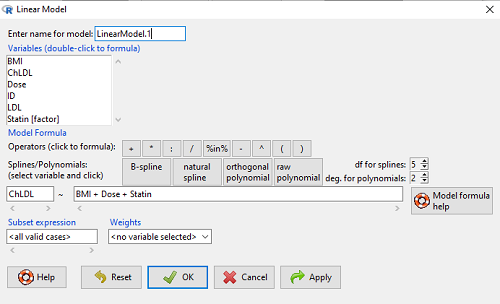
Figure 1. Screenshot of Rcmdr linear model menu with our model elements in place.
The output
summary(LinearModel.1)
Call:
lm(formula = ChLDL ~ BMI + Dose + Statin, data = cholStatins)

Residuals:
    Min      1Q  Median     3Q    Max
-3.7756 -0.5147 -0.0449 0.5038 4.3821

Coefficients:
                      Estimate Std. Error t value Pr(>|t|)
(Intercept)           1.016715   1.178430   0.863 0.39041
BMI                   0.058078   0.047012   1.235 0.21970
Dose                 -0.014197   0.004829  -2.940 0.00411 **
Statin[Statin2]       0.514526   0.262127   1.963 0.05255 .
---
Signif. codes: 0 '***' 0.001 '**' 0.01 '*' 0.05 '.' 0.1 ' ' 1

Residual standard error: 1.31 on 96 degrees of freedom
Multiple R-squared: 0.1231, Adjusted R-squared: 0.09565
F-statistic: 4.49 on 3 and 96 DF, p-value: 0.005407
Question. What are the estimates of the model coefficients (rounded)?
 = intercept = 1.017
 = slope for variable BMI = 0.058
 = slope for variable Dose = -0.014
 = slope for variable Statin = -0.515
Question. Which of the three coefficients were statistically different from their null hypothesis (p-value < 5%)?
Answer: Only coefficient was judged statistically significant at the Type I error level of 5% (p = 0.0041). Of the four null hypotheses we have for the coefficients:
 = 0
= 0 = 0
= 0 = 0; we only reject the null hypothesis for
 Dosecoefficient. = 0)
= 0)
The important take-home concept is about the lack of a direct relationship between the magnitude of the estimate of the coefficient and the likelihood that it will be statistically significant! In absolute value terms  , but was not close to statistical significance (p = 0.220).
We generate a 2D scatterplot and include the regression lines (by group=Statin) to convey the relationship between at least one of the predictors (Fig 2).
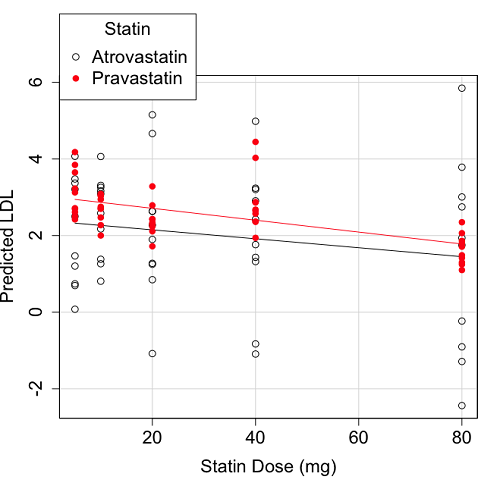
Figure 2. Scatter plot of predicted LDL against dose of a statin drug. Regression lines represent the different statin drugs (Statin1, Statin2).
Question. Based on the graph, can you explain why there will be no statistical differences between levels of the statin drug type, Statin1 (shown open circles) vs. Statin2 (shown closed red circles).
Because we have two predictors (BMI and Statin Dose), you may also elect to use a 3D-scatterplot. Here’s one possible result (Fig 3).
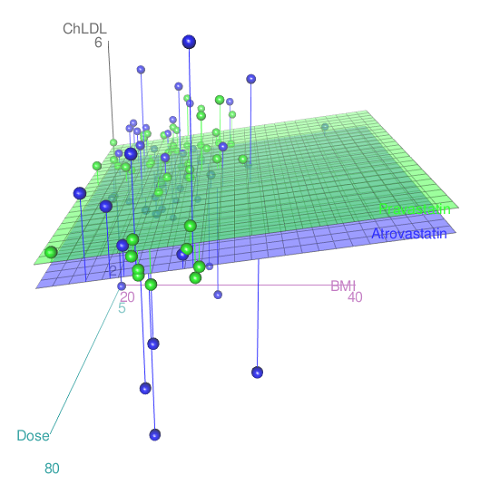
Figure 3. 3D plot of BMI and dose of Statin drugs on change in LDL levels (green Statin2, blue Statin1).
R code for Figure 3.
Graph made in Rcmdr: Graphs → 3D Graph → 3D scatterplot …
scatter3d(ChLDL~BMI+Dose|Statin, data=diabetesCholStatin, fit="linear",
residuals=TRUE, parallel=FALSE, bg="white", axis.scales=TRUE, grid=TRUE,
ellipsoid=FALSE)
Note 2: Figure 3 is a challenging graphic to interpret. I wouldn’t use it because it doesn’t convey a strong message. With some effort we can see the two planes representing mean differences between the two statin drugs across all predictors, but it’s a stretch. No doubt the graph can be improved by changing colors, for example, but I think the 2d plot Figure 2 works better). Alternatively, if the platform allows, you can use animation options to help your reader see the graph elements. Interactive graphics are very promising and, again, unsurprisingly, there are several R packages available. For this example, plot3d() of the package rgl can be used. Figure 4 is one possible version; I saved images and made animated gif.
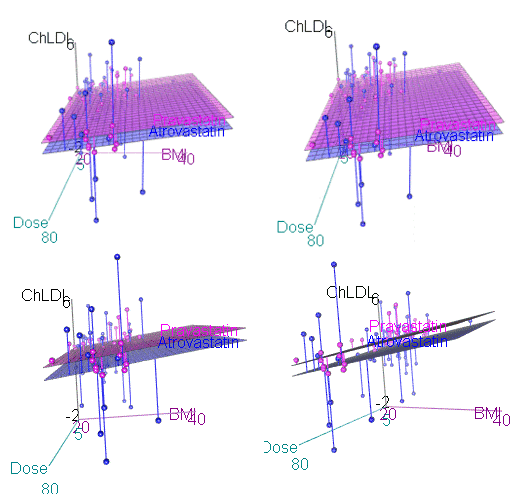
Figure 4. An example of a possible interactive 3D plot; the file embedded in this page is not interactive, just an animation.
Diagnostic plots
While visualization concerns are important, let’s return to the statistics. All evaluations of regression equations should involve an inspection of the residuals. Inspection of the residuals allows you to decide if the regression fits the data; if the fit is adequate, you then proceed to evaluate the statistical significance of the coefficients.
The default diagnostic plots (Fig 5) R provides are available from
Rcmdr: Models → Graphs → Basic diagnostics plots
Four plots are returned
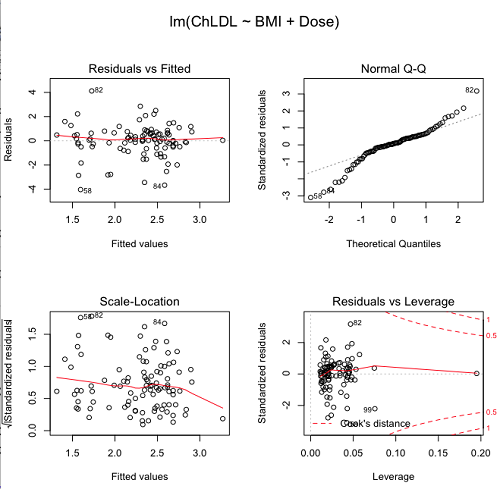
Figure 5. R’s default regression diagnostic plots.
Each of these diagnostic plots in Figure 4 gives you clues about the model fit.
- Plot of residuals vs. fitted helps you identify patterns in the residuals
- Normal Q-Q plot helps you to see if the residuals are approximately normally distributed
- Scale-location plot provides a view of the spread of the residuals
- The residuals vs. leverage plot allows you to identify influential data points.
We introduced these plots in Chapter 17.8 when we discussed fit of simple linear model to data. My conclusion? No obvious trend in residuals, so linear regression is a fit to the data; data not normally distributed Q-Q plot shows S-shape.
Interpreting the diagnostic plots for this problem
The “Normal Q-Q” plot allows us to view our residuals against a normal distribution (the dotted line). Our residuals do no show an ideal distribution: low for the first quartile, about on the line for intermediate values, then high for the 3rd and 4th quartile residuals. If the data were bivariate normal we would see the data fall along a straight line. The “S-shape” suggests log-transformation of the response and or one or more of the predictor variables.
There also seems to be a pattern in residuals vs the predicted (fitted) values. There is a trend of increasing residuals as cholesterol levels increase, which is particularly evident in the “scale-location” plot. Residuals tended to be positive at low and high doses, but negative at intermediate doses. This suggests that the relationship between predictors and cholesterol levels may not be linear, and it demonstrates what statisticians refer to as a monotonic spread of residuals.
The last diagnostic plot looks for individual points that influence, change, or “leverage” the regression — in other words, if a point is removed, does the general pattern change? If so, then the point had “leverage” and thus we need to decide whether or not to include the datum. diagnostic plots Cook’s distance is a measure of the influence of a point in regression. Points with large Cook’s distance values warrant additional checking.
The multicollinearity problem
Statistical model building is a balancing act by the statistician. While simpler models may be easier to interpret and, perhaps, to use, it is a basic truism that the more predictor variables the model includes, the more realistic the statistical model. However, each additional parameter that is added to the statistical model must be independent of all other parameters already in the model. To the extent that this assumption is violated, the problem is termed multicollinearity. If predictor variables are highly correlated, then they are essentially just linear combinations and do not provide independent evidence. For example, one would naturally not include two core body temperature variables in a statistical model on basal metabolic rate, one in degrees Fahrenheit and the other in degrees Celsius, because it is a simple linear conversion between the two units. This would be an example of structural collinearity: the collinearity is because of misspecification of the model variables. In contrast, collinearity among predictor variables may because the data are themselves correlated. For example, if multiple measures of body size are included: weight, height, length of arm, etc., then we would expect these to be correlated, ie, data multicollinearity.
Collinearity in statistical models may have a number of undesirable effects on a multiple regression model. These include
- estimates of coefficients not stable: with collinearity, values of coefficients depend on other variables in the model; if collinear predictors, then the assumption of independent predictor variables is violated.
- precision of the estimates decreases (standard error of estimates increase).
- statistical power decreases.
- p-values for individual coefficients not trust worthy.
Tolerance and Variance Inflation Factor
Absence of multicollinearity is important assumption of multiple regression. A partial test is to calculate product moment correlations among predictor variables. For example, when we calculate the correlation between BMI and Dose for our model, we get r = 0.101 (P = 0.3186), and therefore would tentatively conclude that there was little correlation between our predictor variables.
A number of diagnostic statistics have been developed to test for multicollinearity. Tolerance for a particular independent variable (Xi) is defined as 1 minus the proportion of variance it shares with the other independent variables in the regression analysis (1 − R2i) (O’Brien 2007). Tolerance reports the proportion of total variance explained by adding the Xi–th predictor variable that is unrelated to the other variables in the model. A small value for tolerance indicates multicollinearity — and that the predictor variable is nearly a perfect combination (linear) of the variables already in the model and therefore should be omitted from the model. Because tolerance is defined in relation to the coefficient of determination you can interpret a tolerance score as the unique variance accounted for by a predictor variable.
A second, related diagnostic of multicollinearity is called the Variance Inflation Factor, VIF. VIF is the inverse of tolerance.
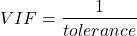
VIF shows how much of the variance of a regression coefficient is increased because of collinearity with the other predictor variables in the model. VIF is easy to interpret: a tolerance of 0.01 has a VIF of 100; a tolerance of 0.1 has a VIF of 10; a tolerance of 0.5 has a VIF of 2, and so on. Thus, small values of tolerance and large values of VIF are taken as evidence of multicollinearity.
Rcmdr: Models → Numerical diagnostics → Variation-inflation factors
vif(RegModel.2)
      BMI     Dose
1.010256 1.010256
A rule of thumb is that if VIF is greater than 5 then there is multicollinearity; with VIF values close to one we would conclude, like our results from the partial correlation estimate above, that there is little evidence for a problem of collinearity between the two predictor variables. They can therefore remain in the model.
Solutions for multicollinearity
If there is substantial multicollinearity then you cannot simply trust the estimates of the coefficients. Assuming that there hasn’t been some kind of coding error on your part, then you may need to find a solution. One solution is to drop one of the predictor variables and redo the regression model. Another option is to run what is called a Principal Components Regression (PCR). One takes the predictor variables and runs a Principal Component Analysis to reduce the number of variables, then the regression is run on the PCA components. By definition, the PCA components are independent of each other. Another option is to use ridge regression approach.
Note 3. Principal Component Analysis (PCA) is a dimensionality reduction technique that finds new uncorrelated variables (principal components) by maximizing variance. Principal Component Regression (PCR) uses PCA as a preprocessing step to create a regression model. The key difference is that PCA is an unsupervised method for data transformation, whereas PCR is a supervised regression technique that uses the components from PCA to predict an outcome. It’s probably not a great idea to use the acronym PCR in our biology reports; easily confused with polymerase chain reaction
Like any diagnostic rule, however, one should not blindly apply a rule of thumb. A VIF of 10 or more may indicate multicollinearity, but it does not necessarily lead to the conclusion that the linear regression model requires that the researcher reduce the number of predictor variables or analyze the problem using a different statistical method to address multicollinearity as the sole criteria of a poor statistical model. Rather, the researcher needs to address all of the other issues about model and parameter estimate stability, including sample size. Unless the collinearity is extreme (like a correlation of 1.0 between predictor variables!), larger sample sizes alone will work in favor of better model stability (by lowering the sample error) (O’Brien 2007).
Questions
- Write up three learning outcomes for this page. Hint: Point your favorite generative AI to this page and ask for help.
- Please explain why the magnitude of the slope is not the key to statistical significance of a slope? Hint: look at the equation of the t-test for statistical significance of the slope.
- Consider the following scenario. A researcher measures his subjects multiple times for blood pressure over several weeks, then plots all of the values over time. In all, the data set consists of thousands of readings. He then proceeds to develop a model to explain blood pressure changes over time. What kind of collinearity is present in his data set? Explain your choice.
- We noted that
Dosecould be viewed as categorical variable. ConvertDoseto factor variable (fDose) and redo the linear model. Compare the summary output and discuss the additional coefficients.- Use Rcmdr: Data → Manage variables in active data set → Convert numeric Variables to Factors to create a new factor variable
fDose. It’s ok to use the numbers as factor levels.
- Use Rcmdr: Data → Manage variables in active data set → Convert numeric Variables to Factors to create a new factor variable
- We flagged the change in LDL as likely to be not normally distributed. Create a log10-transformed variable for
ChLDLand perform the multiple regression again.- Write the new statistical model
- Obtain the regression coefficients — are they statistically significant?
- Run basic diagnostic plots and evaluate for
Quiz Chapter 18.1
Multiple Linear Regression
Data set
| ID | Statin | Dose | BMI | LDL | ChLDL |
|---|---|---|---|---|---|
| 1 | Statin2 | 5 | 19.5 | 3.497 | 2.714778 |
| 2 | Statin1 | 20 | 20.2 | 4.268 | 1.276483 |
| 3 | Statin2 | 40 | 20.3 | 3.989 | 2.677377 |
| 4 | Statin2 | 20 | 20.3 | 3.502 | 2.430618 |
| 5 | Statin2 | 80 | 20.4 | 3.766 | 1.79463 |
| 6 | Statin2 | 20 | 20.6 | 3.44 | 2.234295 |
| 7 | Statin1 | 20 | 20.7 | 3.414 | 2.635305 |
| 8 | Statin1 | 10 | 20.8 | 3.222 | 0.809181 |
| 9 | Statin1 | 10 | 21.1 | 4.04 | 3.259599 |
| 10 | Statin1 | 40 | 21.2 | 4.429 | 1.763997 |
| 11 | Statin1 | 5 | 21.2 | 3.528 | 3.369377 |
| 12 | Statin1 | 40 | 21.5 | 3.01 | -0.827154 |
| 13 | Statin2 | 20 | 21.6 | 3.393 | 2.11172 |
| 14 | Statin1 | 10 | 21.7 | 4.512 | 3.166238 |
| 15 | Statin1 | 80 | 22 | 5.449 | 3.00833 |
| 16 | Statin2 | 10 | 22.2 | 4.03 | 3.05013 |
| 17 | Statin2 | 40 | 22.2 | 3.911 | 2.646034 |
| 18 | Statin2 | 10 | 22.2 | 3.724 | 2.945656 |
| 19 | Statin1 | 5 | 22.2 | 3.238 | 3.209584 |
| 20 | Statin2 | 10 | 22.5 | 4.123 | 3.088763 |
| 21 | Statin1 | 20 | 22.6 | 3.859 | 5.152548 |
| 22 | Statin1 | 10 | 23 | 4.926 | 2.58483 |
| 23 | Statin2 | 20 | 23 | 3.512 | 2.291975 |
| 24 | Statin1 | 5 | 23 | 3.838 | 1.469 |
| 25 | Statin2 | 20 | 23.1 | 3.548 | 2.34079 |
| 26 | Statin1 | 5 | 23.1 | 3.424 | 1.204346 |
| 27 | Statin1 | 40 | 23.2 | 3.709 | 3.238179 |
| 28 | Statin1 | 80 | 23.2 | 4.786 | 2.748643 |
| 29 | Statin1 | 20 | 23.3 | 4.103 | 1.250082 |
| 30 | Statin1 | 40 | 23.4 | 3.341 | 1.432292 |
| 31 | Statin1 | 10 | 23.5 | 3.828 | 1.381755 |
| 32 | Statin2 | 10 | 23.8 | 4.02 | 3.039187 |
| 33 | Statin1 | 20 | 23.8 | 3.942 | 0.848328 |
| 34 | Statin2 | 20 | 23.8 | 2.89 | 1.721163 |
| 35 | Statin1 | 80 | 23.9 | 3.326 | 1.939346 |
| 36 | Statin1 | 10 | 24.1 | 4.071 | 3.090741 |
| 37 | Statin1 | 40 | 24.1 | 4.222 | 1.322305 |
| 38 | Statin2 | 10 | 24.1 | 3.44 | 2.472223 |
| 39 | Statin1 | 5 | 24.2 | 3.507 | 0.076817 |
| 40 | Statin2 | 20 | 24.2 | 3.647 | 2.425758 |
| 41 | Statin2 | 80 | 24.3 | 3.812 | 1.710575 |
| 42 | Statin2 | 40 | 24.3 | 3.305 | 1.940572 |
| 43 | Statin2 | 5 | 24.3 | 3.455 | 2.502214 |
| 44 | Statin2 | 5 | 24.4 | 4.258 | 3.228008 |
| 45 | Statin1 | 5 | 24.4 | 4.16 | 3.477747 |
| 46 | Statin2 | 80 | 24.4 | 4.128 | 2.063247 |
| 47 | Statin1 | 80 | 24.5 | 4.507 | 3.784422 |
| 48 | Statin1 | 5 | 24.5 | 3.553 | 0.695709 |
| 49 | Statin2 | 10 | 24.5 | 3.616 | 2.69987 |
| 50 | Statin2 | 80 | 24.6 | 3.372 | 1.300401 |
| 51 | Statin2 | 80 | 24.6 | 3.667 | 1.418109 |
| 52 | Statin2 | 5 | 24.7 | 3.854 | 3.126671 |
| 53 | Statin1 | 80 | 24.7 | 3.32 | -1.286439 |
| 54 | Statin2 | 5 | 24.7 | 3.756 | 2.423664 |
| 55 | Statin1 | 40 | 24.8 | 4.398 | 2.907473 |
| 56 | Statin2 | 40 | 24.9 | 3.621 | 2.362429 |
| 57 | Statin1 | 10 | 25 | 3.17 | 1.264656 |
| 58 | Statin1 | 80 | 25.1 | 3.424 | -2.436908 |
| 59 | Statin2 | 10 | 25.1 | 3.196 | 2.001465 |
| 60 | Statin2 | 80 | 25.2 | 3.367 | 1.100704 |
| 61 | Statin1 | 80 | 25.2 | 3.067 | -0.23154 |
| 62 | Statin1 | 20 | 25.3 | 3.678 | 4.662866 |
| 63 | Statin2 | 5 | 25.5 | 4.077 | 2.611705 |
| 64 | Statin1 | 20 | 25.5 | 3.678 | 2.633053 |
| 65 | Statin2 | 5 | 25.6 | 4.994 | 4.180082 |
| 66 | Statin1 | 20 | 25.8 | 3.699 | 1.899031 |
| 67 | Statin1 | 10 | 25.9 | 3.507 | 4.063757 |
| 68 | Statin2 | 20 | 25.9 | 3.445 | 2.303761 |
| 69 | Statin1 | 5 | 26 | 4.025 | 2.501427 |
| 70 | Statin1 | 5 | 26.3 | 3.616 | 0.740863 |
| 71 | Statin2 | 40 | 26.4 | 3.937 | 2.573321 |
| 72 | Statin2 | 40 | 26.4 | 3.823 | 2.363839 |
| 73 | Statin1 | 10 | 26.7 | 4.46 | 2.174198 |
| 74 | Statin2 | 5 | 26.7 | 5.03 | 3.845271 |
| 75 | Statin2 | 10 | 26.7 | 3.73 | 2.708896 |
| 76 | Statin2 | 10 | 26.7 | 3.232 | 2.272627 |
| 77 | Statin1 | 80 | 26.8 | 3.693 | 1.751169 |
| 78 | Statin2 | 80 | 27 | 4.108 | 1.86131 |
| 79 | Statin2 | 40 | 27.2 | 5.398 | 4.028977 |
| 80 | Statin2 | 80 | 27.2 | 4.517 | 2.348903 |
| 81 | Statin2 | 20 | 27.3 | 3.901 | 2.790047 |
| 82 | Statin1 | 80 | 27.3 | 5.247 | 5.848545 |
| 83 | Statin2 | 80 | 27.4 | 3.507 | 1.247863 |
| 84 | Statin1 | 20 | 27.4 | 3.807 | -1.079928 |
| 85 | Statin2 | 80 | 27.6 | 3.574 | 1.486789 |
| 86 | Statin1 | 40 | 27.8 | 4.16 | 2.427753 |
| 87 | Statin2 | 20 | 28 | 4.501 | 3.284648 |
| 88 | Statin2 | 5 | 28.1 | 3.621 | 2.699007 |
| 89 | Statin1 | 40 | 28.2 | 3.652 | -1.091256 |
| 90 | Statin2 | 40 | 28.2 | 4.191 | 2.874231 |
| 91 | Statin2 | 40 | 28.4 | 5.791 | 4.445454 |
| 92 | Statin1 | 40 | 28.6 | 4.698 | 3.202874 |
| 93 | Statin1 | 5 | 29 | 4.32 | 4.070753 |
| 94 | Statin2 | 10 | 29.1 | 3.776 | 2.751281 |
| 95 | Statin2 | 5 | 29.2 | 4.703 | 3.64949 |
| 96 | Statin2 | 40 | 29.9 | 4.128 | 2.864691 |
| 97 | Statin1 | 40 | 30.4 | 4.693 | 4.983704 |
| 98 | Statin1 | 20 | 30.4 | 4.123 | 2.273898 |
| 99 | Statin1 | 80 | 30.5 | 3.921 | -0.903438 |
| 100 | Statin1 | 10 | 36.5 | 4.175 | 3.311437 |
Chapter 18 contents
17.7 – Regression model fit
Introduction
In Chapter 17.5 and 17.6 we introduced the example of tadpoles body size and oxygen consumption. We ran a simple linear regression, with the following output from R
RegModel.1 <- lm(VO2~Body.mass, data=example.Tadpole)

summary(RegModel.1)

Call:
lm(formula = VO2 ~ Body.mass, data = example.Tadpole)

Residuals:
    Min      1Q    Median       3Q       Max
-202.26 -126.35     30.20    94.01    222.55

Coefficients:
                Estimate     Std. Error    t value    Pr(>|t|)
(Intercept)      -583.05         163.97     -3.556     0.00451 **
Body.mass         444.95          65.89      6.753   0.0000314 ***
---
Signif. codes: 0 '***' 0.001 '**' 0.01 '*' 0.05 '.' 0.1 ' ' 1

Residual standard error: 145.3 on 11 degrees of freedom
Multiple R-squared: 0.8057, Adjusted R-squared: 0.788
F-statistic: 45.61 on 1 and 11 DF, p-value: 0.00003144
You should be able to pick out the estimates of slope and intercept from the table (intercept was -583 and slope was 445). Additionally, as part of your interpretation of the model, you should be able to report how much variation in VO2 was explained by tadpole body mass (coefficient of determination,  , was 0.81, which means about 81% of variation in oxygen consumption by tadpoles is explained by knowing the body mass of the tadpole.
What’s left to do? We need to evaluate how well our model fits the data, i.e., we evaluate regression model fit. By fit we mean, how well does our model agree to the raw data? A poor fit and the model predictions are far from the raw data; a good fit, the model accurately predicts the raw data. In other words, if we draw a line through the raw data, a good fit line crosses through most of the points — a poor fit the line rarely passes through the cloud of points.
How to judge fit? This we can do by evaluating the error components relative to the portion of the model that explains the data. Additionally, we can perform a number of diagnostics of the model relative to the assumptions we made to perform linear regression. These diagnostics form the subject of Chapter 17.8. Here, we ask how well does the model,

fit the data?
Model fit statistics
The second part of fitting a model is to report how well the model fits the data. The next sections apply to this aspect of model fitting. The first area to focus on is the magnitude of the residuals: the greater the spread of residuals, the less well a fitted line explains the data.
In addition to the output from lm() function, which focuses on the coefficients, we typically generate the ANOVA table also.
Anova(RegModel.1, type="II")
Anova Table (Type II tests)

Response: VO2
                Sum Sq   Df    F value       Pr(>F)
Body.mass       962870    1     45.605   0.00003144 ***
Residuals       232245   11
---
Signif. codes: 0 '***' 0.001 '**' 0.01 '*' 0.05 '.' 0.1 ' ' 1
Standard error of regression
S, the Residual Standard Error (aka Standard error of regression), is an overall measure to indicate the accuracy of the fitted line: it tells us how good the regression is in predicting the dependence of response variable on the independent variable. A large value for S indicates a poor fit. One equation for S is given by
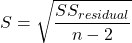
In the above example, S = 145.3 (underlined, bold in regression output above). We can see how if  is large, S will be large indicating poor fit of the linear model to the data. However, by itself S is not of much value as a diagnostic as it is difficult to know what to make of 145.3, for example. Is this a large value for S? Is it small? We don’t have any context to judge S, so additional diagnostics have been developed.
Coefficient of determination
, the coefficient of determination, is also used to describe model fit. can take on values between 0 and 1 (0% to 100%). A good model fit has a high value. In our example above,  or 80.57%. One equation for is given by
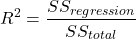
A value of close to 1 means that the regression “explains” nearly all of the variation in the response variable, and would indicate the model is a good fit to the data. As we mentioned in Chapter 17.2, the coefficient of determination, , is the squared value of r, the product moment correlation.
Adjusted R-squared
Before moving on we need to remark on the difference between and adjusted . For Simple Linear Regression there is but one predictor variable, X; for multiple regression there can be many additional predictor variables. Without some correction, will increase with each additional predictor variables. This doesn’t mean the model is more useful, however, and in particular, one cannot compare between models with different numbers of predictors. Therefore, an adjustment is used so that the coefficient of determination remains a useful way to assess how reliable a model is and to permit comparisons of models. Thus, we have the Adjusted  , which is calculated as

In our example above, Adjusted R 2 = 0.3806 or 38.06%.
Which should you report? Adjusted ,because it is independent of the number of parameters in the model.
Both and S are useful for regression diagnostics, a topic which we will discuss next (Chapter 17.8).
Questions
- Write up three learning outcomes for this page. Hint: Point your favorite generative AI to this page and ask for help.
- As you may know, the US census is used to reapportion congress and also to determine the number of electoral college votes. In honor of the election for US President that’s just days away, in the next series of questions in this Chapter and subsequent sections of Chapter 17 and 18, I’ll ask you to conduct a regression analysis on the electoral college. For starters, make the regression of Electoral votes on 2010 census population. (Ignore for now the other columns, just focus on POP_2019 and Electoral.) Report the
- regression coefficients (slope, intercept)
- percent of the variation in electoral college votes explained by the regression ( ).
- Make a scatterplot and add the regression line to the plot
Quiz Chapter 17.7
Regression model fit
Data set
USA population year 2010 and year 2019 with Electoral College counts
| State | Region | Division | POP_2010 | POP_2019 | Electoral |
|---|---|---|---|---|---|
| Alabama | South | East South Central | 4779736 | 4903185 | 9 |
| Alaska | West | Pacific | 710231 | 731545 | 3 |
| Arizona | West | Mountain | 6392017 | 7278717 | 11 |
| Arkansas | South | West South Central | 2915918 | 3017804 | 6 |
| California | West | Pacific | 37253956 | 39512223 | 55 |
| Colorado | West | Mountain | 5029196 | 5758736 | 9 |
| Connecticut | Northeast | New England | 3574097 | 3565287 | 7 |
| Delaware | South | South Atlantic | 897934 | 982895 | 3 |
| District of Columbia | South | South Atlantic | 601723 | 705749 | 3 |
| Florida | South | South Atlantic | 18801310 | 21477737 | 29 |
| Georgia | South | South Atlantic | 9687653 | 10617423 | 16 |
| Hawaii | West | Pacific | 1360301 | 1415872 | 4 |
| Idaho | West | Mountain | 1567582 | 1787065 | 4 |
| Illinois | Midwest | East North Central | 12830632 | 12671821 | 20 |
| Indiana | Midwest | East North Central | 6483802 | 6732219 | 11 |
| Iowa | Midwest | West North Central | 3046355 | 3155070 | 6 |
| Kansas | Midwest | West North Central | 2853118 | 2913314 | 6 |
| Kentucky | South | East South Central | 4339367 | 4467673 | 8 |
| Louisiana | South | West South Central | 4533372 | 4648794 | 8 |
| Maine | Northeast | New England | 1328361 | 1344212 | 4 |
| Maryland | South | South Atlantic | 5773552 | 6045680 | 10 |
| Massachusetts | Northeast | New England | 6547629 | 6892503 | 11 |
| Michigan | Midwest | East North Central | 9883640 | 9883635 | 16 |
| Minnesota | Midwest | West North Central | 5303925 | 5639632 | 10 |
| Mississippi | South | East South Central | 2967297 | 2976149 | 6 |
| Missouri | Midwest | West North Central | 5988927 | 6137428 | 10 |
| Montana | West | Mountain | 989415 | 1068778 | 3 |
| Nebraska | Midwest | West North Central | 1826341 | 1934408 | 5 |
| Nevada | West | Mountain | 2700551 | 3080156 | 6 |
| New Hampshire | Northeast | New England | 1316470 | 1359711 | 4 |
| New Jersey | Northeast | Mid-Atlantic | 8791894 | 8882190 | 14 |
| New Mexico | West | Mountain | 2059179 | 2096829 | 5 |
| New York | Northeast | Mid-Atlantic | 19378102 | 19453561 | 29 |
| North Carolina | South | South Atlantic | 9535483 | 10488084 | 15 |
| North Dakota | Midwest | West North Central | 672591 | 762062 | 3 |
| Ohio | Midwest | East North Central | 11536504 | 11689100 | 18 |
| Oklahoma | South | West South Central | 3751351 | 3956971 | 7 |
| Oregon | West | Pacific | 3831074 | 4217737 | 7 |
| Pennsylvania | Northeast | Mid-Atlantic | 12702379 | 12801989 | 20 |
| Rhode Island | Northeast | New-England | 1052567 | 1059361 | 4 |
| South Carolina | South | South-Atlantic | 4625364 | 5148714 | 9 |
| South Dakota | Midwest | West-North-Central | 814180 | 884659 | 3 |
| Tennessee | South | East-South-Central | 6346105 | 6829174 | 11 |
| Texas | South | West-South-Central | 25145561 | 28995881 | 38 |
| Utah | West | Mountain | 2763885 | 3205958 | 6 |
| Vermont | Northeast | New-England | 625741 | 623989 | 3 |
| Virginia | South | South-Atlantic | 8001024 | 8535519 | 13 |
| Washington | West | Pacific | 6724540 | 7614893 | 12 |
| West Virginia | South | South-Atlantic | 1852994 | 1792147 | 5 |
| Wisconsin | Midwest | East-North-Central | 5686986 | 5822434 | 10 |
| Wyoming | West | Mountain | 563626 | 578759 | 3 |
Chapter 17 contents
- Introduction
- Simple Linear Regression
- Relationship between the slope and the correlation
- Estimation of linear regression coefficients
- OLS, RMA, and smoothing functions
- Testing regression coefficients
- ANCOVA – Analysis of covariance
- Regression model fit
- Assumptions and model diagnostics for Simple Linear Regression
- References and suggested readings (Ch17 & 18)
17.5 – Testing regression coefficients
Introduction
Whether the goal is to create a predictive model or an explanatory model, then there are two related questions the analyst asks about the linear regression model fitted to the data:
- Does a line actually fit the data
- Is the linear regression statistically significant?
We will turn to the first question pertaining to fit in time, but for now, focus on the second question.
Like the one-way ANOVA, we have the null and alternative hypothesis for the regression model itself. We write our hypotheses for the regression
H0 : linear regression fits the data vs. HA : linear regression does not fit
We see from the output in R and Rcmdr that an ANOVA table has been provided. Thus, the test of the regression is analogous to an ANOVA — we partition the overall variability in the response variable into two parts: the first part is the part of the variation that can be explained by there being a linear regression (the linear regression sum of squares) plus a second part that accounts for the rest of the variation in the data that is not explained by the regression (the residual or error sum of squares). Thus, we have

As we did in ANOVA, we calculate Mean Squares  , where x refers to either “regression” or “residual” sums of squares and degrees of freedom. We then calculate F-values, the test statistics for the regression, to test the null hypothesis.
The degrees of freedom (DF) in simple linear regression are always

where
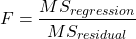
and FDFregression, DFresidual are compared to the critical value at Type I error rate α, with DFregression, DFresidual.
Linear regression inference
Estimation of the slope and intercept is a first step and should be accompanied by the calculation of confidence intervals.
What we need to know if we are to conclude that there’s a functional relationship between the X and Y variable is whether the same relationship exists in the population. We’ve sampled from the population, calculated an equation to describe the relationship between them. However, just as in all cases of inferential statistics, we need to consider the possibility that, through chance alone, we may have committed a Type I error.
The graph below (Fig 1) shows a possible outcome under a scenario in which the statistical analyst would likely conclude that there is a statistically significant linear model fit to the data, but the true relationship in the population was a slope of zero. How can this happen? Under this scenario, by chance alone the researchers sampled points (circled in red) from the population that fall along a line. We will conclude that there is linear relationship — that’s what are inferential statistics work would indicate — but there was none in the population from which the sampling was done; there would be no way for us to recognize the error except to repeat the experiment — the principal of research reproducibility — with a different sample.
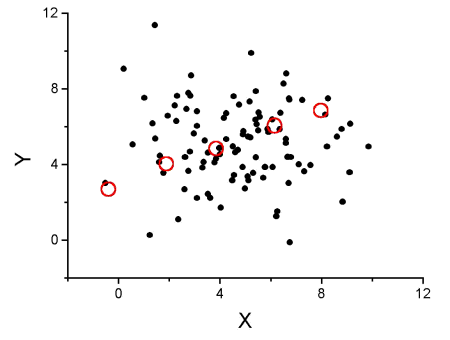
Figure 1. Scatterplot of hypothetical x,y data for which the researcher may obtain a statistically significant linear fit to sample of data from population in which null hypothesis is true relationship between x and y.
So in conclusion, you must keep in mind the meaning of statistical significance in the context of statistical inference: it is inference done on a background of random chance, the chance that sampling from the population leads to a biased sample of subjects.
Note 1. If you think about what I did with this data for Figure 1 graph, purposely selecting data that showed a linear relationship between Y and X (red circles), then you should recognize this as an example of data dredging or p-hacking, cf. discussion in Head et al (2015); Stefan and Schönbrodt (2023). However, the graph is supposed to be read as if we could do a census and therefore have full knowledge of the true relationship between y and x. The red circles indicate the chance that sampling from a population may sometimes yield incorrect conclusions.
Tests of coefficients
One criterion for a good model is that the coefficients in the model, the intercept and the slope(s) are all statistically significant.
For the statistical of the slope, b1, we generally treat the test as a two-tailed test of the null hypothesis that the regression slope is equal to zero.
H0 : b1 = 0 vs. HA : b1 ≠ 0
Similarly, for the statistical of the intercept, b0, we generally treat the test as a two-tailed test of the null hypothesis that the Y-intercept is equal to zero.
H0 : b0 = 0 vs. HA : b0 ≠ 0
For both slope and intercept we use t-statistics.

We’ll illustrate the tests of the slope and intercept by letting R and Rcmdr do the work. You’ll find this simple data set at the bottom of this page (scroll or click here). The first variable is the number of matings, the second is the size of the paired female, and the third is the size of the paired male. All body mass were in grams.
R code
After loading the worksheet into R and Rcmdr, begin by selecting
Rcmdr: Statistics → Fit model → Linear Regression
Note that more than one predictor can be entered, but only one response (dependent) variable may be selected (Fig 2).
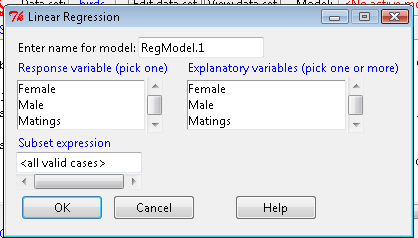
Figure 2. Screenshot linear regression menu. More than explanatory (predictor or independent) variables may be selected, but only one response (dependent) variable may be selected.
This procedure will handle simple and multiple regression problems. But before we go further, answer these two questions for the data set.
Question 1. What is the Response variable?
Question 2. What is the Explanatory variable?
Answers. See below in the R output to see if you were correct!
If there is only one predictor, then this is a Simple Linear Regression; if more than one predictor is entered, then this is a Multiple Linear Regression. We’ll get some more detail, but for now, identify and evaluate the test (p-value) of the slope coefficient (labeled after the name of the predictor variable), the test of the intercept coefficient, and some new stuff.
R output
RegModel.1 <- lm(Matings ~ Female, data=birds)
summary(RegModel.1)
Call: lm(formula = Matings ~ Female, data = birds)
Residuals:
     Min       1Q     Median         3Q        Max
-2.32805 -1.59407   -0.04359    1.77292    2.67195

Coefficients:
              Estimate    Std. Error     t value    Pr(>|t|)
(Intercept)    -8.6175        3.5323      -2.440     0.02528 *
Female          0.3670        0.1042       3.524     0.00243 **
---
Signif. codes: 0 '***' 0.001 '**' 0.01 '*' 0.05 '.' 0.1 ' ' 1
Residual standard error: 1.774 on 18 degrees of freedom
Multiple R-squared: 0.4082, Adjusted R-squared: 0.3753 F-statistic: 12.42 on 1 and 18 DF, p-value: 0.002427
In this example, slope = 0.367 and the intercept = -8.618. The first new term we encounter is called Multiple R-squared (R2) — it’s also called the coefficient of determination. It’s the ratio of the sum of squares due to the regression to the total sums of squares. R2 ranges from zero to 1, with a value of 1 indicating a perfect fit of the regression to the data.
Note 2. If you are looking for a link between correlation and simple linear regression, then here it is: R2 is the square of the product-moment correlation, r. Thus, r = √R2 see Chapter 17.2).
We introduced in Chapter 17.1 . Interpretation of R2 goes like this: If R2 is close to zero, then the regression model does not explain much of the variation in the dependent variable; conversely, if R2 is close to one, then the regression model explains a lot of the variation in the dependent variable.
Did you get the Answers?
Answer 1: Number of matings
Answer 2: Size of females
Interpreting the output
Recall that
then

From the output we see that R2 was 0.408, which means that about 40% of the variation in numbers of matings may be explained by size of the females alone.
To complete the analysis get the ANOVA table for the regression.
Rcmdr: Models → Hypothesis tests → ANOVA table…
> Anova(RegModel.1, type="II")
Anova Table (Type II tests)
            Sum Sq   Df   F value      Pr(>F)
Female      39.084    1    12.415    0.002427 **
Residuals   56.666   18
---
Signif. codes: 0 '***' 0.001 '**' 0.01 '*' 0.05 '.' 0.1 ' ' 1
With only one predictor (explanatory) variable, note that the regression test in the ANOVA is the same (has the same probability vs. the null hypothesis) as the test of the slope.
Test two slopes
A more general test of the null hypothesis involving the slope might be
H0 : b1 = b vs. HA : b1 ≠ b
where b can be any value, including zero. Again, t-test would then be used to conduct the test of the slope, where the t-test would have the form

where SEb1-b2 is the standard error of the difference between the two regression coefficients. We saw something similar to this value back when we did a paired t-test. To obtain sb1–b2, we need the pooled residual mean square and the squared sums of the X values for each of our sample.
First, the pooled (hence the subscript p) residual mean square is calculated as

where resSS and resDF refer to residual sums of squares and residual degrees of freedom for the first (1) and second (2) regression equations.
Second, the standard error of the difference between regression coefficients (squared!!) is calculated as

where the subscript “1” and “2” refer to the X values from the first sample (eg, the body size values for the males) and the second sample (eg, the body size values for the females).
Note 3. To obtain the squared sum in R and Rcmdr, use the Calc function (eg, two sum the squared X values for the females, use SUM(‘Female’*’Female’)).
We can then use our t-test, with the degrees of freedom now

Alternatively, the t-test of two slopes can be written as
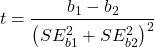
with again  .
.
In this way, we can see a way to test any two slopes for equality. This would be useful if we wanted to compare two samples (eg, males and females) and wanted to see if the regressions were the same (eg, metabolic rate covaried with body mass in the same way — that is, the slope of the relationship was the same). This situation arises frequently in biology. For example, we might want to know if male and female birds have different mean field metabolic rates, in which case we might be tempted to use a one-way ANOVA or t-test (since one factor with two levels). However, if males and females also differ for body size, then any differences we might see in metabolic rate could be due to differences in metabolic rate or to differences in the covariable body size. The test is generally referred to as the analysis of covariance (ANCOVA), which is the subject for Chapter 17.6. In brief, ANCOVA allows you to test for mean differences in traits like metabolic rate between two or more groups, but after first accounting for covariation due to another variable (eg, body size). However, ANCOVA makes the assumption that relationship between the covariable and the response variable is the same in the two groups. This is the same as saying that the regression slopes are the same. Let’s proceed to see how we can compare regression slopes, then move to a more general treatment in Chapter 17.6.
Example
For a sample of 13 tadpoles (Rana pipiens), hatched in the laboratory, oxygen consumption at rest was recorded with a YSI meter, model 51B, and a YSI oxygen – temperature probe (Yellow Spring Instruments Co., Yellow Springs, Ohio). Individual tadpoles were placed into a mason jar (volume 885 ml), with a magnetic stir bar housed in a slotted Petri dish glued to the bottom of the jar to gently stir the water. Water samples from the aquarium were used and petroleum jelly served as a sealant once the vessel had been fitted with the probe. Oxygen consumption was recorded in ppm and  values (ml O2 STP · hr-1). The tadpoles were scored for developmental stage by Gosner’s (1960) criteria. The tadpoles ranged from Gosner stage 35 to 44.
Note 4. Gosner stages 1 through 25 include the embryonic stages; By stage 31, toes develop on the limb buds; Following stage 40, substantial body changes are observed in the growing tadpole, transitioning from tailed tadpole to tail-less adult form. Complete metamorphosis is assigned Gosner stage 45.
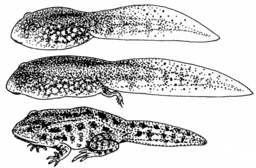
Figure 3. Pearson Scott Foresman, Public domain, via Wikimedia Commons
.png)
The question we addressed: metamorphosis of Anuran tadpoles to adults (frogs) likely involves increased metabolic demands, demands that may exceed simple allometric predictions based on increase in body size during development. Thus, we predicted that mass-specific metabolic rate for metamorphic frogs would exceed mass-specific metabolism of pre-metamorphic frogs.
M. Dohm unpublished results from my undergraduate days (1986!), you’ll find this simple data set at the bottom of this page (scroll or click here). For simplicity, we grouped all tadpoles between stages 35 and 38 as Stage I and all tadpoles between 39 and 44 as stage II. No tadpoles who completed metamorphosis were included in the dataset. It shouldn’t surprise you — with such a small sample size, the project lacked power to test the hypothesis, but many such studies, it’s worth looking at in the case anyway because the prevailing sentiment is that the metabolic cost of metamorphosis is significant — in other words, we expect a large effect size — and remains an ongoing research effort (see Burraco et al 2019).
You should confirm your self, but the slope of the regression equation of oxygen consumption (ml O2/hour) on body mass (g) was 444.95 (with SE = 65.89). Plot of data shown in Figure 4.
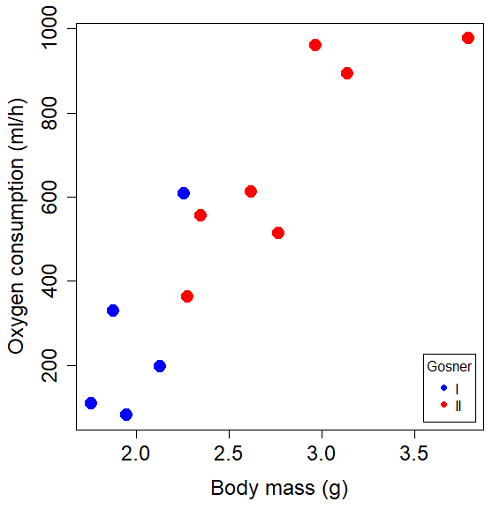
Figure 4. Scatterplot of oxygen consumption by tadpoles (blue: Gosner developmental stage I [35 – 38]; red: Gosner developmental stage II [39 – 44]), vs body mass (g).
The project looked at whether metabolism as measured by oxygen consumption was consistent across two developmental stages. Metamorphosis in frogs and other amphibians represents profound reorganization of the organism as the tadpole moves from water to air. Thus, we would predict some cost as evidenced by change in metabolism associated with later stages of development. Figure 5 shows a box plot of tadpole oxygen consumption by Gosner (1960) developmental stage.
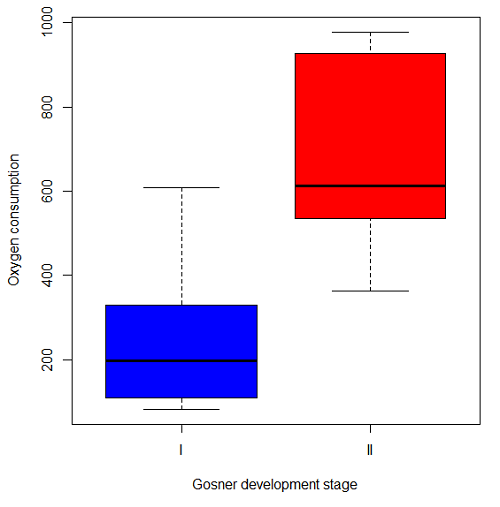
Figure 5. Boxplot of oxygen consumption by Gosner developmental stages (blue: stage I; red: stage 2).
Looking at Figure 4 we see a trend consistent with our prediction; developmental stage may be associated with increased metabolism. However, older tadpoles also tend to be larger, and the plot in Figure 4 does not account for that. Thus, body mass is a confounding variable in this example. There are several options for analysis here (eg, ANCOVA), but one way to view this is to compare the slopes for the two developmental stages. While this test does not compare the means, it does ask a related question: is there evidence of change in rate of oxygen consumption relative to body size between the two developmental stages? The assumption that the slopes are equal is a necessary step for conducting the ANCOVA, which we describe in Chapter 17.6.
So, divide the data set into two groups by developmental stage (12 tadpoles could be assigned to one of two developmental stages; one tadpole was at a lower Gosner stage than the others and so is dropped from the subset).
Gosner stage I (stages 35 – 39)
| Body mass | |
| 1.76 | 109.41 |
| 1.88 | 329.06 |
| 1.95 | 82.35 |
| 2.13 | 198 |
| 2.26 | 607.7 |
Gosner stage II (stage 40 – 44)
| Body mass | |
| 2.28 | 362.71 |
| 2.35 | 556.6 |
| 2.62 | 612.93 |
| 2.77 | 514.02 |
| 2.97 | 961.01 |
| 3.14 | 892.41 |
| 3.79 | 976.97 |
The slopes and standard errors were
| Gosner Stage I | Gosner stage II | |
| slope | 750.0 | 399.9 |
| standard error of slope | 444.6 | 111.2 |
Are the two slopes equal?
Looking at the table, we would say, no. slopes look different (750 vs 399.9). However, the errors are large and, given this is a small data set, we need to test statistically; are the slopes indistinguishable (Ho: bI = bII), where bI is the slope for the Gosner Stage I subset and bII is the slope for the Gosner Stage II subset?
To use our tests discussed above, we need sum of squared X values for Gosner Stage I and sum of squared for Gosner stage II results. We can get these from the ANOVA tables. Recall that after applying
ANOVA regression Gosner Stage I, R work
Anova(gosI.1, type="II")
Anova Table (Type II tests)

Response: VO2
            Sum Sq   Df    F value   Pr(>F)
Body.mass    89385    1     2.8461   0.1902
Residuals    94220    3
ANOVA regression Gosner Stage II
Anova(gosII.1, type="II")
Anova Table (Type II tests)

Response: VO2
             Sum Sq    Df   F value  Pr(>F)
Body.mass    258398     1    12.935  0.0156 *
Residuals     99882     5
Rcmdr: Models – Compare model coefficients..
compareCoefs(gosI.1, gosII.1)
Calls:
1: lm(formula = VO2 ~ Body.mass, data = gosI)
2: lm(formula = VO2 ~ Body.mass, data = gosII)

            Model 1    Model 2
(Intercept)   -1232       -441
SE              891        321

Body.mass       750        400
SE              445        111
SSgosnerI = 89385
SSgosnerII = 258398
We also need the residual Mean Squares (SSresid/DF resid) from the ANOVA tables
MSgosnerI = 94220/3 = 31406.67
MSgosnerII = 99882/5 = 19976.4
[under construction] Therefore, the pooled residual MS (s2x.y)p = nnn and the pooled SE of the difference sb1-b2 = nnn using the formulas above.
Now, we plug in the values I can get a t-test = (750 – 444.6)/nnn = nnn
The DF for this t-test are n1 + n2 – 4 = 4 + 6 – 4 = 6.
Using Table of Student’s t distribution (Appendix), I find the two-tailed critical value for t at alpha = 5% with DF = 6 is equal to 3.758. Since nn >> 3.758, we conclude that the two slopes are statistically different and P < 0.001 that the null hypothesis (Ho: bw = ball) was true. (edit: fix nn).
Questions
1. Write up three learning outcomes for this page. Hint: Point your favorite generative AI to this page and ask for help.
2. Metabolic rates like oxygen consumption over time are well-known examples of allometric relationships. That is, many biological variables (eg, is related as a · Mb, where M is body mass, b is scaling exponent (the slope!), and a is a constant (the intercept!)), and best evaluated on log-log scale. Redo the linear regression of oxygen consumption vs. body mass for the tadpoles, but this time, apply log10-transform to VO2 and to Body.mass. For example
Data in this page, bird matings
| Body.Mass | Matings |
|---|---|
| 29 | 0 |
| 29 | 2 |
| 29 | 4 |
| 32 | 4 |
| 32 | 2 |
| 35 | 6 |
| 36 | 3 |
| 38 | 3 |
| 38 | 5 |
| 38 | 8 |
| 40 | 6 |
Data in this page, Oxygen consumption, , of Anuran tadpoles
| Gosner | Body mass | VO2 |
|---|---|---|
| NA | 1.46 | 170.91 |
| I | 1.76 | 109.41 |
| I | 1.88 | 329.06 |
| I | 1.95 | 82.35 |
| I | 2.13 | 198 |
| II | 2.28 | 362.71 |
| I | 2.26 | 607.7 |
| II | 2.35 | 556.6 |
| II | 2.62 | 612.93 |
| II | 2.77 | 514.02 |
| II | 2.97 | 961.01 |
| II | 3.14 | 892.41 |
Gosner refers to Gosner (1960), who developed a criteria for judging metamorphosis staging.
Quiz Chapter 17.5
Testing regression coefficients
Chapter 17 contents
- Introduction
- Simple Linear Regression
- Relationship between the slope and the correlation
- Estimation of linear regression coefficients
- OLS, RMA, and smoothing functions
- Testing regression coefficients
- ANCOVA – Analysis of covariance
- Regression model fit
- Assumptions and model diagnostics for Simple Linear Regression
- References and suggested readings (Ch17 & 18)
17.3 – Estimation of linear regression coefficients
Introduction
In discussing correlations we made the distinction between inference, testing the statistical significance of the estimate, and the process of getting the estimate of the parameter itself. Estimating parameters is possible for any data set; whether or not the particular model is a good and useful model is another matter. Statisticians speak about the fit of a model… that a model with one or more independent predictor variables explains a substantial amount of the variation in the dependent variable, that it describes the relationship between the predictors and the dependent variable without bias.
Note 1. We introduced the concept of statistical fit in our discussion of Chi-square, goodness of fit, Chapter 9.1.
A number of tools have been developed to assess model fit. For starters, I’ll list just two ways you can approach whether or not a linear model fits your data ore requires some intervention on your part.
Assess fit of a linear model
Recall our R output from the regression of Number of Matings on Body Mass from the bird data set. We used the linear model function.
LinearModel.1 <- lm(Matings ~ Body.Mass, data=bird_matings)
summary(LinearModel.1)
Call: lm(formula = Matings ~ Body.Mass, data = bird_matings)
Residuals:       Min       1Q    Median       3Q      Max
            -2.29237 -1.34322 .-0.03178..1.33792 .2.70763
Coefficients:
             Estimate  Std. Error  t value  Pr(>|t|)
(Intercept)   -8.4746      4.6641   -1.817    0.1026
Body.Mass      0.3623      0.1355    2.673    0.0255 *
---
Signif. codes: 0 '***' 0.001 '**' 0.01 '*' 0.05 '.' 0.1 ' ' 1
Residual standard error: 1.776 on 9 degrees of freedom
Multiple R-squared: 0.4425, Adjusted R-squared: 0.3806
F-statistic: 7.144 on 1 and 9 DF, p-value: 0.02551
Request R to print the ANOVA table.
Anova(RegModel.1, type="II")
Anova Table (Type II tests)
Response: Matings
            Sum Sq   Df   F value    Pr(>F)
Body.Mass   22.528    1    7.1438   0.02551 *
Residuals   28.381    9
With a little rounding we have the following statistical model

and in English, Number of matings equals Body.mass multiplied by 0.36 then subtract 8.5; the intercept was -8.5, the slope was 0.36.
Note 2. The results of the regression analyses were stored in the object called “LinearModel.1“. This is a nice feature of Rcmdr — it automatically provides an object name for you. Note that with each successive run of the linear model function via Rcmdr that it will change the object name by adding numbers successively. For example, after LinearModel.1 the next run of lm() in Rcmdr will automatically be called “LinearModel.2” and so on. In your own work you may specify the names of the objects directly or allow Rcmdr to do it for you, but do keep track of the object names!
From the R output we see that the estimate of the slope was +0.36, statistically different from zero (p = 0.025). The intercept was -8.5, but not statistically significant (p = 0.103), which means the intercept may be zero.
As a general rule, if you make an estimate of a parameter or coefficient, then you should provide a confidence interval of the form.
estimate + critical value X standard error of the estimate
Note 3. Reminder: Approximate 95% CI can be obtained by + twice the standard error for the coefficient.
For confidence interval of regression slope we have a couple of options in R
Option 1.
confint(LinearModel.1, 'Body.Mass', level=0.95)

               2.5 %    97.5 %
Body.Mass 0.05565899 0.6689173
Option 2.
Goal: Extract the coefficients from the output of the linear model and calculate the approximate SE with nine degrees of freedom. This is the big advantage of saving output from functions as objects. Typically, much more information is about the results are available, and, additionally, can be retrieved for additional use. Extracting coefficients from the objects is the best option, but does come with a learning curve. Let’s get started.
First, what information is available in the linear model output beyond the default information? To find out, use the names() function
names(LinearModel.1)
R output
 [1] "coefficients"  "residuals"     "effects"       "rank"
 [5] "fitted.values" "assign"        "qr"            "df.residual"
 [9] "xlevels"       "call"          "terms"         "model"
Another way is to use the summary() function call.
summary(LinearModel.1)$coefficients
              Estimate Std. Error   t value   Pr(>|t|)
(Intercept) -8.4745763  4.6640856 -1.816986 0.10259256
Body.Mass    0.3622881  0.1355472  2.672781 0.02550595
How can we get just the standard error for the slope? Note that the estimates are reported in a 2X4 matrix like so
| 1,1 | 1,2 | 1,3 | 1,4 |
| 2,1 | 2,2 | 2,3 | 2,4 |
Therefore, to get the standard error for the slope we identify that it is stored in cell 2,2 of the matrix and we write
summary(LinearModel.1)$coefficients[2,2]
which returns
[1] 0.1355472
Let’s use this information to calculate confidence intervals
slp=summary(LinearModel.1)$coefficients[2,1]
slpErrs=summary(LinearModel.1)$coefficients[2,2]
slp + c(-1,1)*slpErrs*qt(0.975, 9)
where qt() is the quantile function for the t distribution and “9” is the degrees of freedom from the regression. Results follow
coef + c(-1,1)*errs*qt(0.975, 9)
[1] 0.05565899 0.66891728
And for the intercept
int=summary(LinearModel.1)$coefficients[1,1]
intErrs=summary(LinearModel.1)$coefficients[1,2]
int + c(-1,1)*intErrs*qt(0.975, 9)
Results
int + c(-1,1)*intErrs*qt(0.975, 9)
[1] -19.025471   2.076318
In conclusion, part of fitting a model includes reporting the estimates of the coefficients (model parameters). And, in general, when estimation is performed, reporting of suitable confidence intervals are expected.
Extract additional statistics from R’s linear model function
The summary() function is used to report the general results from ANOVA and linear model function output in R software, but additional functions can be used to extract the rest of the output, e.g., coefficient of determination. To complete our example of extracting information from the summary() function, we next turn to summary.lm() function to see what is available.
At the R prompt type and submit
summary.lm(LinearModel.1)
returns the following R output
Call:
lm(formula = Matings ~ Body.Mass, data = bird_matings)

Residuals:
     Min       1Q   Median       3Q      Max
-2.29237 -1.34322 -0.03178  1.33792  2.70763

Coefficients:
            Estimate Std. Error t value Pr(>|t|)
(Intercept)  -8.4746     4.6641  -1.817   0.1026
Body.Mass     0.3623     0.1355   2.673   0.0255 *
---
Signif. codes:  0 '***' 0.001 '**' 0.01 '*' 0.05 '.' 0.1 ' ' 1

Residual standard error: 1.776 on 9 degrees of freedom
Multiple R-squared:  0.4425,    Adjusted R-squared:  0.3806
F-statistic: 7.144 on 1 and 9 DF,  p-value: 0.02551
Looks exactly like the output from summary(). Let’s look at what is available in the summary.lm() function
names(summary.lm(LinearModel.1))
 [1] "call"          "terms"         "residuals"     "coefficients"
 [5] "aliased"       "sigma"         "df"            "r.squared"
 [9] "adj.r.squared" "fstatistic"    "cov.unscaled"
We see some information we got from summary(), e.g., “coefficients”. If we interrogate the name coefficients like so
summary.lm(LinearModel.1)$coefficients
we get
summary.lm(LinearModel.1)$coefficients
              Estimate Std. Error   t value   Pr(>|t|)
(Intercept) -8.4745763  4.6640856 -1.816986 0.10259256
Body.Mass    0.3622881  0.1355472  2.672781 0.02550595
which, again, is a 2X4 matrix (see above)
So to get the standard error for the slope we identify that it is stored in cell 2,2 of the matrix and call it LinearModel.1$coefficients[2,2].
Questions
1. Write up three learning outcomes for this page. Hint: Point your favorite generative AI to this page and ask for help.
2. What does a small standard error of the slope for a SLR model tell us?
3. For slope, intercept, for just about any statistical estimate, why are we obligated to provide a confidence interval?
Quiz Chapter 17.3
Estimation of linear regression coefficients
Chapter 17 contents
- Introduction
- Simple Linear Regression
- Relationship between the slope and the correlation
- Estimation of linear regression coefficients
- OLS, RMA, and smoothing functions
- Testing regression coefficients
- ANCOVA – analysis of covariance
- Regression model fit
- Assumptions and model diagnostics for Simple Linear Regression
- References and suggested readings (Ch17 & 18)
17.2 – Relationship between the slope and the correlation
Introduction
Product moment correlation is used to indicate the direction and the strength of the linear association between two ratio-scale variables; the slope tells you the rate of change between the two variables. When the correlation is negative, the slope will be negative; when correlation is positive, so too will the slope.
As you might suspect, there is a mathematical relationship between the product moment correlation, r, and the regression slope, b1. We haven’t spent much time explaining the equations presented in this text, but correlation and linear regression are such important tools it’s worth a closer look.
Recall from our discussion in Chapter 16.1, the equation of the correlation is
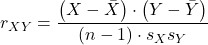
where the numerator is termed the covariance between X and Y and the denominator contains the standard deviations of X and Y variables. We can say the at the covariance is standardized by the variability in X and Y. In contrast, the regression slope is equal to the covariance divided by the variance in X.
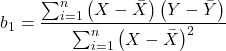
Thus, with a little algebra, we can see that the slope and correlation are equal to each other as

This should drive home the following statistical reasoning point. You can always calculate a slope from a correlation, but recall that correlation analysis is intended as a test of the hypothesis of a linear association between variables for which cause and effect model — though perhaps reasonable — should be implied. Just because it is mathematically possible does not mean the analysis is correct for the problem.
Coefficient of determination and the Product moment correlation
, the coefficient of determination, was introduced in the last chapter. It’s the ratio of variation of the data explained by the linear regression model divided by the total variation in the data. Values range from 0% to 100% — it’s a measure of fit, how well the data are described by a line. Note that part of our description for  , the product moment correlation — strength of the linear association — is simply another way to describe model fit. Thus,

Of course, we lose the direction information by squaring the correlation.
Questions
- Write up three learning outcomes for this page. Hint: Point your favorite generative AI to this page and ask for help.
- If the correlation is 0.6,
 , and
, and  , what is the slope estimate?
Quiz Chapter 17.2
Relationship between the slope and the correlation
Chapter 17 contents
- Introduction
- Simple Linear Regression
- Relationship between the slope and the correlation
- Estimation of linear regression coefficients
- OLS, RMA, and smoothing functions
- Testing regression coefficients
- ANCOVA – analysis of covariance
- Regression model fit
- Assumptions and model diagnostics for Simple Linear Regression
- References and suggested readings (Ch17 & 18)
20.10 – Growth equations and dose response calculations
Introduction
In biology, growth may refer to increase in cell number, change in size of an individual across development, or increase of number of individuals in a population over time. Nonlinear, time-series, several models proposed to fit growth data, including the Gompertz, logistic, and the von Bertalanffy. These models fit many S-shaped growth curves. These models are special cases of generalized linear models, also called Richard curves.
Growth example
This page describes how to use R to analyze growth curve data sets.
| Hours | Abs |
|---|---|
| 0.000 | 0.002207 |
| 0.274 | 0.010443 |
| 0.384 | 0.033688 |
| 0.658 | 0.063257 |
| 0.986 | 0.111848 |
| 1.260 | 0.249240 |
| 1.479 | 0.416236 |
| 1.699 | 0.515578 |
| 1.973 | 0.572632 |
| 2.137 | 0.589528 |
| 2.466 | 0.619091 |
| 2.795 | 0.608486 |
| 3.123 | 0.621136 |
| 3.671 | 0.616850 |
| 4.110 | 0.614689 |
| 4.548 | 0.614643 |
| 5.151 | 0.612465 |
| 5.534 | 0.606082 |
| 5.863 | 0.603933 |
| 6.521 | 0.595407 |
| 7.068 | 0.589006 |
| 7.671 | 0.578372 |
| 8.164 | 0.567749 |
| 8.877 | 0.559217 |
| 9.644 | 0.546451 |
| 10.466 | 0.537907 |
| 11.233 | 0.537826 |
| 11.890 | 0.529300 |
| 12.493 | 0.516551 |
| 13.205 | 0.505905 |
| 14.082 | 0.491013 |
Key to parameter estimates: y0 is the lag, mumax is the growth rate, and K is the asymptotic stationary growth phase. The spline function does not return an estimate for K.
R code
require(growthrates)
#Enter the data. Replace these example values with your own
#time variable (Hours)
Hours <- c(0.000, 0.274, 0.384, 0.658, 0.986, 1.260, 1.479, 1.699, 1.973, 2.137, 2.466, 2.795, 3.123, 3.671, 4.110, 4.548, 5.151, 5.534, 5.863, 6.521, 7.068, 7.671, 8.164, 8.877, 9.644, 10.466, 11.233, 11.890, 12.493, 13.205, 14.082)
#absorbance or concentration variable (Abs)
Abs <- c(0.002207, 0.010443, 0.033688, 0.063257, 0.111848, 0.249240, 0.416236, 0.515578, 0.572632, 0.589528, 0.619091, 0.608486, 0.621136, 0.616850, 0.614689, 0.614643, 0.612465, 0.606082, 0.603933, 0.595407, 0.589006, 0.578372, 0.567749, 0.559217, 0.546451, 0.537907, 0.537826, 0.529300, 0.516551, 0.505905, 0.491013)
#Make a dataframe and check the data; If error, then check that variables have equal numbers of entries
Yeast <- data.frame(Hours,Abs); Yeast
#Obtain growth parameters from fit of a parametric growth model
#First, try some reasonable starting values
p <- c(y0 = 0.001, mumax = 0.5, K = 0.6)
model.par <- fit_growthmodel(FUN = grow_logistic, p = p, Hours, Abs, method=c("L-BFGS-B"))
summary(model.par)
coef(model.par)
#Obtain growth parameters from fit of a nonparametric smoothing spline
model.npar <- fit_spline(Hours,Abs)
summary(model.npar)
coef(spline.md)
#Make plots
par(mfrow = c(2, 1))
plot(Yeast, ylim=c(0,1), cex=1.5,pch=16, main="Parametric Nonlinear Growth Model", xlab="Hours", ylab="Abs")
lines(model.par, col="blue", lwd=2)
plot(model.npar, ylim=c(0,1), lwd=2, main="Nonparametric Spline Fit", xlab="Hours", ylab="Abs")
Results from example code
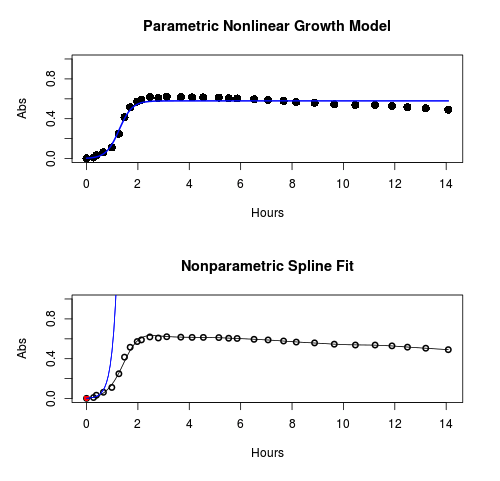
Figure 1. Top: Parametric Nonlinear Growth Model; Bottom: Nonparametric Spline Fit
LD50
In toxicology, the dose of a pathogen, radiation, or toxin required to kill half the members of a tested population of animals or cells is called the lethal dose, 50%, or LD50. This measure is also known as the lethal concentration, LC50, or properly after a specified test duration, the LCt50 indicating the lethal concentration and time of exposure. LD50 figures are frequently used as a general indicator of a substance’s acute toxicity. A lower LD50 is indicative of increased toxicity.
The point at which 50% response of studied organisms to range of doses of a substance (e.g., agonist, antagonist, inhibitor, etc.) to any response, from change in behavior or life history characteristics up to and including death can be described by the methods described in this chapter. The procedures outlined below assume that there is but one inflection point, i.e., an “s-shaped” curve, either up or down; if there are more than one inflection points, then the logistic equations described will not fit the data well and other choices need to be made (see Di Veroli et al 2015). We will use the drc package (Ritz et al 2015).
Example
First we’ll work through use of R. We’ll follow up with how to use Solver in Microsoft Excel.
After starting R, load the drc library.
library(drc)
Consider some hypothetical 24-hour survival data for yeast exposed to salt solutions. Let resp equal the variable for frequency of survival (e.g., calculated from OD660 readings) and NaCl equal the millimolar (mm) salt concentrations or doses.
At the R prompt type
resp <- c(1,1,1,.9,.7,.3,.4,.2,0,0,0)
NaCl=seq(0,1000,100)
#Confirm sequence was correctly created; alternatively, enter the values.
NaCl
[1] 0 100 200 300 400 500 600 700 800 900 1000
#Make a plot
plot(NaCl,resp,pch=19,cex=1.2,col="blue",xlab="NaCl [mm]",ylab="Survival frequency")
And here is the plot (Fig. 2).
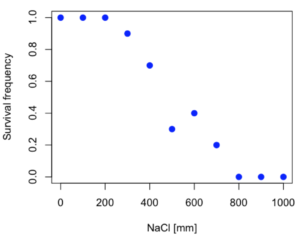
Figure 2. Hypothetical data set, survival of yeast in different salt concentrations.
Note the sigmoidal “S” shape — we’ll need an logistic equation to describe the relationship between survival of yeast and NaCl doses.
The equation for the four parameter logistic curve, also called the Hill-Slope model, is

where c is the parameter for the lower limit of the response, d is the parameter for the upper limit of the response, e is the relative EC50, the dose fitted half-way between the limits c and d, and b is the relative slope around the EC50. The slope, b, is also known as the Hill slope. Because this experiment included a dose of zero, a three parameter logistic curve would be appropriate. The equation simplifies to

EC50 from 4 parameter model
Let’s first make a data frame
dose <- data.frame(NaCl, resp)
Then call up a function, drm, from the drc library and specify the model as the four parameter logistic equation, specified as LL.4(). We follow with a call to the summary command to retrieve output from the drm function. Note that the four-parameter logistic equation
model.dose1 = drm(dose,fct=LL.4())
summary(model.dose1)
And here is the R output.
Model fitted: Log-logistic (ED50 as parameter) (4 parms)
Parameter estimates:
                   Estimate  Std. Error    t-value  p-value
b:(Intercept)      3.753415    1.074050   3.494636   0.0101
c:(Intercept)     -0.084487    0.127962  -0.660251   0.5302
d:(Intercept)      1.017592    0.052460  19.397441   0.0000
e:(Intercept)    492.645128   47.679765  10.332373   0.0000

Residual standard error:
0.0845254 (7 degrees of freedom)
The EC50, technically the LD50 because the data were for survival, is the value of e: 492.65 mM NaCl.
You should always plot the predicted line from your model against the real data and inspect the fit.
At the R prompt type
plot(model.dose1, log="",pch=19,cex=1.2,col="blue",xlab="NaCl [mm]",ylab="Survival frequency")
As long as the plot you made in earlier steps is still available, R will add the line specified in the lines command. Here is the plot with the predicted logistic line displayed (Fig. 3).
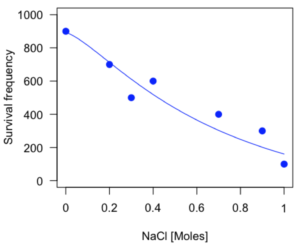
Figure 3. Logistic curve added to Figure 1 plot.
While there are additional steps we can take to decide is the fit of the logistic curve was good to the data, visual inspection suggests that indeed the curve fits the data reasonably well.
More work to do
Because the EC50 calculations are estimates, we should also obtain confidence intervals. The drc library provides a function called ED which will accomplish this. We can also ask what the survival was at 10% and 90% in addition to 50%, along with the confidence intervals for each.
At the R prompt type
ED(model.dose1,c(10,50,90), interval="delta")
And the output is shown below.
Estimated effective doses
(Delta method-based confidence interval(s))
     Estimate Std. Error   Lower   Upper
1:10  274.348     38.291 183.803  364.89
1:50  492.645     47.680 379.900  605.39
1:90  884.642    208.171 392.395 1376.89
Thus, the 95% confidence interval for the EC50 calculated from the four parameter logistic curve was between the lower limit of 379.9 and an upper limit of 605.39 mm NaCl.
EC50 from 3 parameter model
Looking at the summary output from the four parameter logistic function we see that the value for c was -0.085 and p-value was 0.53, which suggests that the lower limit was not statistically different from zero. We would expect this given that the experiment had included a control of zero mm added salt. Thus, we can explore by how much the EC50 estimate changes when the additional parameter c is no longer estimated by calculating a three parameter model with LL.3().
model.dose2 = drm(dose,fct=LL.3())
summary(model.dose2)
R output follows.
Model fitted: Log-logistic (ED50 as parameter) with lower limit at 0 (3 parms)
Parameter estimates:
               Estimate Std. Error   t-value p-value
b:(Intercept)   4.46194    0.76880   5.80378   4e-04
d:(Intercept)   1.00982    0.04866  20.75272   0e+00
e:(Intercept) 467.87842   25.24633  18.53253   0e+00
Residual standard error:
 0.08267671 (8 degrees of freedom)
The EC50 is the value of e: 467.88 mM NaCl.
How do the four and three parameter models compare? We can rephrase this as as statistical test of fit; which model fits the data better, a three parameter or a four parameter model?
At the R prompt type
anova(model.dose1, model.dose2)
The R output follows.
1st mode
fct:      LL.3()
2nd model
fct:      LL.4()
ANOVA table
          ModelDf      RSS Df F value p value
2nd model       8 0.054684
1st model       7 0.050012  1  0.6539  0.4453
Because the p-value is much greater than 5% we may conclude that the fit of the four parameter model was not significantly better than the fit of the three parameter model. Thus, based on our criteria we established in discussions of model fit in Chapter 16 – 18, we would conclude that the three parameter model is the preferred model.
The plot below now includes the fit of the four parameter model (red line) and the three parameter model (green line) to the data (Fig. 4).
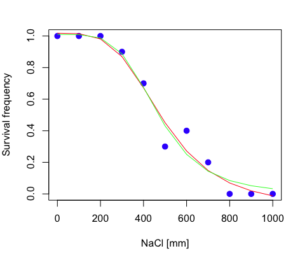
Figure 4. Four parameter (red) and three parameter (green) logistic models fitted to data.
The R command to make this addition to our active plot was
lines(dose,predict(model.dose2, data.frame(x=dose)),col="green")
We continue with our analysis of the three parameter model and produce the confidence intervals for the EC50 (modify the ED() statement above for model.dose2 in place of model.dose1).
Estimated effective doses
(Delta method-based confidence interval(s))
     Estimate Std. Error   Lower  Upper
1:10  285.937     33.154 209.483 362.39
1:50  467.878     25.246 409.660 526.10
1:90  765.589     63.026 620.251 910.93
Thus, the 95% confidence interval for the EC50 calculated from the three parameter logistic curve was between the lower limit of 409.7 and an upper limit of 526.1 mm NaCl. The difference between upper and lower limits was 116.4 mm NaCl, a smaller difference than the interval calculated for the 95% confidence intervals from the four parameter model (225.5 mm NaCl). This demonstrates the estimation trade-off: more parameters to estimate reduces the confidence in any one parameter estimate.
Additional notes of EC50 calculations
Care must be taken that the model fits the data well. What if we did not have observations throughout the range of the sigmoidal shape? We can explore this by taking a subset of the data.
dd = dose[1:6,]
Here, all values after dose 500 were dropped
dd
  resp dose
1  1.0    0
2  1.0  100
3  1.0  200
4  0.9  300
5  0.7  400
6  0.3  500
and the plot does not show an obvious sigmoidal shape (Fig. 5).
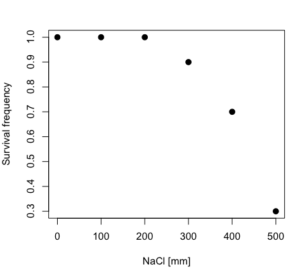
Figure 5. Plot of reduced data set.
We run the three parameter model again, this time on the subset of the data.
model.dosedd = drm(dd,fct=LL.3())
summary(model.dosedd)
Output from the results are
Model fitted: Log-logistic (ED50 as parameter) with lower limit at 0 (3 parms)
Parameter estimates:
                Estimate Std. Error    t-value p-value
b:(Intercept)   6.989842   0.760112   9.195801  0.0027
d:(Intercept)   0.993391   0.014793  67.153883  0.0000
e:(Intercept) 446.882542   5.905728  75.669344  0.0000
Residual standard error:
 0.02574154 (3 degrees of freedom)
Conclusion? The estimate is different, but only just so, 447 vs. 468 mm NaCl.
Thus, within reason, the drc function performs well for the calculation of EC50. Not all tools available to the student will do as well.
NLopt and nloptr
draft
Free open source library for nonlinear optimization.
Steven G. Johnson, The NLopt nonlinear-optimization package, http://github.com/stevengj/nlopt
https://cran.r-project.org/web/packages/nloptr/vignettes/nloptr.html
Alternatives to R
What about online tools? There are several online sites that will allow students to perform these kinds of calculations. Students familiar with MatLab know that it can be used to solve nonlinear equation problems. An open source alternative to MatLab is called GNU Octave, which can be installed on a personal computer or run online at http://octave-online.net. Students also may be aware of other sites, e.g., mycurvefit.com and IC50.tk.
Both of these free services performed well on the full dataset (results not shown), but fared poorly on the reduced subset: mycurvefit returned a value of 747.64 and IC50.tk returned an EC50 estimate of 103.6 (Michael Dohm, pers. obs.).
Simple inspection of the plotted values shows that these values are unreasonable.
EC50 calculations with Microsoft Excel
Most versions of Microsoft Excel include an add-in called Solver, which will permit mathematical modeling. The add-in is not installed as part of the default installation, but can be installed via the Options tab in the File menu for a local installation or via Insert for the Microsoft Office online version of Excel (you need a free Microsoft account). The following instructions are for a local installation of Microsoft Office 365 and were modified from information provided by sharpstatistics.co.uk.
After opening Excel, set up worksheet as follows. Note that in order to use my formulas your spreadsheet values need to be set up exactly as I describe.
- Dose values in column A, beginning with row 2
- Response values in column B, beginning with row 2
- In column F type
bin row 2,cin row 3,din row 4, andein row 5. - In cells G2 – G5, enter the starting values. For this example, I used b = 1, c = 0, d = 1, e = 400.
- For your own data you will have to explore use of different starting values.
- Enter headers in row 1.
- Column A
Dose - Column B
Response - Column C
Predicted - Column D
Squared difference - Column F
Constants
- Column A
- In cell C14 enter
sum squares - In cell D14 enter
=sum(D2:D12)
Here is an image of the worksheet (Fig. 6), with equations entered and values updated, but before Solver run.
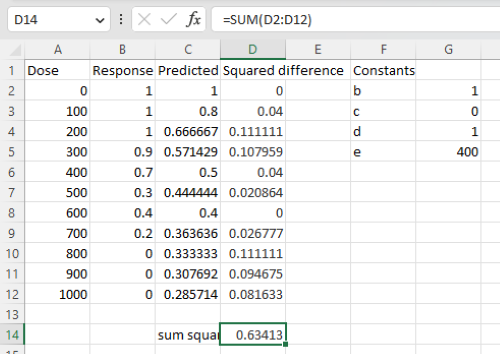
Figure 6. Screenshot Microsoft Excel worksheet containing our data set (col A & B), with formulas added and calculated. Starting values for constants in column G, rows 2 – 4.
Next, enter the functions.
- In cell C2 enter the four parameter logistic formula — type everything between the double quotes: “
=$G$3+(($G$4-$G$3)/(1+(A2/$G$5)^$G$2))“. Next, copy or drag the formula to cell C12 to complete the predictions.- Note: for a three parameter model, replace the above formula with “
=(($G$4)/(1+(A2/$G$5)^$G$2))“.
- Note: for a three parameter model, replace the above formula with “
- In cell D2 type everything between the double quotes: “
=(B2-C2)^2“. - Next, copy or drag the formula to cell
D12to complete the predictions. - Now you are ready to run solver to estimate the values for b, c, d, and e.
- Reminder: starting values must be in cells
G2:G5
- Reminder: starting values must be in cells
- Select cell
D14and start solver by clicking on Data and looking to the right in the ribbon.
Solver is not normally installed as part of the default installation of Microsoft Excel 365. If the add-in has been installed you will see Solver in the Analyze box (Fig. 7).
Figure 7. Screenshot Microsoft Excel, Solver add-in available.
If Solver is not installed, go to File → Options → Add-ins (Fig. 8).
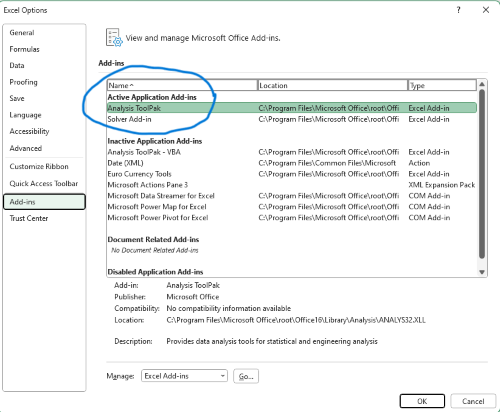
Figure 8. Screenshot Microsoft Excel, Solver add-in available and ready for use.
Go to Microsoft support for assistance with add-ins.
With the spreadsheet completed and Solver available, click on Solver in the ribbon (Fig. 7) to begin. The screen shot from the first screen of Solver is shown below (Fig. 9).
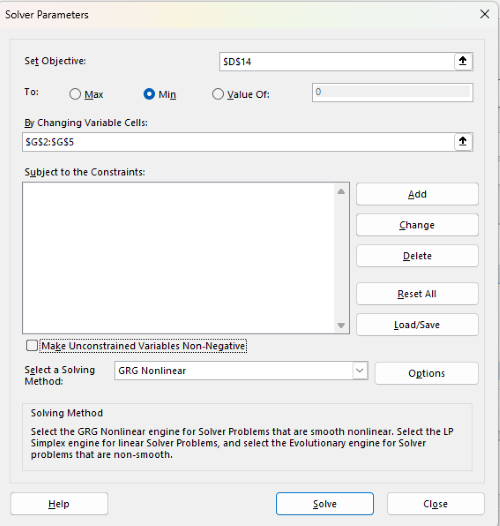
Figure 9. Screenshot Microsoft Excel solver menu.
Setup Solver
- Set Objective, enter the absolute cell reference to the sum squares value, \
$D$14 - Set To: Min.
- For By Changing Variable Cells, enter the range of cells for the four parameters, $G$2:$G$5
- Uncheck the box by “Make Unconstrained Variables Non-Negative.”
- Where constraints refers to any system of equalities or inequalities equations imposed on the algorithm.
- Select a Solving method, choose “GRG Nonlinear,” the nonlinear programming solver option (not shown in Fig. 7, select by clicking on the down arrow).
- Click Solve button to proceed.
GRG Nonlinear is one of many optimization methods. In this case we calculate the minimum of the sum of squares — the difference between observed and predicted values from the logistic equation — given the range of observed values. GRG stands for Generalized Reduced Gradient and finds the local optima — in this case the minimum or valley — without any imposed constraints. See solver.com for additional discussion of this algorithm.
If all goes well, this next screen (Fig. 10) will appear which shows the message, “Solver has converged to the current solution. All constraints are satisfied.”
Figure 10. Screenshot solver completed run.
Click OK and note that the values of the parameters have been updated (Table 1).
Table 1. Four parameter logistic model, results from Solver
| Constant | Starting values | Values after solver |
| b | 1 | 3.723008382 |
| c | 0 | -0.088865487 |
| d | 1 | 1.017964505 |
| e | 400 | 493.9703594 |
Note the values obtained by Solver are virtually identical to the values obtained in the drc R package. The differences are probably because of the solver algorithm.
More interestingly, how did Solver do on the subset data set? Here are the results from a three parameter logistic model (Table 2).
Table 2. Three parameter logistic model, results from Solver
| Constant | Starting values | Full dataset, Solver results |
Subset, Solver results |
| b | 1 | 3.723008382 | 6.989855948 |
| d | 1 | 1.017964505 | 0.993391264 |
| e | 400 | 493.9703594 | 446.8819282 |
The results are again very close to results from the drc R package.
Thus, we would conclude that Solver and Microsoft Excel would be a reasonable choice for EC50 calculations, and much better than IC50.tk and mycurvefit.com. The advantages of R over Microsoft Excel is that the model building is more straightforward than entering formulas in the cell reference format required by Excel.
Questions
[pending]
References and suggested readings
Beck B, Chen YF, Dere W, et al. Assay Operations for SAR Support. 2012 May 1 [Updated 2012 Oct 1]. In: Sittampalam GS, Coussens NP, Nelson H, et al., editors. Assay Guidance Manual [Internet]. Bethesda (MD): Eli Lilly & Company and the National Center for Advancing Translational Sciences; 2004-. Available from: www.ncbi.nlm.nih.gov/books/NBK91994/
Di Veroli G. Y., Fornari C., Goldlust I., Mills G., Koh S. B., Bramhall J. L., Richards, F. M., Jodrell D. I. (2015) An automated fitting procedure and software for dose-response curves with multiphasic features. Scientific Reports 5: 14701.
Ritz, C., Baty, F., Streibig, J. C., Gerhard, D. (2015) Dose-Response Analysis Using R PLOS ONE, 10(12), e0146021
Tjørve, K. M., & Tjørve, E. (2017). The use of Gompertz models in growth analyses, and new Gompertz-model approach: An addition to the Unified-Richards family. PloS one, 12(6), e0178691.
Chapter 20 contents
- Additional topics
- Area under the curve
- Peak detection
- Baseline correction
- Surveys
- Time series
- Dimensional analysis
- Estimating population size
- Diversity indexes
- Survival analysis
- Growth equations and dose response calculations
- Plot a Newick tree
- Phylogenetically independent contrasts
- How to get the distances from a distance tree
- Binary classification
- Meta-analysis
/MD