Jupyter notebook
Draft
Introduction
Jupyter notebook, python. A “web-based computational environment,” combines executable code, data outputs, visualizations, and rich narrative text into a single document. It streamlines both the analytical process and the management of data-driven projects.
Project homepage: https://jupyter.org/
Besides the python kernel, Jupyter kernels include
Cytoscape, “an open source software platform for visualizing complex networks and integrating these with any type of attribute data,” (from the homepage).
SageMATH, “a free open-source mathematics software system licensed under the GPL. It builds on top of many existing open-source packages: NumPy, SciPy, matplotlib, Sympy, Maxima, GAP, FLINT, R and many more,” (from SageMath homepage).
and, of course R, which, along with python and Julia, is one of the core programming languages available in Jupyter. We present how to install the IRkernel on this page.
In the cloud
Access to Jupyter notebook was discussed for running R in the cloud.
Local installation
From a script with the R app open, copy this R code.
# install latest python 3.12.4
# https://www.python.org/

# https://www.python.org/downloads/windows/
# macOS universal installer
# https://www.python.org/downloads/macos/

# default python on macOS
# see how to bash alias at https://stackoverflow.com/questions/18425379/how-to-set-pythons-default-version-to-3-x-on-os-x

# Open terminal
python3 --version
python3 -m pip --version
# pip3 install jupyterlab

pip install jupyterlab
jupyter lab
browser opens http://localhost:8888/lab

End R code.
Install IRkernel from CRAN
IRkernel acts as an essential translator and execution bridge: Jupyter is built on a decoupled architecture — the frontend web interface (where you type) is entirely separated from the backend engine that runs our code.
Installation requires use of your terminal app.
# Run R in terminal as administrator
sudo R
# At R prompt enter
install.packages("IRkernel")
# Making the kernel available to Jupyter
IRkernel::installspec(user = FALSE)
End R code.
Run R as Jupyter Notebook
In the terminal (Fig 1), type at the bash shell line
jupyter lab
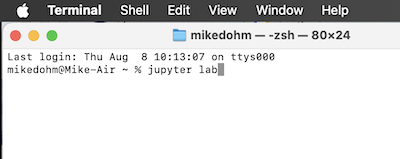
Figure 1. Screenshot of macOS terminal with command to start Jupyter lab.
Set working drive, then load kernel. Select the R kernel and create a new Notebook, Figure 43 (ie. don’t select a Console, Fig 2).
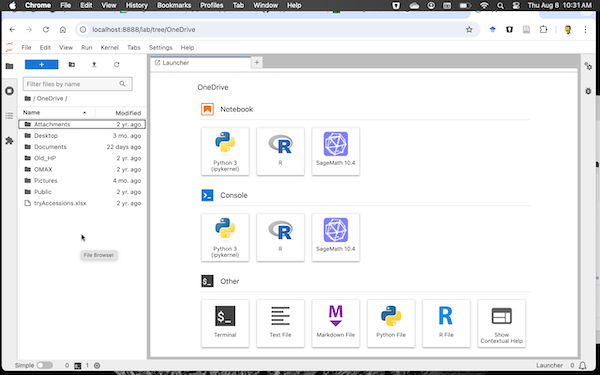
Figure 2. Screenshot of Jupyter Lab. Select R icon under Notebook to set IRkernel.
Ready to go, Figure 3.
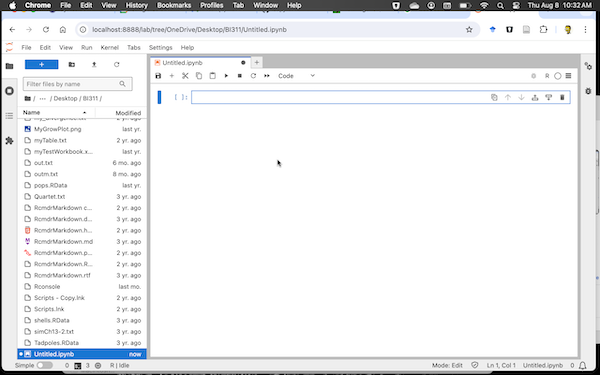
Figure 3. Screenshot of Jupyter Notebook running the IRkernel.
Set the runtime to R (Fig 4).
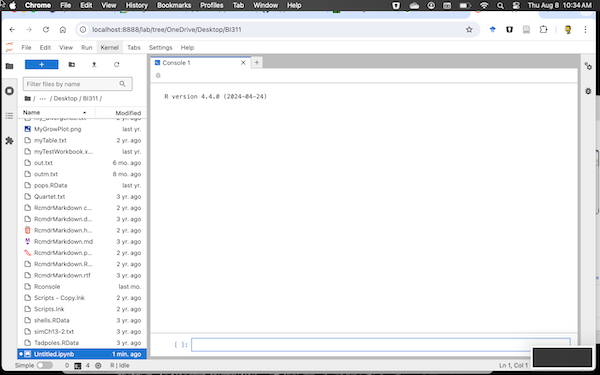
Figure 4. Screenshot of Jupyter Console running R.
It’s easy to switch kernels. Let’s say you started Jupyter Lab and notice that Python is running (Fig 5). Click on the kernel name — see green arrow in Figure 5 — to bring up a popup menu, Fig 6.
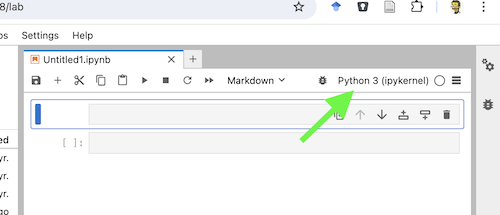
Figure 5. Screenshot of Notebook with Python set as kernel.
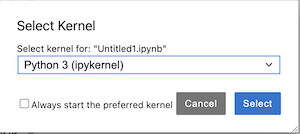
Figure 6. Screenshot of select kernel popup menu.
Click on the drop arrow and select R kernel (Fig 2), then click on blue Select button (see Figure 7).
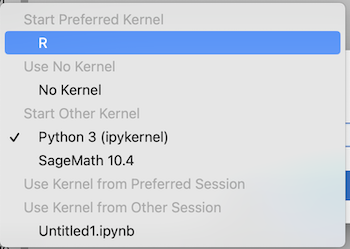
Figure 7. Screenshot of installed kernels.
Confirm R is running (Fig 8, green circle).
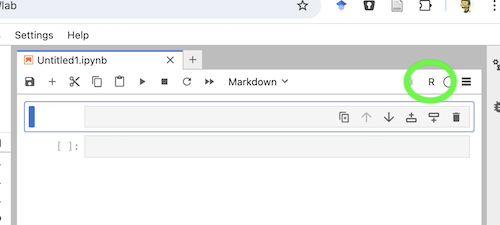
Figure 8. Screenshot Jupyter Notebook, confirm R runtime is set (green circle).
References and additional resources
Kluyver, T., Ragan-Kelley, B., Pé, Rez, F., Granger, B., Bussonnier, M., Frederic, J., Kelley, K., Hamrick, J., Grout, J., Corlay, S., Ivanov, P., Avila, D., n, Abdalla, S., Willing, C., & Team, J. D. (2016). Jupyter Notebooks – a publishing format for reproducible computational workflows. In Positioning and Power in Academic Publishing: Players, Agents and Agendas (pp. 87–90). IOS Press. https://doi.org/10.3233/978-1-61499-649-1-87
JupyterLab Developers. (Ongoing). JupyterLab Documentation. jupyterlab.readthedocs.io
Project Jupyter. (Ongoing). Project Jupyter Documentation. docs.jupyter.org
/MD
Free apps for Bioinformatics
Mike’s suggested free and or open source apps for bioinformatics on macOS or Windows 11 pcs.
Note 1: Chrome OS users. If your device is Intel-based, then it is possible to install many of the apps (or equivalents) listed via activating LINUX on your device. This route is only advisable if you are willing and able to do some pretty serious installation work.
Statistics
R Core Team (2024). R: A language and environment for statistical computing. R Foundation for Statistical Computing, Vienna, Austria. URL https://www.R-project.org/.
Python programming language and libraries: panda, Numby, Scipy, Matplotlib, Biopython, PySB, and others
Mathematics software
GNU Octave, free and open source, uses similar programming syntax to MATLAB, https://octave.org/
SageMATH, python based, free and open source alternative to MATLAB and Wolfram Mathematica, https://www.sagemath.org/
Image, Drawing, Concept & Mind maps, Flow charts
Newt Editor, a free, web based, open source viewer and editor for biology pathways, https://newteditor.org/index.html
Draw.io, used to create work flows, mind maps, https://app.diagrams.net/
FreeCAD, open source “parametric 3D modeler”, https://www.freecad.org/
GIMP, GNU Image Manipulation Program, at https://www.gimp.org/
ImageJ2, JAVA-based, https://imagej.net/software/imagej2/
Krita, free and open source painting program, https://krita.org/en/
Preview, macos only
Video editor
Shortcut, at https://shotcut.org/
Handbrake, at https://handbrake.fr/
Screen recording, Video streaming
OBS Studio, at https://obsproject.com/
QuickTimePlayer, macos only
Office suite (compatible with Microsoft Word)
LibreOffice, at https://www.libreoffice.org/
Reference manager
Zotero, https://www.zotero.org/
Digital Notebook
Jupyter Lab and Notebooks, python based, web-based computational notebooks. In addition to python, Jupyter supports Julia and R Programming languages as well as Cytoscape, GNU Octave, SageMATH and other software. https://docs.jupyter.org/en/latest/index.html
Obsidian, markdown note-taking app. URL https://obsidian.md/
OneNote, at https://www.onenote.com/
Bioinformatics tools
Bioconductor, at https://www.bioconductor.org/
Unipro UGENE, at http://ugene.net/
Cytoscape, at https://cytoscape.org/
MEGA, at https://www.megasoftware.net/
Coding IDE and code editor
Jupyter Lab
Visual Studio with Python application, Community edition, https://visualstudio.microsoft.com/vs/features/python/
Posit team (2024). RStudio: Integrated Development Environment for R. Posit Software, PBC, Boston, MA URL http://www.posit.co/.
Qualitative analysis
QualCoder, Computer aided qualitative data analysis software. URL https://qualcoder.wordpress.com/
qcoder, “Code Qualitative Data A light weight approach to qualitative coding and analysisan R package for Qualitative Data Analysis. URL https://docs.ropensci.org/qcoder/reference/qcoder-package.html .