19.2 – Bootstrap sampling
Introduction
Bootstrapping is a general approach to estimation or statistical inference that utilizes random sampling with replacement (Kulesa et al. 2015). In classic frequentist approach, a sample is drawn at random from the population and assumptions about the population distribution are made in order to conduct statistical inference. By resampling with replacement from the sample many times, the bootstrap samples can be viewed as if we drew from the population many times without invoking a theoretical distribution. A clear advantage of the bootstrap is that it allows estimation of confidence intervals without assuming a particular theoretical distribution and thus avoids the burden of repeating the experiment.
Base install of R includes the boot package. The boot package allows R users to work with most functions, and many authors have provided helpful packages. I highlight a couple packages
install packages lmboot, confintr
Example data set, Tadpoles from Chapter 14, copied to end of this page for convenience (scroll down or click here).
Bootstrapped 95% Confidence interval of population mean
Recall classic frequentist (large-sample) approach to confidence interval estimates of mean by R
x = round(mean(Tadpole$Body.mass),2); x
n = length(Tadpole$Body.mass); n
s = sd(Tadpole$Body.mass); s
error = qt(0.975,df=n-1)*(s/sqrt(n)); error
lower_ci = round(x-error,3)
upper_ci = round(x+error,3)
paste("95% CI of ", x, " between:", lower_ci, "&", upper_ci)
Output results are
> n = length(Tadpole$Body.mass); n
[1] 13
> s = sd(Tadpole$Body.mass); s
[1] 0.6366207
> error = qt(0.975,df=n-1)*(s/sqrt(n)); error
[1] 0.384706
> paste("95% CI of ", x, " between:", lower_ci, "&", upper_ci)
[1] "95% CI of 2.41 between: 2.025 & 2.795"
We used the t-distribution because both  the population mean and
  the population standard deviation were unknown. Thus, 95 out of 100 confidence intervals would be expected to include the true value.
Bootstrap equivalent
library(confintr)
ci_mean(Tadpole$Body.mass, type=c("bootstrap"), boot_type=c("stud"), R=999, probs=c(0.025, 0.975), seed=1)
Output results are
Two-sided 95% bootstrap confidence interval for the population mean based on 999 bootstrap replications
and the student method

Sample estimate: 2.412308
Confidence interval:
    2.5%    97.5%
2.075808 2.880144
where stud is short for student t distribution (another common option is the percentile method — replace stud with perc), R = 999 directs the function to resample 999 times. We set seed=1 to initialize the pseudorandom number generator so that if we run the command again, we would get the same result. Any integer number can be used. For example, I set seed = 1 for output below
Confidence interval:
    2.5%    97.5%
2.075808 2.880144
compared to repeated runs without initializing the pseudorandom number generator:
Confidence interval:
    2.5%    97.5%
2.067558 2.934055
and again
Confidence interval:
    2.5%    97.5%
2.067616 2.863158
Note that the classic confidence interval is narrower than the bootstrap estimate, in part because of the small sample size (i.e., not as accurate, does not actually achieve the nominal 95% coverage). Which to use? The sample size was small, just 13 tadpoles. Bootstrap samples were drawn from the original data set, thus it cannot make a small study more robust. The 999 samples can be thought as estimating the sampling distribution. If the assumptions of the t-distribution hold, then the classic approach would be preferred. For the Tadpole data set, Body.mass was approximately normally distributed (Anderson-Darling test = 0.21179, p-value = 0.8163). For cases where assumption of a particular distribution is unwarranted (e.g., what is the appropriate distribution when we compare medians among samples?), bootstrap may be preferred (and for small data sets, percentile bootstrap may be better). To complete the analysis, percentile bootstrap estimate of confidence interval are presented.
The R code
ci_mean(Tadpole$Body.mass, type=c("bootstrap"), boot_type=c("perc"), R=999, probs=c(0.025, 0.975), seed=1)
and the output
Two-sided 95% bootstrap confidence interval for the population mean based on 999 bootstrap replications
and the percent method
Sample estimate: 2.412308
Confidence interval:
    2.5%    97.5%
2.076923 2.749231
In this case, the bootstrap percentile confidence interval is narrower than the frequentist approach.
Model coefficients by bootstrap
R code
Enter the model, then set B, the number of samples with replacement.
myBoot <- residual.boot(VO2~Body.mass, B = 1000, data = Tadpoles)
R returns two values:
bootEstParam, which are the bootstrap parameter estimates. Each column in the matrix lists the values for a coefficient. For this model,bootEstParam$[,1]is the intercept andbootEstParam$[,2]is the slope.origEstParam, a vector with the original parameter estimates for the model coefficients.seed, numerical value for the seed; use seed number to get reproducible results. If you don’t specify the seed, then seed is set to pick any random number.
While you can list the $bootEstParam, not advisable because it will be a list of 1000 numbers (the value set with B)!
Get necessary statistics and plots
#95% CI slope
quantile(myBoot$bootEstParam[,2], probs=c(.025, .975))
R returns
    2.5%    97.5%
335.0000 562.6228
#95% CI intercept
quantile(myBoot$bootEstParam[,1], probs=c(.025, .975))
R returns
     2.5%     97.5%
-881.3893 -310.8209
Slope
#plot the sampling distribution of the slope coefficient
par(mar=c(5,5,5,5)) #setting margins to my preferred values
hist(myBoot$bootEstParam[,2], col="blue", main="Bootstrap Sampling Distribution",
xlab="Slope Estimate")
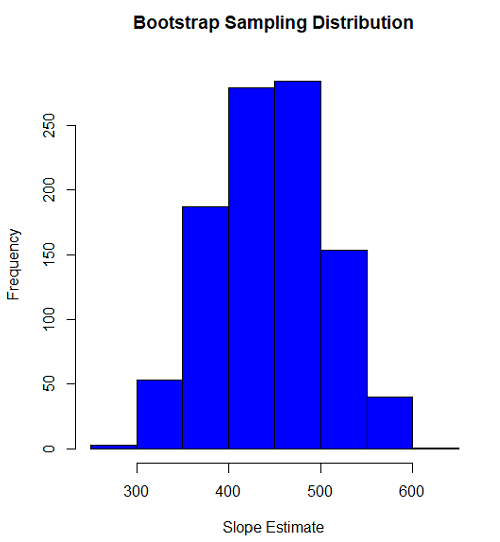
Figure 1. histogram of bootstrap estimates for slope
Intercept
#95% CI intercept
quantile(myBoot$bootEstParam[,1], probs=c(.025, .975))
par(mar=c(5,5,5,5))
hist(myBoot$bootEstParam[,1], col="blue", main="Bootstrap Sampling Distribution",
xlab="Intercept Estimate")
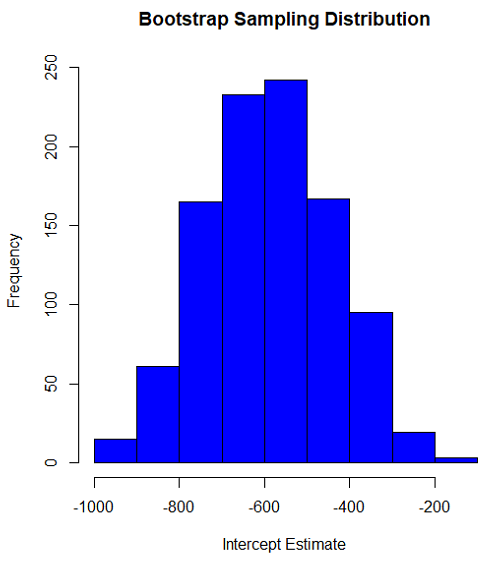
Figure 2. Histogram of bootstrap estimates for intercept.
Questions
edits: pending
Data set used this page (sorted)
| Gosner | Body mass | VO2 |
| I | 1.76 | 109.41 |
| I | 1.88 | 329.06 |
| I | 1.95 | 82.35 |
| I | 2.13 | 198 |
| I | 2.26 | 607.7 |
| II | 2.28 | 362.71 |
| II | 2.35 | 556.6 |
| II | 2.62 | 612.93 |
| II | 2.77 | 514.02 |
| II | 2.97 | 961.01 |
| II | 3.14 | 892.41 |
| II | 3.79 | 976.97 |
| NA | 1.46 | 170.91 |
Chapter 19 contents
- Introduction
- Jackknife sampling
- Bootstrap sampling
- Monte Carlo methods
- Ch19 References and suggested readings
3 – Exploring data
Describing data: An introduction to summary statistics and basic visualization.
.
Scientists answer questions about natural phenomena using the scientific method. The questions in the form of hypotheses are tested by data, the raw information collected either by observing natural outcomes among groups (observational studies) or by manipulating variables (experimental studies) and recording the outcomes.
Note 1: We discussed the scientific method in Chapter 2.5. The distinction between experimental and observational studies was discussed in Chapter 2.4.
Regardless, after a study has been completed, the collection of observations needs to be summarized or described, a process now referred to as data exploration. Interpretation of the data constitutes the evidence used to evaluate the hypothesis. How many mice grew tumors in the treated versus control group? Did all mice respond to treatment? What is the typical cost of a new home in Hilo, HI? How large of a difference is there between the most expensive home and the middle? These questions require simple, summary statistics also called descriptive statistics and informative data visualizations. Both are required of any data analysis report (students: see Making a report in Mike’s Workbook for Biostatistics) — to communicate the findings of the experiment or observational study.
Note 2: Throughout Chapter 3, we present use of R Commander and R functions to accomplish our data exploration objectives. It should come as not surprise that folks have provided many solutions to improve the workflow of data exploration. rattle (R Analytic Tool To Learn Easily) is a great “data-mining” package. Rattle (version 6.5.8 as of August 2025) provides a graphical user interface, which makes it straightforward to work with. It doesn’t work well with Rcmdr, but can be used along with RStudio. rattle is an appropriate option for accomplishing tasks needed for Chapter 3, Chapter 13, and Chapter 16.
BI-311: Installing rattle is optional. Because rattle’s programming history, installation of rattle is a little different from other R packages we have described thus far. Follow instructions for your operating system at https://rattle.togaware.com/. On WinPC, download and install rattle-dev-windows-inno.exe. If you followed my R installation instructions you may need to edit the PATH environment variable on your WinPC so that R will be found by rattle. On macOS, download and extract the archived (zip) file, rattle-dev-macos.zip, and run the app (rattle.app). You will need to inform gatekeeper to allow rattle.app to run — go to Settings > Security & Privacy, and find the request to permit running the app.
In Chapter 3 we introduce two aspects of summary statistics expected in any report about a data set (see Chapter 4 — How to report statistics). Summary statistics provide a brief overview of relevant characteristics of observations in the data set to provide the reader to get a quick but meaningful look at the data set. Data set refers to a collection of data, usually a collection of related, ordered observations, measurements, and related information.
Summary statistics vary according to the needs of the reporting vehicle, but may generally address two characteristics of the data set
- Central tendency or the description of the middle of the data. See Chapter 3.2 – Measures of Central Tendency.
- Data dispersion, the variability around the middle of the data set. See Chapter 3.3 – Measures of dispersion.
- The other two sections in Chapter 3 introduce estimation, the role random sampling plays, and the kinds of error in statistics (Chapter 3.4 — Estimating parameters).
- The final section, 3.5 – Statistics of error, introduces incorporating estimates of error in measurement calculations are used to report confidence — confidence intervals — in the estimates we make.
Before we can talk about descriptive statistics we need to introduce the concept of data types, which we do in Chapter 3.1 — Data types. Understanding data types is crucial for accurately calculating and interpreting measures of central tendency and dispersion, which are essential for effective data visualization.
We introduce statistical graphics, a specialized kind of data visualization, in Chapter 4 – How to report statistics . Statistical graphs are utilized to describe data sets, but also to communicate statistical inference, which we address formally beginning in Chapter 7 – Probability, Risk Analysis.
Formulas — a reminder.
Most of you have been asked at some point to calculate the average or the sample standard deviation. We will provide these again, but with additional statistics. Textbooks may present calculator formulas — nothing wrong with them, although we have to watch significant figures. But computer statistical packages generally do not use these formulations as the approach to calculate — the algorithms are typically much more involved. So why present formulas throughout the book as I do? Formulas often are the best definition of the statistical concept. I haven’t investigated this last point in any systematic way, but, because of access by scientists to increasingly powerful computers since the 1980s, I doubt anyone in the business of data analysis in the biological sciences has much use of the hand calculator or the formulas except as definitions.
Note 3. Chaminade University students: On homework, quizzes and exams, you may be asked to calculate these descriptive statistics. The data sets will always be simple ones, simple enough that calculators should not be needed.
Homework to go with this topic.
Mike’s Workbook for Biostatistics:
Homework 2A: Descriptive statistics
Quizzes in this chapter
A total of 56 questions among the several subchapters, a mix of true or false and multiple choice question format.
Chapter 3 contents
.