20.9 – Survival analysis
draft
Introduction
As the name suggests, survival analysis is a branch of statistics used to account for death of organisms, or more generally, failure in a system. In general, this kind of analysis models time to event, where event would be death or failure. The basics of the method is defined by the survival function

where  is time,
  is a variable that represents time of death or other end point, and
  is probability of an event occurring later than at time . Two methods are common: the descriptive Kaplan-Meier estimator and the the semi-parametric Cox proportional hazards model.
Excellent resources available, series of articles in volume 89 of British Journal of Cancer: Clark et al (2003a), Bradburn et al (2003a), Bradburn et al (2003b), and Clark et al (2003b).
Hazard function
Defined as the event rate at time t based on survival for time times equal to or greater than t.
Censoring
Censoring is a a missing data problem typical of survival analysis. Distinguish right-censored and left-censored.
Kaplan-Meier plot
Kaplan-Meier (KM) estimator of survival function. Other survival function estimators Fleming-Harrington. The KM estimator,  is
is
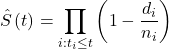
where di is the number of events that occurred at time ti, ni is the number of individuals known to have survived or not been censored. Because it’s an estimate, a statistic, need an estimate of the error variance. Several options, the default in R is the Greenwood estimator.

The KM plot, censoring times noted with plus.
R code
Download and install the RcmdrPlugin.survival package.
Example
data(heart, package="survival")
attach(heart)
#Get help with the data set
help("heart", package="survival")
head(heart)
 start stop event        age      year surgery transplant id
1    0   50     1 -17.155373 0.1232033       0          0  1
2    0    6     1   3.835729 0.2546201       0          0  2
3    0    1     0   6.297057 0.2655715       0          0  3
4    1   16     1   6.297057 0.2655715       0          1  3
5    0   36     0  -7.737166 0.4900753       0          0  4
6   36   39     1  -7.737166 0.4900753       0          1  4
Run basic survival analysis. After installing the RcmdrPlugin.survival, from Rcmdr select estimate survival function.
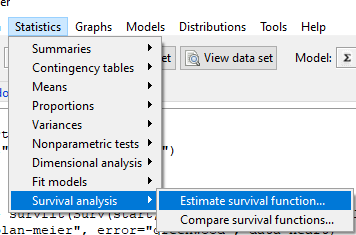
Figure 1. Screenshot of menu call for survival analysis in Rcmdr
Get survival estimator and KM plot (Figure 2)
R output
.Survfit <- survfit(Surv(start, event) ~ 1, conf.type="log", conf.int=0.95,
Rcmdr+ type="kaplan-meier", error="greenwood", data=heart)

 .Survfit
Call: survfit(formula = Surv(start, event) ~ 1, data = heart, error = "greenwood",
conf.type = "log", conf.int = 0.95, type = "kaplan-meier")

n events median 0.95LCL 0.95UCL
172 75 26 17 37

plot(.Survfit, mark.time=TRUE)

quantile(.Survfit, quantiles=c(.25,.5,.75))
$quantile
25 50 75
3 26 67

$lower
25 50 75
1 17 46

$upper
25 50 75
12 37 NA

#by default, Rcmdr removes the object
remove(.Survfit)
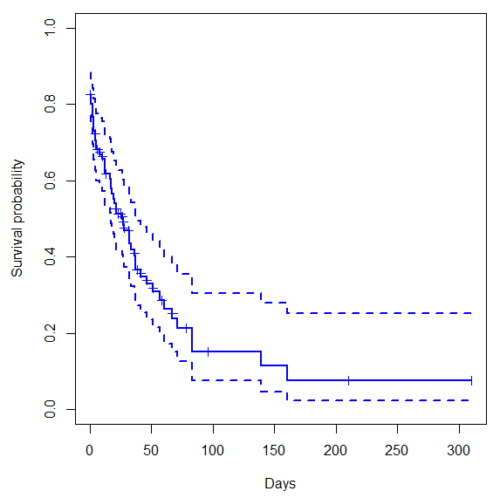
Figure 2. Kaplan-Meier plot of heart data. Dashed lines are upper and lower confidence intervals about the survival function.
Interpreting the plot is straightforward — every time an event occurs, the curve drops.
Note 1: I modified the plot() code with these additions
ylim = c(0,1), ylab="Survival probability", xlab="Days", lwd=2, col="blue"
the data set includes age and whether or not subjects had heart surgery before transplant. Compare.
Variable surgery is recorded 0,1, so need to create a factor
fSurgery <- as.factor(surgery)
Now, to compare
Rcmdr: Statistics → Survival analysis → Compare survival functions…
R output
Rcmdr> survdiff(Surv(start,event) ~ fSurgery, rho=0, data=heart)
Call:
survdiff(formula = Surv(start, event) ~ fSurgery, data = heart,
rho = 0)

              N Observed Expected (O-E)^2/E (O-E)^2/V
fSurgery=No 143       66     58.7     0.902      4.56
fSurgery=Yes 29        9     16.3     3.255      4.56

Chisq= 4.6 on 1 degrees of freedom, p= 0.03
Get the KM estimator and make a KM plot
mySurvfit <- survfit(Surv(start, event) ~ surgery, conf.type="log", conf.int=0.95,
type="kaplan-meier", error="greenwood", data=heart)

plot(mySurvfit, mark.time=TRUE, ylim=c(0,1),lwd=2, col=c("blue","red"), xlab="Number of days", ylab="Survival probability")
legend("topright", legend = paste(c("Surgery - No", "Surgery - Yes")), col = c("blue", "red"), pch = 19, bty = "n")
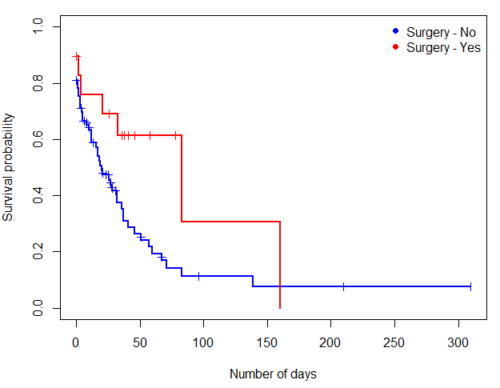
Figure 3. KM plot comparing survival of patients who received surgery (red) and those who did not have the surgery (blue).
The comparison plot can be made in Rcmdr by selecting our Surgery factor in Strata setting (Fig. 4). Recall that strata refers to subgroups of a population.
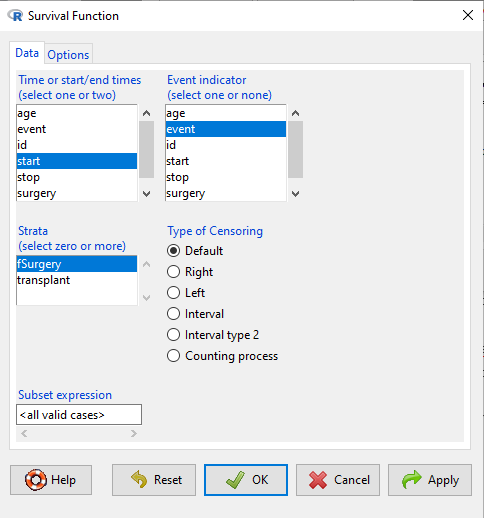
Figure 4. Screenshot of Survival estimator menu in Rcmdr.
Cox proportional hazards model
coxph()
Questions
[pending]
Chapter 20 contents
- Additional topics
- Area under the curve
- Peak detection
- Baseline correction
- Surveys
- Time series
- Dimensional analysis
- Estimating population size
- Diversity indexes
- Survival analysis
- Growth equations and dose response calculations
- Plot a Newick tree
- Phylogenetically independent contrasts
- How to get the distances from a distance tree
- Binary classification
- Meta-analysis
/MD
14.6 – Some other ANOVA designs
Introduction
There are several additional ANOVA models in common use. The crossed, balanced design is but one example of the two-way ANOVA. And, from a consideration of two factors it logically follows that there can be more than two factors as part of the design of an experiment. As the number of factors increase, the number of two-way, three-way, and even higher-order interactions are possible and at least in principle may be estimated.
Our purpose here is to highlight several, but certainly not all possible experimental designs from the perspective of ANOVA. Examples are provided. Keep in mind that the general linear model approach unifies these designs.
Some of the classical experimental ANOVA designs one sees include
- Two-way randomized complete block design
- Two-way factorial with no replication design
- Repeat-measures ANOVA with one factor
- Nested ANOVA
- Three-way ANOVA
- Split-plot ANOVA
- Latin squares ANOVA
Put simply, these designs differ in how the groups are arranged and how members of the groups are included.
Two-way randomized complete block design
This design refers to the “textbook” design. For each, factor A and factor B, there are multiple levels, in this example three levels of Factor A and three levels of Factor B, and subjects (sampling units) are randomly assigned to each level. However, one of the factors is, perhaps, of less interest, yet certainly accounts for variation in the response variable.
| Factor B | ||||
| 1 | 2 | 3 | ||
| Factor A | 1 |  |
 |
 |
| 2 |  |
 |
 |
|
| 3 |  |
 |
 |
|
where n1,1, n2,1, etc. represents the number of subjects in each cell. Thus, in this design there are nine groups. Typically, minimum replication would be three subjects per group.
Two-way factorial with no replication design
While it may seem obvious that a good experiment should have replication, there are situations in which replication is impossible. While this seems rather odd, this scenario very much describes a typical microarray, gene expression project.
| Factor B | ||||
| 1 | 2 | 3 | ||
| Factor A | 1 | |
|
|
| 2 | |
|
|
|
| 3 | |
|
|
|
where, again, n1,1, n2,1, etc., represents the number of subjects in each cell and there are nine groups in this study. With no replication, then no more than one subject per group.
Repeated-measures ANOVA
When subjects in the study are measured multiple times for the dependent variable, this is called a repeated-measures design. We introduced the design for the simple case of before and after measures on the same individuals in Chapter 12.3. It’s straight-forward to extend the design concept to more than two measures on the subjects. The blocking effect is the individual (see Chapter 14.4), and, therefore, a random effect (see Chapters 12.3 and 14.3) in this type of experimental design.
Although straightforward in concept, repeated measure designs have many complications in practice. For example, long-term studies can expect for subjects to drop out of the study, resulting in censored data. Another complication, the assumption is that there is no carry over effect — it doesn’t matter the order different treatments are applied to the subjects. Think of this assumption as akin to the equal variances assumption in ANOVA; just like unequal variances effects Type I error rates in ANOVA, deviations from sphericity inflate Type I error rates in repeated-measures designs.
Sphericity assumption is described in two ways:
Assumption of sphericity — the ranking of individuals remains the same across treatment levels — no interaction between individual and treatment. Sphericity assumption is always met if there are just two levels of the repeated measure, eg, before and after.
Compound symmetry assumption — the variances and covariances are equal across the study: the changes experienced by the subjects are the same across the study regardless of the order of treatments.
Tests for sphericity include:
Mauchly test: mauchly.test(object)
If results of tests for violations of sphericity warrant, corrections are available. One recommended correction is called Greenhouse-Giesser correction, which adjusts the degrees of freedom and so results in a better p-value estimate. A second correction is called Huyhn-Feldt correction; this correction, too, adjusts the degrees of freedom to improve the p-value estimate.
Three-way ANOVA
It is relatively straightforward to imagine an experiment that involves three or more factors. The analysis and interpretation of such designs, while feasible, becomes somewhat complicated especially for the mixed models (Model III).
Consider just the case of a fixed-effects 3-way ANOVA. How many tests of null hypotheses are there?
- Three tests for main effects.
- Three tests of two-way interactions.
- A test for a three-way interaction.
Thus, there are seven separate null hypotheses from a three-way ANOVA with fixed effects! As you can imagine, large sample sizes are needed for such designs, and the “higher-order” interactions (eg, three-way interaction) can be difficult to interpret and may lack biological significance.
ANOVA designs without random assignment to treatment levels
Latin square design
We have introduced you to several ANOVA experimental designs that employed randomization for assignment of subjects to treatment groups. The purpose of randomization is even out differences due to confounding variables. However, if we know in advance something about the direction of the influence of these confounding variables, strictly random assignment is not in fact the best design. For example, the Latin square design is common in agriculture research and is very useful for situations in which two gradients are present (eg, soil moisture levels, soil nutrient levels).
| Dry soil ←→ Wet soil | ||||
| Soil Nutrients
low |
T1 | T4 | T3 | T2 |
| T3 | T2 | T1 | T4 | |
| T2 | T3 | T4 | T1 | |
| T4 | T1 | T2 | T3 | |
Split-Plot Design
Another design from agriculture research is especially useful to ecotoxicology research. We mentioned the repeated measures design in which individuals are measured more than once and each individual receives all levels of the treatment in a random order (cross-over design). However, this design assumes that there are no carry-over effects (see Hills and Armitage 1979; For ecology/evolution definition see O’Connor et al 2014). While this assumption may hold for many experiments, we can also imagine many more situations in which this is undoubtedly false. For example, if we wish to measure the effects of ozone and relative humidity on frog behavior, we might consider using the individual as its own control. But we also wish to compare frog behavior following ozone exposure against behavior exhibited in clean air. But we are likely to violate the carry-over assumption. If a frog receives ozone then air, the effects of ozone may inhibit activity for several days after the initial exposure, which would then influence subsequent measures. The solution to this dilemma is to use what’s called a split plot design. The design combines elements of nesting.
Consider our frog experiment. There would be three factors:
Factor 1 = Exposure (air or ozone),
Factor 2 = Saturation (dry, intermediate, wet),
Factor 3 = Individual (each frog is measured 3 times).
The design table would look like
| Exposure | |||||||
| Air | Ozone | ||||||
| Humidity | Dry | Frog1 | Frog2 | Frog3 | Frog4 | Frog5 | Frog6 |
| Intermediate | Frog1 | Frog2 | Frog3 | Frog4 | Frog5 | Frog6 | |
| Wet | Frog1 | Frog2 | Frog3 | Frog4 | Frog5 | Frog6 | |
Thus, the design is crossed for one factor (saturation), but nested for another factor (individuals are nested within Exposure factor).
Questions
- Which of the study designs mentioned so far are sensitive to carry-over effects?
- With respect to how levels of Factors are assigned, distinguish the split-plot design from the Latin square design.
Quiz Chapter 14.6
Some other ANOVA designs