19.3 — Monte Carlo methods
edits: — under construction —
Introduction
Statistical method that employ Monte Carlo methods use repeated random sampling to estimate properties of a frequency distribution. These distributions may be well-known, e.g., gamma-distribution, normal distribution, or t-distribution, or . The simulation is based on generation of a set of random numbers on the open interval (0,1) — the set of real numbers between zero and one (all numbers greater than 0 and less than 1).
If the set included 0 and 1, then it would be called a closed set, i.e., the set includes the boundary points zero and one.
Markov chain Monte Carlo (MCMC) sampling approach used to solve large scale problems. The Markov chain refers to how the sample is drawn from a specified probability distribution. It can be drawn by discrete time steps (DTMC) or by a continuous process (CTMC). The Markov process is “memoryless:” predictions of future events are derived solely from their present state — the future and past states are independent.
Gibbs sampling is a common MCMC algorithm.
ccc
R code
R’s uniform generator is runif function. Examples of the samples generated over different values (100, 1000, 10000, 100000) with output displayed as histograms (Fig. 1). Note that as sample size increases, the simulated distributions resemble more and more the uniform distribution. Use set.seed() to reproduce the same set and sequence of numbers
require(RcmdrMisc)
par(mfrow = c(2, 2))
myUniformH <- data.frame(runif(100))
with(myUniformH, Hist(runif.100., scale="frequency", ylim=c(0,20), breaks="Sturges", col="red", xlab="100 samples", ylab="Count"))
myUniform1K <- data.frame(runif(1000))
with(myUniform1K, Hist(runif.1000., scale="frequency", ylim=c(0,150), breaks="Sturges", col="green", xlab="1K samples", ylab="Count"))
myUniform10K <- data.frame(runif(10000))
with(myUniform10K, Hist(runif.10000., scale="frequency", ylim=c(0,600), breaks="Sturges", col="lightblue", xlab="10K samples", ylab="Count"))
myUniform100K <- data.frame(runif(100000))
with(myUniform100K, Hist(runif.100000., scale="frequency", ylim=c(0,5000),breaks="Sturges", col="blue", xlab="100K samples", ylab="Count"))
#reset par()
dev.off()
Yes, a nice repeating function would be more elegant code, but we move on. As a suggestion, you should create one! Use sapply() or a basic for loop.
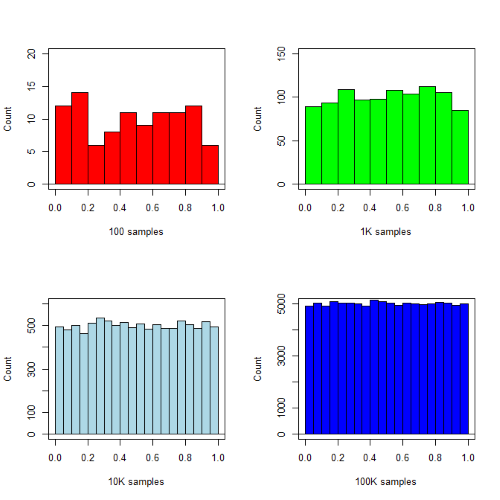
Figure 1. Histograms of runif results with 100, 1K, 10K, and 100K numbers of values to be generated
Looks pretty uniform. A property of random numbers is that history should not influence the future, i.e., no autocorrelation. We can check using the acf() function (Fig. 2).
par(mfrow = c(2, 2))
acf(myUniformH, main="100")
acf(myUniform1K, main="1K")
acf(myUniform10K, main="10K")
acf(myUniform100K, main="100K"
dev.off()
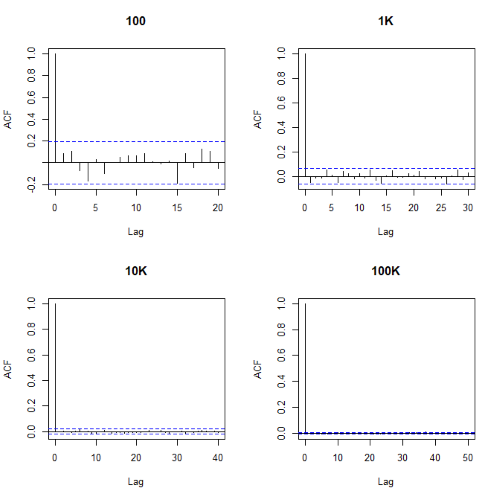
Figure 2. Autocorrelation plots of runif results with 100, 1K, 10K, and 100K numbers of values
Correlations among points are plotted versus lag, where lag refers to the number of points between adjacent points, e.g., lag = 10 reflects the correlation among points 1 and 11, 2 and 12, and so forth. The band defined by two parallel blue dashed lines
Questions
- Use
set.seed(123)and repeatrunif(10)twice. Confirm that the two sets are different (do not set seed) or the same whenset.seedis used. R hint: use functionidentical(x,y), where x and y are the two generated samples. This function tests whether the values and sequence of elements are the same between the two vectors.
Chapter 19 contents
- Introduction
- Jackknife sampling
- Bootstrap sampling
- Monte Carlo methods
- Ch19 References and suggested readings
17.8 – Assumptions and model diagnostics for Simple Linear Regression
Introduction
The assumptions for all linear regression:
- Linear model is appropriate.
The data are well described (fit) by a linear model. - Independent values of Y and equal variances.
Although there can be more than one Y for any value of X, the Y‘s cannot be related to each other (that’s what we mean by independent). Since we allow for multiple Y‘s for each X, then we assume that the variances of the range of Y‘s are equal for each X value (this is similar to our ANOVA assumptions for equal variance by groups). Another term for equal variances is homoscedasticity. - Normality.
For each X value there is a normal distribution of Y‘s (think of doing the experiment over and over). - Error
The residuals (error) are normally distributed with a mean of zero.
Note the mnemonic device: Linear, Independent, Normal, Error or LINE.
Each of the four elements will be discussed below in the context of Model Diagnostics. These assumptions apply to how the model fits the data. There are other assumptions that, if violated, imply you should use a different method for estimating the parameters of the model.
Ordinary least squares makes the additional assumption about the quality of the independent variable that e that measurement of X is done without error. Measurement error is a fact of life in science, but the influence of error on regression differs if the error is associated with the dependent or independent variable. Measurement error in the dependent variable increases the dispersion of the residuals but will not affect the estimates of the coefficients; error associated with the independent variables, however, will affect estimates of the slope. In short, error in X leads to biased estimates of the slope.
The equivalent, but less restrictive practical application of this assumption is that the error in X is at least negligible compared to the measurements in the dependent variable.
Multiple regression makes one more assumption, about the relationship between the predictor variables (the X variables). The assumption is that there is no multicollinearity, a subject we will bring up next time (see Chapter 18).
Model diagnostics
We just reviewed how to evaluate the estimates of the coefficients of the model. Now we need to address a deeper meaning — how well the model explains the data. Consider a simple linear regression first. If Ho: b = 0 is not rejected — then the slope of the regression equation is taken to not differ from zero. We would conclude that if repeated samples were drawn from the population, on average, the regression equation would not fit the data well (lots of scatter) and it would not yield useful prediction.
However, recall that we assume that the fit is linear. One assumption we make in regression is that a line can, in fact, be used to describe the relationship between X and Y.
Here are two very different situations where the slope = 0.
Example 1. Linear Slope = 0, No relationship between X and Y
Example 2. Linear Slope = 0, A significant relationship between X and Y
But even if Ho: b = 0 is rejected (and we conclude that a linear relationship between X and Y is present), we still need to be concerned about the fit of the line to the data — the relationship may be more nonlinear than linear, for example. Here are two very different situations where the slope is not equal to 0.
Example 3. Linear Slope > 0, a linear relationship between X and Y
Example 4. Linear Slope > 0, curve-linear relationship between X and Y
How can you tell the difference? There are many regression diagnostic tests, many more than we can cover, but you can start with looking at the coefficient of determination (low R2 means low fit to the line), and we can look at the pattern of residuals plotted against the either the predicted values or the X variables (my favorite). The important points are:
- In linear regression, you fit a model (the slope + intercept) to the data;
- We want the usual hypothesis tests (are the coefficients different from zero?) and
- We need to check to see if the model fits the data well. Just like in our discussions of chi-square, a “perfect fit would mean that the difference between our model and the data would be zero.
Graph options
Using residual plots to diagnose regression equations
Yes, we need to test the coefficients (intercept Ho = 0; slope Ho = 0) of a regression equation, but we also must decide if a regression is an appropriate description of the data. This topic includes the use of diagnostic tests in regression. We address this question chiefly by looking at
- scatterplots of the independent (predictor) variable(s) vs. dependent (response) variable(s).
what patterns appear between X and Y? Do your eyes tell you “Line”? “Curve”? “No relation”? - coefficient of determination
closer to zero than to one? - patterns of residuals plotted against the X variables (other types of residual plots are used to, this is one of my favorites)
Our approach is to utilize graphics along with statistical tests designed to address the assumptions.
One typical choice is to see if there are patterns in the residual values plotted against the predictor variable. If the LINE assumptions hold for your data set, then the residuals should have a mean of zero with scatter about the mean. Deviations from LINE assumptions will show up in residual plots.
Here are examples of POSSIBLE outcomes:
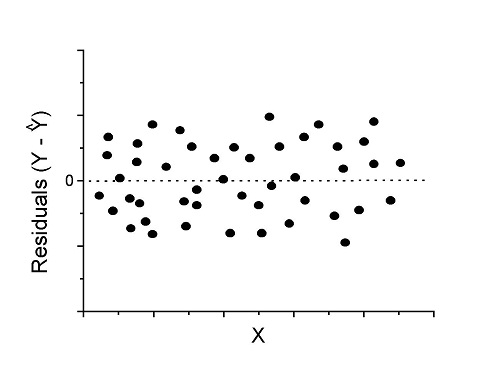
Figure 1. An ideal plot of residuals
Solution: Proceed! Assumptions of linear regression met.
Compare to plots of residuals that differ from the ideal.
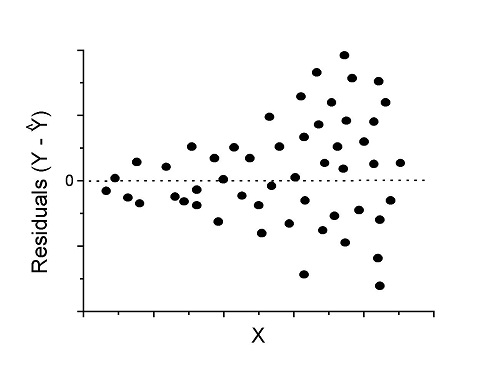
Figure 2. We have a problem. Residual plot shows a “funnel” shape — unequal variance (aka heteroscedasticity).
Solution. Try a transform like the log10-transform.
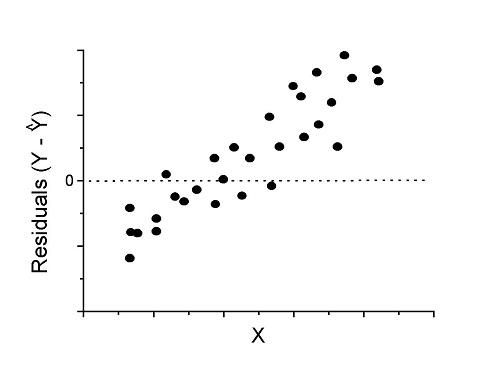
Figure 3. Problem. Residual plot shows systematic trend.
Solution. Linear model a poor fit; May be related to measurement errors for one or more predictor variables. Try adding an additional predictor variable or model the error in your general linear model.
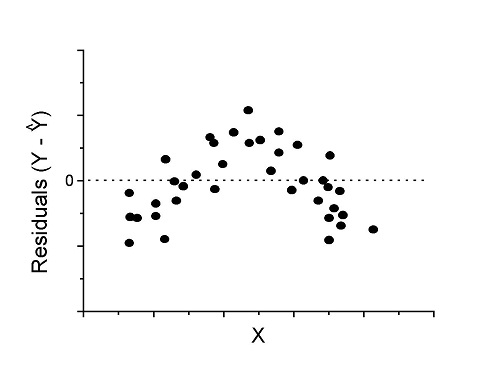
Figure 4. Problem. Residual plot shows nonlinear trend.
Solution. Transform data or use more complex model
This is a good time to mention that in statistical analyses, one often needs to do multiple rounds of analyses, involving description and plots, tests of assumptions, tests of inference. With regression, in particular, we also need to decide if our model (e.g., linear equation) is a good description of the data.
Diagnostic plot examples
Return to our example.Tadpole dataset. To obtain residual plots, Rcmdr: Models → Graphs → Basic diagnostic plots yields four graphs. Graph A is
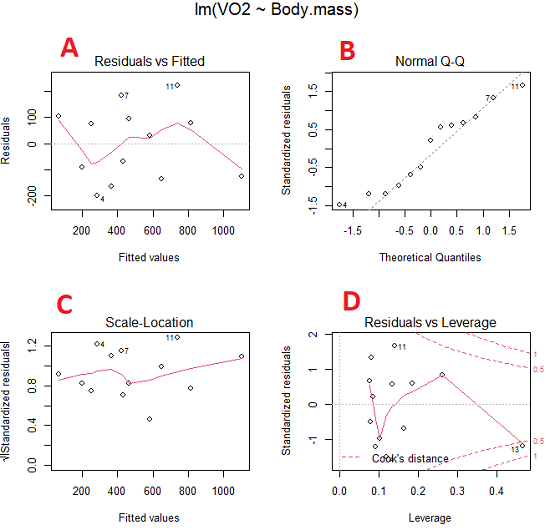
Figure 5. Basic diagnostic plots. A: residual plot; B: Q-Q plot of residuals; C: Scale-location (aka spread-location) plot; D: leverage residual plot.
In brief, we look at plots
A, the residual plot, to see if there are trends in the residuals. We are looking for a spread of points equally above and below the mean of zero. In Figure 5 we count seven points above and six points below zero so there’s no indication of a trend in the residuals vs the fitted VO2 (Y) values.
B, the Q-Q plot is used to see if normality holds. As discussed before, if our data are more or less normally distributed, then points will fall along a straight line in a Q-Q plot.
C, the Scale- or spread-location plot is used to verify equal variances of errors.
D, Leverage plot — looks to see if an outlier has leverage on the fit of the line to the data, i.e., changes the slope. Additionally, provides location of Cook’s distance measure (dashed red lines). Cook’s distance measures the effect on the regression by removing one point at a time and then fitting a line to the data. Points outside the dashed lines have influence.
A note of caution about over-thinking with these plots. R provides a red line to track the points. However, these lines are guides, not judges. We humans are generally good at detecting patterns, but with data visualization, there is the risk of seeing patterns where none exits. In particular, recognizing randomness is not easy. If anything, we may tend to see patterns where none exist, termed apophenia. So yes, by all means look at the graphs, but do so with a plan: red line more or less horizontal? Then no pattern and the regression model is a good fit to the data.
Statistical test options
After building linear models, run statistical diagnostic tests that compliment graphics approaches. Here, simply to introduce the tests, I included the Gosner factor as potential predictor — many of these numerical diagnostics are more appropriate for models with more than one predictor variable, the subject of the next chapter.
Results for the model  were:
were:
lm(formula = VO2 ~ Body.mass + Gosner, data = frogs)

Residuals:
    Min      1Q Median    3Q    Max
-163.12 -125.53 -20.27 83.71 228.56

Coefficients:
           Estimate Std. Error t value  Pr(>|t|)
(Intercept) -595.37     239.87  -2.482 0.03487 *
Body.mass    431.20     115.15   3.745 0.00459 **
Gosner[T.II]  64.96     132.83   0.489 0.63648
---
Signif. codes: 0 '***' 0.001 '**' 0.01 '*' 0.05 '.' 0.1 ' ' 1

Residual standard error: 153.4 on 9 degrees of freedom
  (1 observation deleted due to missingness)
Multiple R-squared: 0.8047, Adjusted R-squared: 0.7613
F-statistic: 18.54 on 2 and 9 DF, p-value: 0.0006432
Question. Note the p-value for the coefficients — do we include a model with both body mass and Gosner Stage? See Chapter 18.5 – Selecting the best model
In R Commander, the diagnostic test options are available via
Rcmdr: Models → Numerical diagnostics
Variance inflation factors (VIF): used to detect multicollinearity among the predictor variables. If correlations are present among the predictor variables, then you can’t rely on the the coefficient estimates — whether predictor A causes change in the response variable depends on whether the correlated B predictor is also included in the model. If correlation between predictor A and B, the statistical effect is increased variance associated with the error of the coefficient estimates. There are VIF for each predictor variable. A VIF of one means there is no correlation between that predictor and the other predictor variables. A VIF of 10 is taken as evidence of serious multicollinearity in the model.
R code:
vif(RegModel.2)
R output
Body.mass Gosner
2.186347 2.186347

round(cov2cor(vcov(RegModel.2)), 3) # Correlations of parameter estimates
         (Intercept) Body.mass Gosner[T.II]
(Intercept)    1.000    -0.958        0.558
Body.mass     -0.958     1.000       -0.737
Gosner[T.II]   0.558    -0.737        1.000
Our interpretation
The output shows a matrix of correlations; the correlation between the two predictor variables in this model was 0.558, large per our discussions in Chapter 16.1 . Not really surprising as older tadpoles (Gosner stage II), are larger tadpoles. We’ll leave the issue of multicollinearity to Chapter 18.1.
Breusch-Pagan test for heteroscedasticity… Recall that heteroscedasticity is another name for unequal variances. This tests pertains to the residuals; we used the scale (spread) location plot (C) above. The test statistic can be calculated as  . The function call is part of the car package, which we download as part of the Rcmdr package. R Commander will pop up a menu of choices for this test. For starters, accept the defaults, enter nothing, and click OK.
R code:
library(zoo, pos=16)
library(lmtest, pos=16)
bptest(VO2 ~ Body.mass + Gosner, varformula = ~ fitted.values(RegModel.2), studentize=FALSE, data=frogs)
R output
Breusch-Pagan test

data:  VO2 ~ Body.mass + Gosner
BP = 0.0040766, df = 1, p-value = 0.9491
Our interpretation
A p-value less than 5% would be interpreted as statistically significant unequal variances among the residuals.
Durbin-Watson for autocorrelation… used to detect serial (auto)correlation among the residuals, specifically, adjacent residuals. Substantial autocorrelation can mean Type I error for one or more model coefficients. The test returns a test statistic that ranges from 0 to 4. A value at midpoint (2) suggests no autocorrelation. Default test for autocorrelation is r > 0.
R code:
dwtest(VO2 ~ Body.mass + Gosner, alternative="greater", data=frogs)
R output
Durbin-Watson test

data:  VO2 ~ Body.mass + Gosner
DW = 2.1336, p-value = 0.4657
alternative hypothesis: true autocorrelation is greater than 0
Our interpretation
The DW statistic was about 2. Per our definition, we conclude no correlations among the residuals.
RESET test for nonlinearity… The Ramsey Regression Equation Specification Error Test is used to interpret whether or not the equation is properly specified. The idea is that fit of the equation is compared against alternative equations that account for possible nonlinear dependencies among predictor and dependent variables. The test statistic follows an F distribution.
R code:
resettest(VO2 ~ Body.mass + Gosner, power=2:3, type="regressor", data=frogs)
R output
RESET test

data:  VO2 ~ Body.mass + Gosner
RESET = 0.93401, df1 = 2, df2 = 7, p-value = 0.437
Our interpretation
Also a nonsignificant test — adding a power term to account for a nonlinear trend gained no model fit benefits, p-value much greater than 5%.
Bonferroni outlier test. Reports the Bonferroni p-values for testing each observation to see if it can be considered to be a mean-shift outlier (a method for identifying potential outlier values — each value is in turn replaced with the mean of its nearest neighbors, Lehhman et al 2020). Compare to results of VIF. The objective of outlier and VIF tests is to verify that the regression model is stable, insensitive to potential leverage (outlier) values.
R code:
outlierTest(LinearModel.3)
R output
No Studentized residuals with Bonferroni p < 0.05
Largest |rstudent|:
  rstudent unadjusted p-value Bonferroni p
7 1.958858        0.085809              NA
Our interpretation
We ran the outlierTest() function on LinearModel.3 to check for influential outliers using Studentized residuals with Bonferroni correction.
The output shows “No Studentized residuals with Bonferroni p < 0.05”, which means no data points were statistically flagged as outliers after adjusting for multiple comparisons. The largest Studentized residual was 1.96 (point 7), with an unadjusted p-value of 0.086. Although this is the largest deviation from the regression line, it is not statistically significant. Therefore, we conclude that no single observation is exerting undue influence on the model fit, and we can be confident that our regression results are not driven by outliers.
Response transformation… The concept of transformations of data to improve adherence to statistical assumptions was introduced in Chapters 3.2, 13.1, and 15.
R code:
summary(powerTransform(LinearModel.3, family="bcPower"))
R output
bcPower Transformation to Normality
    Est Power Rounded Pwr Wald Lwr Bnd Wald Upr Bnd
Y1     0.9987           1       0.2755       1.7218

Likelihood ratio test that transformation parameter is equal to 0
   (log transformation)
                           LRT df      pval
LR test, lambda = (0) 7.374316  1 0.0066162

Likelihood ratio test that no transformation is needed
                                LRT df    pval
LR test, lambda = (1) 0.00001289284  1 0.99714
Our interpretation
The Box-Cox analysis suggests that the response variable for LinearModel.3 can remain on its original scale. No power transformation was needed, and any standard linear regression inference is appropriate. The estimated transformation parameter was close to one, which suggests that the original response variable did not need a transformation. The LRT tests whether a log transformation (lambda = 0) would improve normality. The significant p-value, 0.0066, for the LRT indicates that a log transformation would not be the best choice, consistent with lambda ≈ 1. And last, the very high p-value, 0.99714, confirms that no transformation is necessary; the model residuals were close to normal.
Questions
- Write up three learning outcomes for this page. Hint: Point your favorite generative AI to this page and ask for help.
- Referring to Figures 1 – 4 on this page, which plot best suggests a regression line fits the data?
- Return to the electoral college data set and your linear models of Electoral vs. POP_2010 and POP_2019. Obtain the four basic diagnostic plots and comment on the fit of the regression line to the electoral college data.
- residual plot
- Q-Q plot
- Scale-location plot
- Leverage plot
- With respect to your answers in question 2, how well does the electoral college system reflect the principle of one person one vote?
Quiz Chapter 17.8
Assumptions and model diagnostics for Simple Linear Regression
Chapter 17 contents
- Introduction
- Simple Linear Regression
- Relationship between the slope and the correlation
- Estimation of linear regression coefficients
- OLS, RMA, and smoothing functions
- Testing regression coefficients
- Regression model fit
- Assumptions and model diagnostics for Simple Linear Regression
- References and suggested readings (Ch17 & 18)
20.5 – Time series
Introduction
Time series refers to any measure recorded over time. Stationary time series do not have trends or seasonality, just random (white) noise; differencing, or nonstationary time series do have trends and or seasonality. Stationary time series will not have predictable patterns over the long term, but for us, what this distinction says is that statistics like autocorrelation, the mean and standard deviation remains the same over time. Nonstationary times series can be made stationary by transformation, with taking a differencing approach, subtracting each observation from its preceding one to remove trends and seasonality, one common approach.
All kinds of examples of time series analysis can be made, with stock market price fluctuations (Hamilton 1994) and meteorological forecasting (Mudelsee 2014) as common examples. Time series analysis are also important in clinical situations, for example, analysis of temporal patterns in ECG and blood pressure data, which helps predict risks, monitor patient health, and understand disease trends. In ecology, perhaps the most famous time series data set is the Hudson’s Bay Company fur-trade records, which show a 9- to 11-year predator-prey population cycle between populations of the Canadian lynx (the predator) and the snowshoe hare (the prey) (Krebs et al 1995).
Significant autocorrelation — the correlation between any two observations in a data series separated by a specific time interval or lag — represents the extent to which a time series is correlated with its past values. For example, autocorrelation could measure the association between a person’s heart rate today and its heart rate yesterday, or between its heart rate today and the heart rate from last week. It is not simply the relationship between today’s heart rate and, for instance, today’s environmental temperature. This kind of comparison, between two sets of time series, calls for a cross-correlation or predictive correlation. A cross-correlation measures the correlation between the first series (temperature) and a lagged version of the second series (heart rate some minutes or hours later). Examples of such correlations include our familiar product moment correlation, but generalized across all possible time lags.
Note 1: See RHRV package, the R Heart Rate Variability (HRV) analysis package, for framework to analyze heartbeat, ECG, and other cardiac recordings. See also Chapter 20.3 – Baseline correction for an example of a myogram analysis with baseline drift.
There’s much to the analysis of time series, but one key concept is the moving average. Along with any trend or pattern due to seasonality, time series data are expected to exhibit noise or random variation associated with each point in the series. The moving average is an attempt to smooth out data to reveal underlying trends and are fundamental to seasonal decomposition and forecasting. We calculate a series of averages of different subsets of the data, making it easier to spot long-term patterns by filtering out short-term noise, like fluctuations or outliers.
For example, to calculate the 5-beat moving average of a heartbeat, you would average the last 5 individual heartbeat values. As each new heartbeat is recorded, the oldest one is dropped, and a new average is calculated, creating a smoother trend line that shows a clearer overall picture rather than focusing on individual, potentially spiky, beat-to-beat variations. Rate-responsive or adaptive pacemakers use moving averages to determine the appropriate pacing rate. This helps provide a smoother and more stable heart rate response to the patient’s activity.
Note 2: For some really cool work on adaptive pacemakers, see Kumar et al 2018.
This statistical approach should sound familiar — we introduced without much fanfare use of LOESS (Locally Estimated Scatterplot Smoothing) to smooth data to improve pattern detection in Chapter 4.5 and Chapter 17.4. While a moving average takes average of a fixed number of recent data points, LOESS is a more powerful non-parametric regression technique that fits local polynomial regressions to subsets of the data to create a smooth curve.
In time series analysis, the autocorrelation function (ACF) measures the linear relationship between a time series and a lagged version of itself. It quantifies how correlated a series is with its past values ( ) and
) and  ), where
  is the lag or time interval. An ACF plot, or correlogram, visually displays these correlation coefficients at different lags to help identify patterns, assess randomness, and determine appropriate time series models like ARIMA. ACF is related to moving averages because the ACF plot helps to identify the order of a moving average model, which depends on the ACF’s behavior at different lags.
Note 3: A time-series plot shows how a single variable changes over time, while an ACF (Autocorrelation Function) plot visualizes the correlation between a time series and a lagged version of itself.
Like many pages in Mike’s Biostatistics Book, this page only begins to introduce the subject. For a more thorough introduction, see Introduction to Time Series Analysis, NIST. See also the text by Shumway and Stoffer (2025).
ARIMA and ARMA models
ARIMA and ARMA models are fundamental tools for analyzing time series data in biostatistics, especially when the goal is to understand temporal patterns or forecast future values. An ARMA model combines two ideas: autoregression (AR), where the current value depends on previous values, and moving average (MA), where the current value depends on previous error terms. An ARIMA model extends this by adding differencing—the “I” for Integrated—which helps remove trends and make the series stationary. These models are widely used in public health, epidemiology, and biological monitoring because many variables (e.g., infection rates, physiological signals) show correlation over time.
Note 4: We introduced ARMA models in our Generalized Linear models introduction, Chapter 18.4.
Both ARMA and ARIMA models rely on the concepts of lagged dependence and error smoothing, but ARIMA is more flexible because it explicitly accommodates nonstationary data. An ARMA(p, q) model is appropriate when the time series is already stationary or has been preprocessed to remove trend and seasonality.  is the autoregressive order, the number of lagged observations used to forecast the current value, and
  is the moving average order, the number of lagged forecast errors included in the model.
In contrast, ARIMA(p, d, q) includes a differencing parameter  that automatically transforms the series to stationarity before fitting the ARMA structure. Thus, ARIMA models are typically used for data with a clear trend or evolving mean, while ARMA models are a subset applied to stable series without differencing. In practice, ARIMA is more commonly applied because real-world biological and clinical time series often exhibit trends.
R code
In R, ARMA and ARIMA models can be fit using the forecast or stats packages. The code below shows simple examples of each using a generic time series object  . An ARMA(2,1) model can be fit with:
arma_model <- arima(y, order = c(2, 0, 1))
summary(arma_model)
where the middle “0” indicates no differencing. For an ARIMA(1,1,1) model, which includes first differencing to remove trend, the code is:
arima_model <- arima(y, order = c(1, 1, 1))
summary(arima_model)
ccc
R packages
To conduct time series analysis we can use built in functions like ts() and decompose(). HoltWinters() also useful, now part of stats. Lots of specialized time series packages with advanced features, including forecast, timeSeries (Financial time series), season (Seasonal analysis of health data), and many others. For a more extensive package, see asta, which was designed to accompany the excellent book, now in its 5th edition, Time Series Analysis and its Applications: With R Examples, by Shumway and Stoffer (2025).
Note 4: Caution — newer versions of R have HoltWinters() and related functions included with base package stats.
Rcmdr package for time series was RcmdrPlugin.epack , removed from CRAN as of 2018.
For up-to-date listing of time series packages, see https://cran.r-project.org/web/views/TimeSeries.html
Time series data sets included in R and Rcmdr
R Code
data(co2, package="datasets")
co2 <- as.data.frame(co2)
#convert to time series data type with ts()
tCO2 <- ts(co2,frequency=12,start=c(1959),end=c(1997))
plot.ts(tCO2)
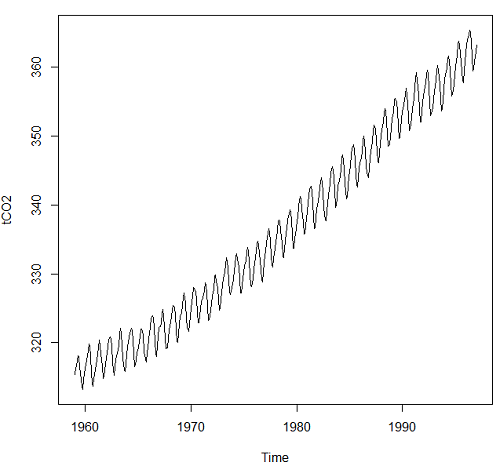
Figure 1. Time series plot of CO2 data set, the Keeling curve, from package datasets, comes with Rcmdr installation.
Other datasets included with R
carData::Arrests
carData::Bfox
carData::CanPop
Example
Get up-to-date CO2 data from NOAA as text file. Download to your computer, load and clean in your favorite spreadsheet app. Months came as numbers 1,2,3, etc., I changed to text, Jan, Feb, Mar, etc. I grabbed three columns: year, month, ppm for import to R.
head(maunaLoa)
R output
> head(maunaLoa)
  year month  ppm
1 1958 Mar 315.70
2 1958 Apr 317.45
3 1958 May 317.51
4 1958 Jun 317.24
5 1958 Jul 315.86
6 1958 Aug 314.93
However, it turns out the time series functions are easiest to work if only the ppm data are included.
tCO2 <- ts(maunaLoa[,"ppm"],frequency=12,start=c(1958,3),end=c(2020,10))
head(tCO2)
R output
> head(tCO2)
        Mar    Apr    May    Jun    Jul    Aug
1958 315.70 317.45 317.51 317.24 315.86 314.93
Get our plot (Figure 2).
plot(tCO2)
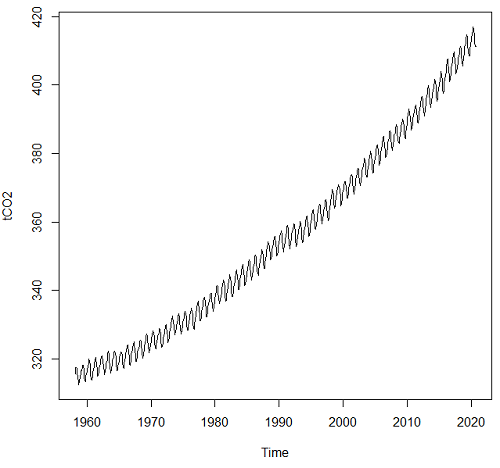
Figure 2. CO2 ppm monthly average data from NOAA, last data October 2020.
Seasonal time series comes with a trend component, a seasonal component, and a random component.
R code
dectCO2 <- decompose(tCO2)
head(dectCO2)
plot(dectCO2)
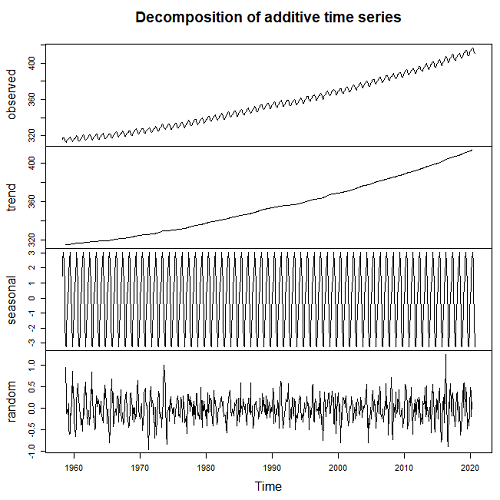
Figure 3. Observed (panel, top), trends over time (panel, second from top), seasonal changes (panel, second from bottom), and random error (panel, bottom).
Forecasting
Excellent resource at https://otexts.com/fpp2/
Exponential smoothing, weighted averages of past observations, weighted so that more recent observations are more influential.
Holt-Winters method extracts seasonal component (additive or multiplicative).
#set start value to value of first observation
tCO2cast <- HoltWinters(tCO2, l.start=315.42)
#Predict for next ten years. Because frequency in ts() was monthly, ten years is h=120
forecastCO2 <- forecast(tCO2cast, h=120)
plot(forecastCO2, fcol="red")
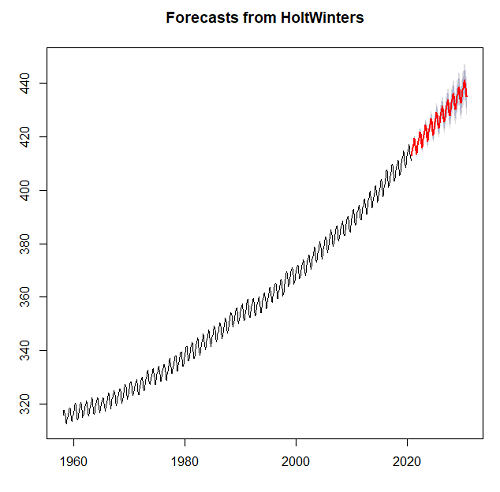
Figure 4. Data in black, predicted values in red (additive) shaded by confidence interval.
Questions
- Write up three learning outcomes for this page. Hint: Point your favorite generative AI to this page and ask for help.
- For the co2 dataset included in Rcmdr (co2, datasets), obtain forecast for year 2020 and compare against actual 2020 data (see Figure 2).
- Positive clinical samples between September 2015 and November 2020 for flu virus in the USA are provided in the data set below (scroll or click here). The frequency of observations was weekly. Apply
decompose()and obtain the seasonal and trend components of the data set. Which month does the peak positive sample occur? - Total pounds of fish (variable = Pounds) and pounds of Akule and Opelu (variable = Akule.Opelu) caught by commercial industry in Hawaiʻi, from 2000 to 2018 are provided in the data set below (scroll or click here). Apply
decompose()and obtain the seasonal and trend components of the data set for Total pounds and again for Akule (Selar crumenophthalmus) and Opelu (Decapterus macarellus). Is there evidence for trends, and if so, describe the trend. Is there evidence of seasonality? If so, which month did peak fishing occur?
Quiz Chapter 20.5
Time series
References and suggested reading
Hamilton, J. D. (1994). Time Series Analysis. Princeton University Press.
Krebs, C. J., Boutin, S., Boonstra, R., Sinclair, A. R. E., Smith, J. N. M., Dale, M. R. T., Martin, K., & Turkington, R. (1995). Impact of food and predation on the snowshoe hare cycle. Science, 269(25 August), 1112–1115.
Kumar, A., Komaragiri, R., & Kumar, M. (2018). From Pacemaker to Wearable: Techniques for ECG Detection Systems. Journal of Medical Systems, 42(2), 34.
Chapter 6.4. Introduction to Time Series Analysis, in NIST/SEMATECH e-Handbook of Statistical Methods, https://www.itl.nist.gov/div898/handbook/index.htm, (first reviewed by Mike in 2019).
Mudelsee, M. (2016). Climate time series Classical statistics and bootstrap methods (2nd ed., Vol. 51). Springer.
Shumway, R. H., & Stoffer, D. S. (2025). Time Series Analysis and Its Applications: With R Examples (5th ed.). Springer.
Data set this page
Flu, extracted 28 Nov 2020 from https://gis.cdc.gov/grasp/fluview/fluportaldashboard.html
| Year | Date | Week | Positive |
|---|---|---|---|
| 2015 | 09/28/15 | 40 | 1.056 |
| 2015 | 10/05/15 | 41 | 1.297 |
| 2015 | 10/12/15 | 42 | 1.109 |
| 2015 | 10/19/15 | 43 | 1.108 |
| 2015 | 10/26/15 | 44 | 1.123 |
| 2015 | 11/02/15 | 45 | 1.382 |
| 2015 | 11/09/15 | 46 | 1.193 |
| 2015 | 11/16/15 | 47 | 1.385 |
| 2015 | 11/23/15 | 48 | 1.395 |
| 2015 | 11/30/15 | 49 | 1.475 |
| 2015 | 12/07/15 | 50 | 2.512 |
| 2015 | 12/14/15 | 51 | 2.287 |
| 2015 | 12/21/15 | 52 | 2.46 |
| 2016 | 01/04/16 | 1 | 2.931 |
| 2016 | 01/11/16 | 2 | 4.254 |
| 2016 | 01/18/16 | 3 | 5.485 |
| 2016 | 01/25/16 | 4 | 6.96 |
| 2016 | 02/01/16 | 5 | 9.699 |
| 2016 | 02/08/16 | 6 | 12.549 |
| 2016 | 02/15/16 | 7 | 15.536 |
| 2016 | 02/22/16 | 8 | 18.362 |
| 2016 | 02/29/16 | 9 | 21.11 |
| 2016 | 03/07/16 | 10 | 23.645 |
| 2016 | 03/14/16 | 11 | 19.972 |
| 2016 | 03/21/16 | 12 | 18.471 |
| 2016 | 03/28/16 | 13 | 16.227 |
| 2016 | 04/04/16 | 14 | 14.016 |
| 2016 | 04/11/16 | 15 | 13.236 |
| 2016 | 04/18/16 | 16 | 12.346 |
| 2016 | 04/25/16 | 17 | 10.262 |
| 2016 | 05/02/16 | 18 | 8.121 |
| 2016 | 05/09/16 | 19 | 6.686 |
| 2016 | 05/16/16 | 20 | 5.811 |
| 2016 | 05/23/16 | 21 | 4.719 |
| 2016 | 05/30/16 | 22 | 3.06 |
| 2016 | 06/06/16 | 23 | 3.02 |
| 2016 | 06/13/16 | 24 | 1.829 |
| 2016 | 06/20/16 | 25 | 1.712 |
| 2016 | 06/27/16 | 26 | 1.223 |
| 2016 | 07/04/16 | 27 | 0.903 |
| 2016 | 07/11/16 | 28 | 0.869 |
| 2016 | 07/18/16 | 29 | 0.849 |
| 2016 | 07/25/16 | 30 | 0.782 |
| 2016 | 08/01/16 | 31 | 0.934 |
| 2016 | 08/08/16 | 32 | 0.901 |
| 2016 | 08/15/16 | 33 | 0.803 |
| 2016 | 08/22/16 | 34 | 1.405 |
| 2016 | 08/29/16 | 35 | 1.678 |
| 2016 | 09/05/16 | 36 | 1.461 |
| 2016 | 09/12/16 | 37 | 1.513 |
| 2016 | 09/19/16 | 38 | 1.741 |
| 2016 | 09/26/16 | 39 | 1.784 |
| 2016 | 10/03/16 | 40 | 1.57 |
| 2016 | 10/10/16 | 41 | 1.359 |
| 2016 | 10/17/16 | 42 | 1.403 |
| 2016 | 10/24/16 | 43 | 1.509 |
| 2016 | 10/31/16 | 44 | 1.916 |
| 2016 | 11/07/16 | 45 | 2.201 |
| 2016 | 11/14/16 | 46 | 2.576 |
| 2016 | 11/21/16 | 47 | 3.348 |
| 2016 | 11/28/16 | 48 | 3.319 |
| 2016 | 12/05/16 | 49 | 4.26 |
| 2016 | 12/12/16 | 50 | 6.683 |
| 2016 | 12/19/16 | 51 | 10.782 |
| 2016 | 12/26/16 | 52 | 13.999 |
| 2017 | 01/02/17 | 1 | 13.344 |
| 2017 | 01/09/17 | 2 | 15.373 |
| 2017 | 01/16/17 | 3 | 18.287 |
| 2017 | 01/23/17 | 4 | 18.53 |
| 2017 | 01/30/17 | 5 | 21.422 |
| 2017 | 02/06/17 | 6 | 24.153 |
| 2017 | 02/13/17 | 7 | 24.512 |
| 2017 | 02/20/17 | 8 | 24.725 |
| 2017 | 02/27/17 | 9 | 19.772 |
| 2017 | 03/06/17 | 10 | 19.271 |
| 2017 | 03/13/17 | 11 | 19.034 |
| 2017 | 03/20/17 | 12 | 19.711 |
| 2017 | 03/27/17 | 13 | 18.482 |
| 2017 | 04/03/17 | 14 | 15.425 |
| 2017 | 04/10/17 | 15 | 12.74 |
| 2017 | 04/17/17 | 16 | 9.696 |
| 2017 | 04/24/17 | 17 | 6.768 |
| 2017 | 05/01/17 | 18 | 5.918 |
| 2017 | 05/08/17 | 19 | 5.333 |
| 2017 | 05/15/17 | 20 | 4.863 |
| 2017 | 05/22/17 | 21 | 4.352 |
| 2017 | 05/29/17 | 22 | 4.165 |
| 2017 | 06/05/17 | 23 | 3.386 |
| 2017 | 06/12/17 | 24 | 3.062 |
| 2017 | 06/19/17 | 25 | 2.649 |
| 2017 | 06/26/17 | 26 | 2.534 |
| 2017 | 07/03/17 | 27 | 2.178 |
| 2017 | 07/10/17 | 28 | 2.164 |
| 2017 | 07/17/17 | 29 | 1.839 |
| 2017 | 07/24/17 | 30 | 1.806 |
| 2017 | 07/31/17 | 31 | 1.948 |
| 2017 | 08/07/17 | 32 | 1.9 |
| 2017 | 08/14/17 | 33 | 1.343 |
| 2017 | 08/21/17 | 34 | 1.434 |
| 2017 | 08/28/17 | 35 | 1.935 |
| 2017 | 09/04/17 | 36 | 1.888 |
| 2017 | 09/11/17 | 37 | 1.896 |
| 2017 | 09/18/17 | 38 | 1.669 |
| 2017 | 09/25/17 | 39 | 1.703 |
| 2017 | 10/02/17 | 40 | 2.202 |
| 2017 | 10/09/17 | 41 | 2.09 |
| 2017 | 10/16/17 | 42 | 2.176 |
| 2017 | 10/23/17 | 43 | 2.583 |
| 2017 | 10/30/17 | 44 | 3.607 |
| 2017 | 11/06/17 | 45 | 4.245 |
| 2017 | 11/13/17 | 46 | 5.3 |
| 2017 | 11/20/17 | 47 | 7.088 |
| 2017 | 11/27/17 | 48 | 7.305 |
| 2017 | 12/04/17 | 49 | 10.745 |
| 2017 | 12/11/17 | 50 | 15.355 |
| 2017 | 12/18/17 | 51 | 22.777 |
| 2017 | 12/25/17 | 52 | 25.386 |
| 2018 | 01/01/18 | 1 | 25.365 |
| 2018 | 01/08/18 | 2 | 26.942 |
| 2018 | 01/15/18 | 3 | 27.034 |
| 2018 | 01/22/18 | 4 | 27.37 |
| 2018 | 01/29/18 | 5 | 27.064 |
| 2018 | 02/05/18 | 6 | 26.998 |
| 2018 | 02/12/18 | 7 | 26.117 |
| 2018 | 02/19/18 | 8 | 22.616 |
| 2018 | 02/26/18 | 9 | 18.487 |
| 2018 | 03/05/18 | 10 | 15.694 |
| 2018 | 03/12/18 | 11 | 15.581 |
| 2018 | 03/19/18 | 12 | 15.328 |
| 2018 | 03/26/18 | 13 | 15.114 |
| 2018 | 04/02/18 | 14 | 12.689 |
| 2018 | 04/09/18 | 15 | 11.249 |
| 2018 | 04/16/18 | 16 | 9.398 |
| 2018 | 04/23/18 | 17 | 7.999 |
| 2018 | 04/30/18 | 18 | 6.259 |
| 2018 | 05/07/18 | 19 | 4.393 |
| 2018 | 05/14/18 | 20 | 3.166 |
| 2018 | 05/21/18 | 21 | 2.39 |
| 2018 | 05/28/18 | 22 | 1.529 |
| 2018 | 06/04/18 | 23 | 1.577 |
| 2018 | 06/11/18 | 24 | 1.299 |
| 2018 | 06/18/18 | 25 | 1.023 |
| 2018 | 06/25/18 | 26 | 1.114 |
| 2018 | 07/02/18 | 27 | 1.003 |
| 2018 | 07/09/18 | 28 | 0.916 |
| 2018 | 07/16/18 | 29 | 1.053 |
| 2018 | 07/23/18 | 30 | 0.995 |
| 2018 | 07/30/18 | 31 | 0.954 |
| 2018 | 08/06/18 | 32 | 0.957 |
| 2018 | 08/13/18 | 33 | 0.764 |
| 2018 | 08/20/18 | 34 | 1.336 |
| 2018 | 08/27/18 | 35 | 1.504 |
| 2018 | 09/03/18 | 36 | 1.747 |
| 2018 | 09/10/18 | 37 | 1.687 |
| 2018 | 09/17/18 | 38 | 1.699 |
| 2018 | 09/24/18 | 39 | 1.497 |
| 2018 | 10/01/18 | 40 | 1.749 |
| 2018 | 10/08/18 | 41 | 1.697 |
| 2018 | 10/15/18 | 42 | 1.993 |
| 2018 | 10/22/18 | 43 | 2.055 |
| 2018 | 10/29/18 | 44 | 2.174 |
| 2018 | 11/05/18 | 45 | 2.733 |
| 2018 | 11/12/18 | 46 | 3.157 |
| 2018 | 11/19/18 | 47 | 3.928 |
| 2018 | 11/26/18 | 48 | 3.915 |
| 2018 | 12/03/18 | 49 | 6.232 |
| 2018 | 12/10/18 | 50 | 10.364 |
| 2018 | 12/17/18 | 51 | 14.265 |
| 2018 | 12/24/18 | 52 | 16.352 |
| 2019 | 12/31/18 | 1 | 12.139 |
| 2019 | 01/07/19 | 2 | 12.722 |
| 2019 | 01/14/19 | 3 | 16.317 |
| 2019 | 01/21/19 | 4 | 19.392 |
| 2019 | 01/28/19 | 5 | 22.549 |
| 2019 | 02/04/19 | 6 | 25.134 |
| 2019 | 02/11/19 | 7 | 26.026 |
| 2019 | 02/18/19 | 8 | 26.241 |
| 2019 | 02/25/19 | 9 | 26.074 |
| 2019 | 03/04/19 | 10 | 25.607 |
| 2019 | 03/11/19 | 11 | 26.132 |
| 2019 | 03/18/19 | 12 | 22.481 |
| 2019 | 03/25/19 | 13 | 19.304 |
| 2019 | 04/01/19 | 14 | 14.942 |
| 2019 | 04/08/19 | 15 | 11.909 |
| 2019 | 04/15/19 | 16 | 8.611 |
| 2019 | 04/22/19 | 17 | 5.844 |
| 2019 | 04/29/19 | 18 | 4.82 |
| 2019 | 05/06/19 | 19 | 3.84 |
| 2019 | 05/13/19 | 20 | 3.542 |
| 2019 | 05/20/19 | 21 | 3.42 |
| 2019 | 05/27/19 | 22 | 3.083 |
| 2019 | 06/03/19 | 23 | 2.79 |
| 2019 | 06/10/19 | 24 | 2.316 |
| 2019 | 06/17/19 | 25 | 1.902 |
| 2019 | 06/24/19 | 26 | 2.081 |
| 2019 | 07/01/19 | 27 | 2.429 |
| 2019 | 07/08/19 | 28 | 2.017 |
| 2019 | 07/15/19 | 29 | 2.218 |
| 2019 | 07/22/19 | 30 | 2.377 |
| 2019 | 07/29/19 | 31 | 2.398 |
| 2019 | 08/05/19 | 32 | 2.054 |
| 2019 | 08/12/19 | 33 | 2.082 |
| 2019 | 08/19/19 | 34 | 2.362 |
| 2019 | 08/26/19 | 35 | 3.455 |
| 2019 | 09/02/19 | 36 | 3.097 |
| 2019 | 09/09/19 | 37 | 2.484 |
| 2019 | 09/16/19 | 38 | 2.757 |
| 2019 | 09/23/19 | 39 | 2.744 |
| 2019 | 09/30/19 | 40 | 1.31 |
| 2019 | 10/07/19 | 41 | 1.479 |
| 2019 | 10/14/19 | 42 | 1.552 |
| 2019 | 10/21/19 | 43 | 2.253 |
| 2019 | 10/28/19 | 44 | 3.057 |
| 2019 | 11/04/19 | 45 | 5.163 |
| 2019 | 11/11/19 | 46 | 6.756 |
| 2019 | 11/18/19 | 47 | 9.546 |
| 2019 | 11/25/19 | 48 | 10.939 |
| 2019 | 12/02/19 | 49 | 11.655 |
| 2019 | 12/09/19 | 50 | 16.154 |
| 2019 | 12/16/19 | 51 | 22.533 |
| 2019 | 12/23/19 | 52 | 26.934 |
| 2020 | 12/30/19 | 1 | 23.488 |
| 2020 | 01/06/20 | 2 | 23.119 |
| 2020 | 01/13/20 | 3 | 26.083 |
| 2020 | 01/20/20 | 4 | 28.281 |
| 2020 | 01/27/20 | 5 | 30.147 |
| 2020 | 02/03/20 | 6 | 30.26 |
| 2020 | 02/10/20 | 7 | 29.675 |
| 2020 | 02/17/20 | 8 | 28.322 |
| 2020 | 02/24/20 | 9 | 25.752 |
| 2020 | 03/02/20 | 10 | 22.491 |
| 2020 | 03/09/20 | 11 | 15.813 |
| 2020 | 03/16/20 | 12 | 7.502 |
| 2020 | 03/23/20 | 13 | 2.322 |
| 2020 | 03/30/20 | 14 | 1.031 |
| 2020 | 04/06/20 | 15 | 0.618 |
| 2020 | 04/13/20 | 16 | 0.623 |
| 2020 | 04/20/20 | 17 | 0.218 |
| 2020 | 04/27/20 | 18 | 0.263 |
| 2020 | 05/04/20 | 19 | 0.326 |
| 2020 | 05/11/20 | 20 | 0.306 |
| 2020 | 05/18/20 | 21 | 0.213 |
| 2020 | 05/25/20 | 22 | 0.165 |
| 2020 | 06/01/20 | 23 | 0.34 |
| 2020 | 06/08/20 | 24 | 0.28 |
| 2020 | 06/15/20 | 25 | 0.381 |
| 2020 | 06/22/20 | 26 | 0.282 |
| 2020 | 06/29/20 | 27 | 0.21 |
| 2020 | 07/06/20 | 28 | 0.176 |
| 2020 | 07/13/20 | 29 | 0.376 |
| 2020 | 07/20/20 | 30 | 0.15 |
| 2020 | 07/27/20 | 31 | 0.133 |
| 2020 | 08/03/20 | 32 | 0.176 |
| 2020 | 08/10/20 | 33 | 0.132 |
| 2020 | 08/17/20 | 34 | 0.227 |
| 2020 | 08/24/20 | 35 | 0.315 |
| 2020 | 08/31/20 | 36 | 0.202 |
| 2020 | 09/07/20 | 37 | 0.186 |
| 2020 | 09/14/20 | 38 | 0.4 |
| 2020 | 09/21/20 | 39 | 0.225 |
| 2020 | 09/28/20 | 40 | 0.33 |
| 2020 | 10/05/20 | 41 | 0.401 |
| 2020 | 10/12/20 | 42 | 0.35 |
| 2020 | 10/19/20 | 43 | 0.251 |
| 2020 | 10/26/20 | 44 | 0.201 |
| 2020 | 11/02/20 | 45 | 0.177 |
| 2020 | 11/09/20 | 46 | 0.222 |
Data set in this page
Fish, Hawaiʻi state DLNR, Pounds refers to total catch, Akule.Opelu refers to pounds for the two kinds of fish.
| Year | Month | Pounds | Akule.Opelu |
|---|---|---|---|
| 1999 | Jan | 2064023 | 85331 |
| 1999 | Feb | 2286785 | 89537 |
| 1999 | Mar | 2083789 | 112897 |
| 1999 | Apr | 2446840 | 136301 |
| 1999 | May | 2300842 | 103692 |
| 1999 | Jun | 2340116 | 134432 |
| 1999 | Jul | 2646429 | 138814 |
| 1999 | Aug | 2254408 | 96569 |
| 1999 | Sep | 1926381 | 56598 |
| 1999 | Oct | 2233789 | 76834 |
| 1999 | Nov | 1730672 | 134706 |
| 1999 | Dec | 1762375 | 92255 |
| 2000 | Jan | 1501164 | 147104 |
| 2000 | Feb | 1993373 | 104165 |
| 2000 | Mar | 2220831 | 132028 |
| 2000 | Apr | 2398180 | 119224 |
| 2000 | May | 2557229 | 121268 |
| 2000 | Jun | 2510298 | 145200 |
| 2000 | Jul | 2270954 | 93883 |
| 2000 | Aug | 1912654 | 69107 |
| 2000 | Sep | 1365264 | 65007 |
| 2000 | Oct | 1615117 | 51208 |
| 2000 | Nov | 1388453 | 117493 |
| 2000 | Dec | 1802926 | 121486 |
| 2001 | Jan | 1481810 | 170702 |
| 2001 | Feb | 1496356 | 44575 |
| 2001 | Mar | 1579528 | 101764 |
| 2001 | Apr | 1184591 | 89388 |
| 2001 | May | 2091424 | 124193 |
| 2001 | Jun | 1966886 | 61122 |
| 2001 | Jul | 2113931 | 73266 |
| 2001 | Aug | 1926661 | 29386 |
| 2001 | Sep | 1353429 | 30268 |
| 2001 | Oct | 1338289 | 29577 |
| 2001 | Nov | 1747198 | 80350 |
| 2001 | Dec | 1458336 | 22817 |
| 2002 | Jan | 1517609 | 107406 |
| 2002 | Feb | 1729084 | 31030 |
| 2002 | Mar | 1747985 | 67691 |
| 2002 | Apr | 2109451 | 101043 |
| 2002 | May | 2069921 | 57251 |
| 2002 | Jun | 1640151 | 100501 |
| 2002 | Jul | 1979382 | 87584 |
| 2002 | Aug | 1831678 | 65566 |
| 2002 | Sep | 1734201 | 53162 |
| 2002 | Oct | 1779207 | 93867 |
| 2002 | Nov | 2191825 | 106167 |
| 2002 | Dec | 2576191 | 67881 |
| 2003 | Jan | 1910500 | 49420 |
| 2003 | Feb | 2075168 | 55006 |
| 2003 | Mar | 2245753 | 71616 |
| 2003 | Apr | 1562751 | 102993 |
| 2003 | May | 2440228 | 106600 |
| 2003 | Jun | 1842907 | 101715 |
| 2003 | Jul | 1957279 | 48453 |
| 2003 | Aug | 2143823 | 69130 |
| 2003 | Sep | 1503212 | 74525 |
| 2003 | Oct | 1611779 | 70949 |
| 2003 | Nov | 1668167 | 54004 |
| 2003 | Dec | 2312537 | 43054 |
| 2004 | Jan | 1605595 | 75751 |
| 2004 | Feb | 1705533 | 94864 |
| 2004 | Mar | 2079402 | 120305 |
| 2004 | Apr | 1883704 | 90950 |
| 2004 | May | 1830168 | 111599 |
| 2004 | Jun | 1918622 | 76392 |
| 2004 | Jul | 2029787 | 98937 |
| 2004 | Aug | 1928009 | 72577 |
| 2004 | Sep | 1620224 | 82650 |
| 2004 | Oct | 1854643 | 74587 |
| 2004 | Nov | 1981567 | 59753 |
| 2004 | Dec | 2022272 | 44353 |
| 2005 | Jan | 2088821 | 60972 |
| 2005 | Feb | 2106948 | 59469 |
| 2005 | Mar | 2386327 | 84551 |
| 2005 | Apr | 2122171 | 101099 |
| 2005 | May | 2369953 | 79042 |
| 2005 | Jun | 2342117 | 104814 |
| 2005 | Jul | 2281871 | 71065 |
| 2005 | Aug | 2124303 | 53383 |
| 2005 | Sep | 1734986 | 37195 |
| 2005 | Oct | 1920131 | 48632 |
| 2005 | Nov | 1969506 | 88235 |
| 2005 | Dec | 2323933 | 98768 |
| 2006 | Jan | 1702766 | 50553 |
| 2006 | Feb | 2060204 | 89037 |
| 2006 | Mar | 2244570 | 33916 |
| 2006 | Apr | 2068922 | 74430 |
| 2006 | May | 2164076 | 108689 |
| 2006 | Jun | 1935951 | 89503 |
| 2006 | Jul | 1968513 | 93758 |
| 2006 | Aug | 1741802 | 111080 |
| 2006 | Sep | 1508897 | 44537 |
| 2006 | Oct | 1892535 | 46747 |
| 2006 | Nov | 2208173 | 82938 |
| 2006 | Dec | 1381412 | 42260 |
| 2007 | Jan | 2211384 | 114496 |
| 2007 | Feb | 2391437 | 60618 |
| 2007 | Mar | 2724021 | 94251 |
| 2007 | Apr | 2639245 | 90078 |
| 2007 | May | 3168913 | 129258 |
| 2007 | Jun | 2706972 | 116628 |
| 2007 | Jul | 2523392 | 129345 |
| 2007 | Aug | 2272502 | 88997 |
| 2007 | Sep | 2121837 | 71560 |
| 2007 | Oct | 2472996 | 52915 |
| 2007 | Nov | 3040118 | 107555 |
| 2007 | Dec | 2934174 | 39239 |
| 2008 | Jan | 2656539 | 44672 |
| 2008 | Feb | 3101819 | 35213 |
| 2008 | Mar | 2816846 | 74421 |
| 2008 | Apr | 3064837 | 63355 |
| 2008 | May | 3560993 | 52287 |
| 2008 | Jun | 2920219 | 33685 |
| 2008 | Jul | 2516561 | 31288 |
| 2008 | Aug | 2338205 | 62171 |
| 2008 | Sep | 2314458 | 31311 |
| 2008 | Oct | 2407240 | 42766 |
| 2008 | Nov | 2060666 | 75102 |
| 2008 | Dec | 2329268 | 74508 |
| 2009 | Jan | 2198569 | 44459 |
| 2009 | Feb | 2314764 | 33206 |
| 2009 | Mar | 1846459 | 64879 |
| 2009 | Apr | 2659230 | 36638 |
| 2009 | May | 2692440 | 77011 |
| 2009 | Jun | 2387175 | 49217 |
| 2009 | Jul | 2672895 | 55033 |
| 2009 | Aug | 2174027 | 40398 |
| 2009 | Sep | 2259153 | 51386 |
| 2009 | Oct | 2386749 | 58095 |
| 2009 | Nov | 2081706 | 51798 |
| 2009 | Dec | 2702871 | 55148 |
| 2010 | Jan | 2059964 | 40855 |
| 2010 | Feb | 2632985 | 100598 |
| 2010 | Mar | 2430562 | 39887 |
| 2010 | Apr | 2652013 | 40528 |
| 2010 | May | 2460228 | 71483 |
| 2010 | Jun | 2743053 | 120553 |
| 2010 | Jul | 2278847 | 96315 |
| 2010 | Aug | 2618427 | 62854 |
| 2010 | Sep | 2483861 | 66613 |
| 2010 | Oct | 2503321 | 53353 |
| 2010 | Nov | 2370032 | 104360 |
| 2010 | Dec | 2431047 | 57919 |
| 2011 | Jan | 2527241 | 37755 |
| 2011 | Feb | 2786453 | 51863 |
| 2011 | Mar | 3789076 | 40188 |
| 2011 | Apr | 3148826 | 60494 |
| 2011 | May | 3015187 | 49037 |
| 2011 | Jun | 2718583 | 58380 |
| 2011 | Jul | 2284521 | 43096 |
| 2011 | Aug | 2475519 | 33612 |
| 2011 | Sep | 2461640 | 48697 |
| 2011 | Oct | 2420554 | 49929 |
| 2011 | Nov | 2059769 | 63045 |
| 2011 | Dec | 2882776 | 64430 |
| 2012 | Jan | 2825116 | 42894 |
| 2012 | Feb | 2653892 | 23528 |
| 2012 | Mar | 2544758 | 39839 |
| 2012 | Apr | 3050109 | 47250 |
| 2012 | May | 3264666 | 41357 |
| 2012 | Jun | 2798204 | 56808 |
| 2012 | Jul | 3331174 | 46853 |
| 2012 | Aug | 2864088 | 62682 |
| 2012 | Sep | 2219536 | 33641 |
| 2012 | Oct | 2482162 | 47478 |
| 2012 | Nov | 2545142 | 49232 |
| 2012 | Dec | 3129507 | 35924 |
| 2013 | Jan | 2902748 | 32373 |
| 2013 | Feb | 2388197 | 21922 |
| 2013 | Mar | 2831279 | 41718 |
| 2013 | Apr | 2467444 | 54619 |
| 2013 | May | 3131153 | 57183 |
| 2013 | Jun | 2819983 | 33484 |
| 2013 | Jul | 3473180 | 44240 |
| 2013 | Aug | 2586863 | 52288 |
| 2013 | Sep | 2459258 | 38145 |
| 2013 | Oct | 3228317 | 48533 |
| 2013 | Nov | 2998732 | 53187 |
| 2013 | Dec | 3023918 | 33381 |
| 2014 | Jan | 2503733 | 31233 |
| 2014 | Feb | 2615184 | 33134 |
| 2014 | Mar | 2808639 | 38876 |
| 2014 | Apr | 2857514 | 45819 |
| 2014 | May | 3363746 | 58283 |
| 2014 | Jun | 2778689 | 54266 |
| 2014 | Jul | 2828847 | 41221 |
| 2014 | Aug | 3074061 | 39744 |
| 2014 | Sep | 2703440 | 40668 |
| 2014 | Oct | 2744813 | 37263 |
| 2014 | Nov | 2541143 | 72020 |
| 2014 | Dec | 3325799 | 44128 |
| 2015 | Jan | 3130822 | 54942 |
| 2015 | Feb | 2806020 | 45098 |
| 2015 | Mar | 3560866 | 53378 |
| 2015 | Apr | 3341695 | 43642 |
| 2015 | May | 3717487 | 70583 |
| 2015 | Jun | 3678283 | 56578 |
| 2015 | Jul | 3954460 | 53615 |
| 2015 | Aug | 3016100 | 42015 |
| 2015 | Sep | 2209724 | 38904 |
| 2015 | Oct | 2795409 | 55583 |
| 2015 | Nov | 3426753 | 70399 |
| 2015 | Dec | 3357454 | 51095 |
| 2016 | Jan | 3087231 | 54089 |
| 2016 | Feb | 3374485 | 48683 |
| 2016 | Mar | 3260054 | 45472 |
| 2016 | Apr | 2930106 | 63926 |
| 2016 | May | 3383331 | 76757 |
| 2016 | Jun | 3209613 | 45557 |
| 2016 | Jul | 2765143 | 37198 |
| 2016 | Aug | 2732867 | 40213 |
| 2016 | Sep | 2180347 | 41660 |
| 2016 | Oct | 2298348 | 34699 |
| 2016 | Nov | 2545574 | 71924 |
| 2016 | Dec | 3691485 | 37448 |
| 2017 | Jan | 3383297 | 48974 |
| 2017 | Feb | 2856584 | 35716 |
| 2017 | Mar | 3413039 | 39789 |
| 2017 | Apr | 3361156 | 30625 |
| 2017 | May | 3576410 | 31092 |
| 2017 | Jun | 3348469 | 27734 |
| 2017 | Jul | 2741187 | 27041 |
| 2017 | Aug | 2675625 | 32476 |
| 2017 | Sep | 2700675 | 33394 |
| 2017 | Oct | 2779159 | 31373 |
| 2017 | Nov | 2817012 | 40681 |
| 2017 | Dec | 3726216 | 33955 |
| 2018 | Jan | 3361591 | 46166 |
| 2018 | Feb | 2625263 | 29890 |
| 2018 | Mar | 3219102 | 31454 |
| 2018 | Apr | 3593287 | 25954 |
| 2018 | May | 3798285 | 35908 |
| 2018 | Jun | 3362829 | 31899 |
| 2018 | Jul | 2735326 | 30968 |
| 2018 | Aug | 2397549 | 19849 |
| 2018 | Sep | 2323735 | 29324 |
| 2018 | Oct | 2472451 | 28927 |
| 2018 | Nov | 2687466 | 40497 |
| 2018 | Dec | 3236293 | 36603 |
/MD
Chapter 20 contents
- Additional topics
- Area under the curve
- Peak detection
- Baseline correction
- Surveys
- Time series
- Dimensional analysis
- Estimating population size
- Diversity indexes
- Survival analysis
- Growth equations and dose response calculations
- Plot a Newick tree
- Phylogenetically independent contrasts
- How to get the distances from a distance tree
- Binary classification
- Meta-analysis
/MD